
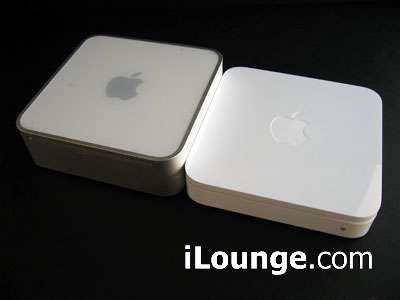
How did we know you wanted to see how the new AirPort Extreme Base Station (802.11n) measured up to the size of a Mac mini? Because we wanted to see that for ourselves. Answer: they have the exact same footprint and curves, while Apple TV (not shown) has the same shape but a slightly larger footprint. Here are the shots – click on read more for the rest – with more details…




The prior shot’s a picture of the notorious 802.11n software updater disk that unlocks the 802.11n capabilities of your Core 2 Duo MacBook, MacBook Pro, Mac Pro or (non-17”) iMac. It comes with this several-page statement from Apple’s accountants explaining why the updater’s not available for free, and why you’ll need to pay for another update once the 802.11n draft specification is finalized. Just kidding!

Some people have groused about the Base Station’s external power supply – namely, that there is one, given how low-tech this device is relative to the external supply-less Apple TV. Since it doesn’t have a wall-mounted power cube or brick, we couldn’t care less about the supply, really. It’s smaller than the Mac mini’s but similarly shaped, with a footprint that’s small iPod-sized (bigger than a nano or mini), and there’s plenty of cable between the supply, Station, and wall, so it sits comfortably on the floor and doesn’t hog more than one outlet.

Setup? Virtually instantaneous. Our steps: disconnect cable modem from old router, connect cable modem to Extreme, reset cable modem, connect Extreme to wall power, and run the setup CD.
The AirPort setup process was painless, except that it required restarts on both Core 2 Duo and non-Core 2 Duo machines. When the Core 2 Duo MacBook was restarted, we saw the above in Network Utility: there’s the now fully unlocked 802.11a/b/g and draft n card, connected to the network. Unfortunately the majority of devices on this network – TiVo, PlayStation 3, Wii, old Mac mini, etcetera – are 802.11g rather than n, but the ease of configuration alone is a nice selling point for the new Extreme.

Then there’s AirPort Disk. Heard about it? It’s the new Base Station’s ability to turn any connected USB 2.0 external hard disk into the rough equivalent of a network-attached storage (NAS) device. We connected one of our 500GB G-Tech backup drives to the Base Station with a USB cable, turned the drive on, and waited to see what happened. Would the new AirPort mount the disk instantly, like an attached drive? Nope. So we loaded Apple’s new program – the AirPort Disk Utility – and turned on the little AirPort Disk icon in our menu bar. Once our AirPort Extreme’s name (“Office”) was selected, a new dialog box came up.

We connected with our AirPort’s password. And then this came up.

Our disk, not named “Office,” but rather its original name G-Drive. Along with all of its contents, including one of the two massive iTunes libraries we’re going to splice together into an uber-library full of music, movies, and TV shows. For a hard-core iTunes fan, this particular feature could be the best little addition to the old AirPort Extreme formula, virtually eliminating the need to store tens or hundreds of gigs worth of media on a capacity-limited laptop or several separate computers. But we still would like some way to remotely turn off our drives when not in use, and are holding out for a true Apple NAS/media storage device.

So far, AirPort Disk’s responsiveness with our G-Tech has been decent – not quite equivalent of having a wired connection to the same drive, but close depending on certain factors. For example, playback of a test 1625kbps MPEG-4 video – similar to an iTunes Store download – on a remote 802.11g machine was totally smooth, but jumping around in the video was sluggish, and frequently caused a beach ball to appear. By comparison, jumping around in the same video on a remote 802.11n machine was trouble-free, without any beach ball issues.











