
Recently, I have been finding myself listening to streaming “Internet Radio” stations, in particular Radioio stations, so I was intrigued when I saw Acoustic Energy’s WiFi Internet Radio (US$300) at last year’s London Apple Expo. In the UK, the WiFi Radio is priced at £199, but I managed to get one for £149 from Play.com with free delivery. The idea is simple: take the streaming audio from almost 10,000 Internet stations, and allow the listener to access them while away from their computer.
Systems such as the Roku Soundbridge and Squeezebox all require the device to be connected to external amp and speakers, and this is fine if you have a fully integrated home audio solution with speakers in every room. But I wanted something along the lines of a conventional radio, which could be stuck in the corner of the kitchen or other room with just a power cord to worry about connecting. Something nice and simple.
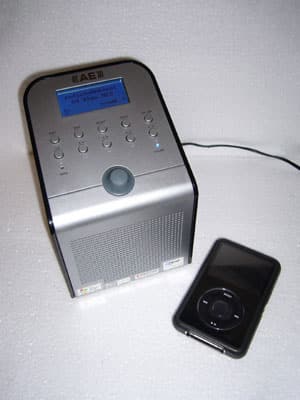
The AE WiFi Radio is certainly that. Acoustic Energy’s packaging contains the device, a power block and cable and the instruction manual – that’s it.
The WiFi Radio finish consists of a brushed silver effect front and top panel with high gloss black back and sides; it is 125mm (approx. 5”) wide, 125mm deep and 180mm (approx. 7”) high. It has a small LCD display which is backlit in blue. Setting up is as simple as turning it on, finding your wireless network and tuning into your stations of choice. There is no remote control, not a big deal if it is being used in a small room, or if, like me, you need the exercise.
The quality of the stereo sound produced from the twin drivers is decent, with a good level of bass and the ability to fill a small room with distortion-free sound when turned up. Acoustic Energy are well established manufacturers of hi-fi speakers in the UK, so getting the sound right is pretty easy for them. (As a fan of the company, I already have the Aego M-System hooked up to my iMac, and have found them to be excellent-sounding speakers.)
Selecting the radio stations starts by choosing either genre or country – so for example, to find Radioio stations you select the USA from the Location menu, then use the control knob to scroll through all 1024 available stations.
Once you find your choice, hit the Select button, and after a 2 or 3 second pause for buffering, the station plays. Up to ten preset stations can be saved using the buttons on the top panel. A standard 3.5mm jack on the rear can be connected to a separate stereo or a pair of headphones.
Another useful function is the ability to listen to on demand “listen again” services as provided by the likes of the BBC – selecting the on-demand version, as opposed to the live stream of a BBC Radio 2 show, allows you to listen for up to a week after the original transmission. The streams are played at 64kbps bitrate in MP3 format which while low for listening to on an iPod is reasonable for playing back over this device, essentially as ‘background’ audio. Using Windows Media Player on a PC running Windows 2000 or XP, you can also “broadcast” the files from your computer to be played via the AE WiFi Radio. AE’s FAQ claims that this “should work fine” on a Mac, too, but I have yet to investigate this aspect of the WiFi Radio, as it is low on my list of priorities. There are also clock and alarm functions built in, so the WiFi Radio could be used to wake you to your favorite Internet station.











