
iLoungeiLounge
  • News
    • Apple
      • AirPods Pro
      • AirPlay
      • Apps
        • Apple Music
      • iCloud
      • iTunes
      • HealthKit
      • HomeKit
      • HomePod
      • iOS 13
      • Apple Pay
      • Apple TV
      • Siri
    • Rumors
    • Humor
    • Technology
      • CES
    • Daily Deals
    • Articles
    • Web Stories
  • iPhone
    • iPhone Accessories
  • iPad
  • iPod
    • iPod Accessories
  • Apple Watch
    • Apple Watch Accessories
  • Mac
    • MacBook Air
    • MacBook Pro
  • Reviews
    • App Reviews
  • How-to
    • Ask iLounge
Font ResizerAa
iLoungeiLounge
Font ResizerAa
Search
  • News
    • Apple
    • Rumors
    • Humor
    • Technology
    • Daily Deals
    • Articles
    • Web Stories
  • iPhone
    • iPhone Accessories
  • iPad
  • iPod
    • iPod Accessories
  • Apple Watch
    • Apple Watch Accessories
  • Mac
    • MacBook Air
    • MacBook Pro
  • Reviews
    • App Reviews
  • How-to
    • Ask iLounge
Follow US

How-to › Ask iLounge

Ask iLoungeiPadiPhone

Why doesn’t Traffic show up on my Today Notifications Screen?

Last updated: May 16, 2021 3:40 pm UTC
By Jesse Hollington
Why doesn’t Traffic show up on my Today Notifications Screen?

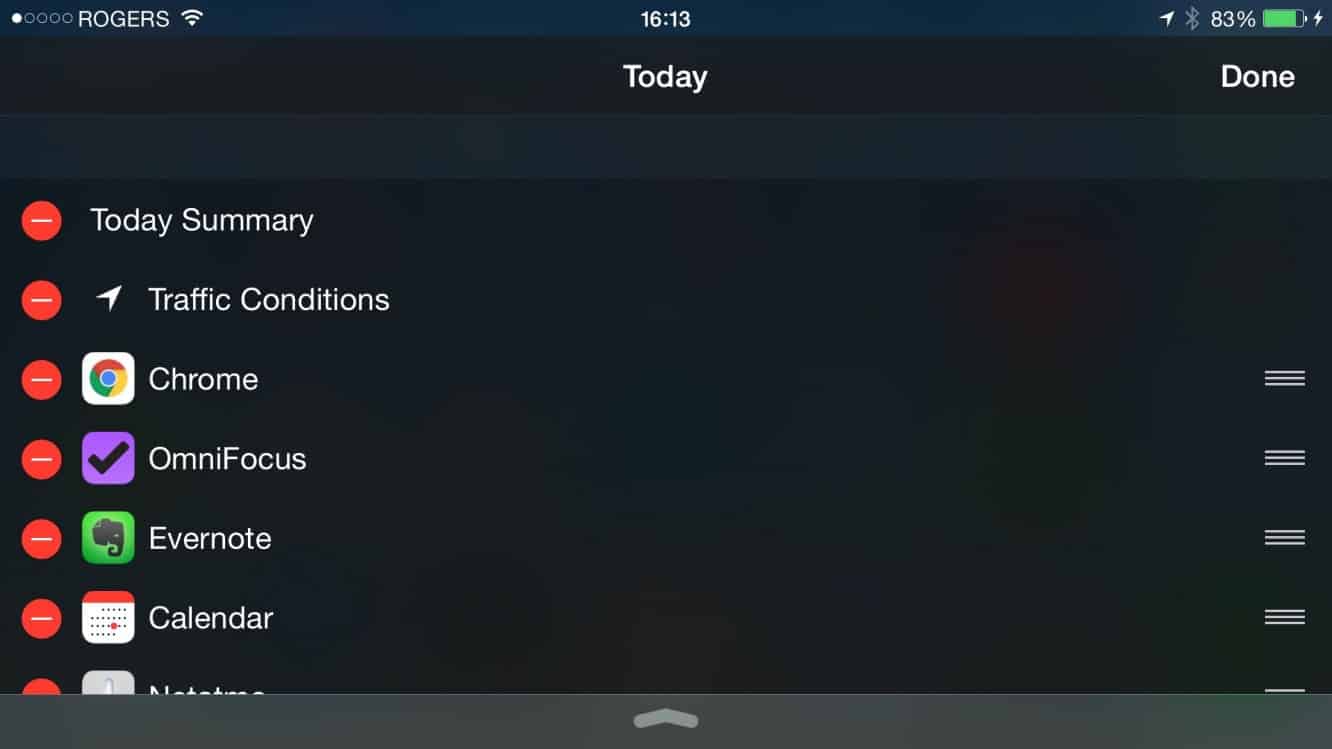
Q: I can’t find the Traffic view on my Today screen anymore (the one that shows up when you pull down the Notification Center). It usually comes up right below the weather report and tells me things like how long it will take me to get home from work, but not anymore. When I go to “Edit” my today widgets, I’m pretty sure “Traffic” used to be a separate line, but it’s not even showing up there. Any ideas on what I can do to bring it back?


A: The built-in “Traffic” feature on iOS is a little bit tricky, as it’s supposed to work automatically in the background, but does depend on a couple of other settings in order to work.
Why doesn’t Traffic show up on my Today Notifications Screen?

Since your iPhone bases traffic data on the time of day, where you are, and your previous habits, the actual information won’t always appear — it’s dependent upon the iPhone “learning” your normal routine and deciding that you are normally likely to be going somewhere at the point at which you’re looking at it. That said, if you normally commute to and from work every day, it should at least be showing up at the beginning of the day and the end of the day.


Further, regardless of whether it has any information to show, you’re correct that the “Traffic” line should normally appear when editing your Today Extensions, so that you can at least choose whether you want to see it or not. If it doesn’t appear anywhere on this list, there are a couple of things you can do to bring it back.

First, since Traffic is based on background monitoring of your traveling habits, it requires that Location Services be enabled in general, and specifically that you’ve turned on “Frequent Locations.” These options can be found in your iPhone Settings app under Privacy, Location Services, System Services. If “Frequent Locations” is disabled, your iPhone won’t know where you’ve been, and therefore won’t be able to determine where you’re likely to be going. Note that the “Routing & Traffic” option in this section doesn’t need to be specifically enabled to get traffic — this option simply determines whether you want to send traffic and route information to Apple while you’re navigating to improve the back-end Maps data for other users.

Why doesn’t Traffic show up on my Today Notifications Screen?

If this option is enabled and Traffic still isn’t appearing, one other way you can give it a kick is to go into the Apple Maps app and toggle the option to “Show Traffic” on your map view.



Latest News
The 14-inch MacBook Pro with M5 Chip 16GB RAM/512GB is $250 Off
1 Min Read
Noise and Static on AirPods Pro 3 Still Unfixed
1 Min Read
New iMac with 24-inch OLED Display May be Brighter With 600 Nits
1 Min Read
The 15-inch M4 MacBook Air 256GB Is $250 Off
1 Min Read
Internal Kernel Debug Kit from Apple Reveals Tests for a MacBook with A15 Chip
1 Min Read
Apple Currently In Talks With Suppliers for Chip Assembly & Packaging of iPhones in India
1 Min Read
Apple Allows Easier Battery Replacement For M5 MacBook Pro with 14-inch Display
1 Min Read
The Apple Watch SE 3 44mm GPS is $50 Off
1 Min Read
20th Anniversary iPhone May Launch in Two Years
1 Min Read
Better Image Generation Capabilities and Apple Music Integration Coming to ChatGPT
1 Min Read
A20 Pro Chip Coming to Next Gen iPad Mini OLED
1 Min Read
Amazon has the AirTag 4 Pack Marked $29 off
1 Min Read

iLounge logo

iLounge is an independent resource for all things iPod, iPhone, iPad, and beyond. iPod, iPhone, iPad, iTunes, Apple TV, and the Apple logo are trademarks of Apple Inc.

This website is not affiliated with Apple Inc.
iLounge © 2001 - 2025. All Rights Reserved.
  • Contact Us
  • Submit News
  • About Us
  • Forums
  • Privacy Policy
  • Terms Of Use
Welcome Back!

Sign in to your account

Lost your password?








