
iLoungeiLounge
  • News
    • Apple
      • AirPods Pro
      • AirPlay
      • Apps
        • Apple Music
      • iCloud
      • iTunes
      • HealthKit
      • HomeKit
      • HomePod
      • iOS 13
      • Apple Pay
      • Apple TV
      • Siri
    • Rumors
    • Humor
    • Technology
      • CES
    • Daily Deals
    • Articles
    • Web Stories
  • iPhone
    • iPhone Accessories
  • iPad
  • iPod
    • iPod Accessories
  • Apple Watch
    • Apple Watch Accessories
  • Mac
    • MacBook Air
    • MacBook Pro
  • Reviews
    • App Reviews
  • How-to
    • Ask iLounge
Font ResizerAa
iLoungeiLounge
Font ResizerAa
Search
  • News
    • Apple
    • Rumors
    • Humor
    • Technology
    • Daily Deals
    • Articles
    • Web Stories
  • iPhone
    • iPhone Accessories
  • iPad
  • iPod
    • iPod Accessories
  • Apple Watch
    • Apple Watch Accessories
  • Mac
    • MacBook Air
    • MacBook Pro
  • Reviews
    • App Reviews
  • How-to
    • Ask iLounge
Follow US

How-to › Ask iLounge

Ask iLoungeiPadiPhoneiPod

Why do I have two separate conversations with the same person in Messages?

Last updated: May 16, 2021 4:04 pm UTC
By Jesse Hollington
Why do I have two separate conversations with the same person in Messages?

Q: I’ve been using Messages to text with my fiance almost since it first came out, and it’s always worked fine, but recently I noticed that I have two separate threads in Messages with his name on both of them, and different parts of our conversions in each. I can send him messages in either one and he’ll get them, and he only has one messages thread on his iPhone, but messages from him seem to randomly go into one or the other. Any idea why this is happening and how I can fix it? Is there some way I can combine these two conversations into one?


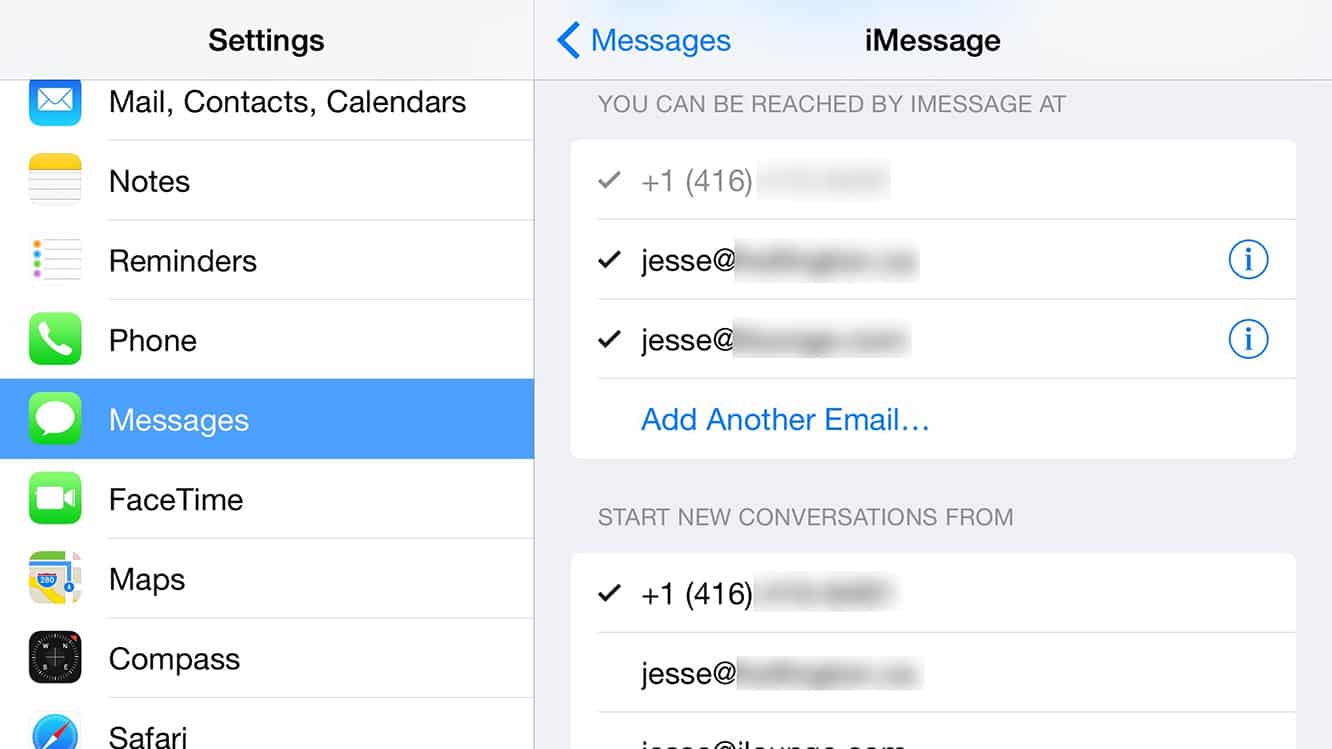
A: The most common cause of this is that the other person has started sending you iMessages from a different address. iMessage users can receive messages at more than one address. It’s not uncommon for iPhone users to have at least two iMessage “addresses” — usually the user’s phone number and the email address associated with their Apple ID — and it’s even possible to use multiple email addresses.
Why do I have two separate conversations with the same person in Messages?

While iMessages can be received at any of the associated addresses, one address is chosen by default to send iMessages. You can see the addresses that have been associated with your Apple ID and which ones are being used for iMessage by going into your Settings app and choosing Messages, Send & Receive.


As the name implies, the address selected under “Start New Conversations from” is the one used to initiate new conversations in iMessage, but there’s a catch: When replying to existing iMessage conversations, the sending address will be the same one that was recently used in that conversation. So in other words, if your fiance sends you a new iMessage, it will come from the address specified in the settings above, but if he’s replying to a message you’ve recently sent, it will come from whatever address you sent that message to.


The Messages app on iOS divided conversations based on the sender’s address, without regard to contact entries.

So an iMessage conversation with somebody’s phone number will be separated from an iMessage conversation from that person’s email address, even if both share the same contact record in your iOS address book. You can determine which address is being used for an iMessage conversation by tapping the “Details” button in the top right corner and then tapping the “i” button beside the user’s name. This will bring up a contact card for that user, with the iMessage address highlighted in blue.

Why do I have two separate conversations with the same person in Messages?

Chances are that if you look at the two conversation threads with your fiance, you’ll discover that they’re both using different addresses. If your fiance has recently upgraded to a new iPhone, changed carriers, or even simply switched to a new SIM card, this can cause iOS to revert back to using his email address by default while the phone number is being re-registered with Apple’s servers.



Latest News
The Apple Watch Series 11 46mm GPS Is $100 Off
1 Min Read
Clamshell Style iPhone Being Looked Into By Apple
1 Min Read
Foldable iPhones May Have the Largest Battery Ever
1 Min Read
Apple and TSMC’s 10-Year Collaboration May Be Ending
1 Min Read
The 13-inch M5 iPad Pro 256GB Wi-Fi Is $149 Off
1 Min Read
M5 Pro and M5 Max Chips for the MacBook Pro could Roll Out with macOS 26.3
1 Min Read
Mac Ordering Process Revamped
1 Min Read
Check Signed By Steve Wozniak and Steve Jobs Sold For $2.4 Million
1 Min Read
The Anker 140W 4-Port GaN USB-C Charger is $35 Off
1 Min Read
No iPhone Air 2 This Year, according to Latest Report
1 Min Read
New Report Corroborates Split iPhone Release Dates
1 Min Read
Apple Losing More Researchers As They Plan To Release 2 Siri Versions
1 Min Read

iLounge logo

iLounge is an independent resource for all things iPod, iPhone, iPad, and beyond. iPod, iPhone, iPad, iTunes, Apple TV, and the Apple logo are trademarks of Apple Inc.

This website is not affiliated with Apple Inc.
iLounge © 2001 - 2025. All Rights Reserved.
  • Contact Us
  • Submit News
  • About Us
  • Forums
  • Privacy Policy
  • Terms Of Use
Welcome Back!

Sign in to your account

Lost your password?








