
iLoungeiLounge
  • News
    • Apple
      • AirPods Pro
      • AirPlay
      • Apps
        • Apple Music
      • iCloud
      • iTunes
      • HealthKit
      • HomeKit
      • HomePod
      • iOS 13
      • Apple Pay
      • Apple TV
      • Siri
    • Rumors
    • Humor
    • Technology
      • CES
    • Daily Deals
    • Articles
    • Web Stories
  • iPhone
    • iPhone Accessories
  • iPad
  • iPod
    • iPod Accessories
  • Apple Watch
    • Apple Watch Accessories
  • Mac
    • MacBook Air
    • MacBook Pro
  • Reviews
    • App Reviews
  • How-to
    • Ask iLounge
Font ResizerAa
iLoungeiLounge
Font ResizerAa
Search
  • News
    • Apple
    • Rumors
    • Humor
    • Technology
    • Daily Deals
    • Articles
    • Web Stories
  • iPhone
    • iPhone Accessories
  • iPad
  • iPod
    • iPod Accessories
  • Apple Watch
    • Apple Watch Accessories
  • Mac
    • MacBook Air
    • MacBook Pro
  • Reviews
    • App Reviews
  • How-to
    • Ask iLounge
Follow US

How-to › Ask iLounge

Ask iLoungeiCloudiPadiPhoneiPod

Whether to include specific apps in iCloud backups

Last updated: May 16, 2021 4:08 pm UTC
By Jesse Hollington
Whether to include specific apps in iCloud backups

Q: I’m trying to find out why I would like to back up certain apps to iCloud? For example, Google Maps that is taking almost 1MB of space? Any suggestions?


– Sara
Whether to include specific apps in iCloud backups

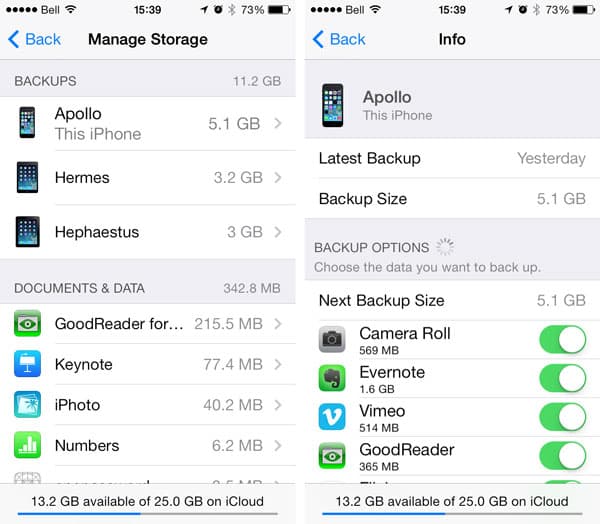
A: The short answer is that the only reason you need to include an app in your iCloud backups is to preserve that application’s data and configuration settings.

Apps can be excluded from your iCloud backups by going to your iOS Settings app, selecting iCloud, Storage & Backup, Manage Storage and choosing the backup for the current device—normally the first backup listed. Switching off an app from this screen will remove its data from your iCloud backup as well as excluding it from any future backups until it is toggled back on.


Excluding an app from your iCloud backups means that if you ever need to restore that device, you will need to set that app up from scratch—as if you had freshly installed it.

Note that this will not prevent the actual app from being reinstalled as part of your iCloud restore, but it does mean that app will come down in a fresh state without any data or configuration settings.

Whether an app needs to be backed up to iCloud or not depends entirely on the type of data it stores, and whether that data is stored only on your device. For example, many games store game progress and high scores only locally, and failing to back up these games would result in you having to start over following a restore of your device.


On the other hand, if an app stores its data online, either directly in iCloud or via its own online service, it’s far less necessary to include it in your iCloud backups.

Examples of this would include apps like Evernote, Dropbox, and Google Drive, to name just a few. The iCloud backups would still contain your application preferences, making setup easier following a restore, but all of the data is stored in each company’s own respective cloud service.

Many apps, like Google Maps, also store minimal data directly on the device, so you would probably lose little by not backing them up, however the amount of data stored is so small that there’s also not much point in excluding them. 1MB is around 1/5000th of the free 5GB of storage space including with every iCloud account.



Latest News
The Apple Watch Series 11 46mm GPS Is $100 Off
1 Min Read
Clamshell Style iPhone Being Looked Into By Apple
1 Min Read
Foldable iPhones May Have the Largest Battery Ever
1 Min Read
Apple and TSMC’s 10-Year Collaboration May Be Ending
1 Min Read
The 13-inch M5 iPad Pro 256GB Wi-Fi Is $149 Off
1 Min Read
M5 Pro and M5 Max Chips for the MacBook Pro could Roll Out with macOS 26.3
1 Min Read
Mac Ordering Process Revamped
1 Min Read
Check Signed By Steve Wozniak and Steve Jobs Sold For $2.4 Million
1 Min Read
The Anker 140W 4-Port GaN USB-C Charger is $35 Off
1 Min Read
No iPhone Air 2 This Year, according to Latest Report
1 Min Read
New Report Corroborates Split iPhone Release Dates
1 Min Read
Apple Losing More Researchers As They Plan To Release 2 Siri Versions
1 Min Read

iLounge logo

iLounge is an independent resource for all things iPod, iPhone, iPad, and beyond. iPod, iPhone, iPad, iTunes, Apple TV, and the Apple logo are trademarks of Apple Inc.

This website is not affiliated with Apple Inc.
iLounge © 2001 - 2025. All Rights Reserved.
  • Contact Us
  • Submit News
  • About Us
  • Forums
  • Privacy Policy
  • Terms Of Use
Welcome Back!

Sign in to your account

Lost your password?








