
Though a number of competing mobile “musicphones” have offered Bluetooth wireless stereo audio streaming for years, the 2007 iPhone conspicuously left that feature out, as did the 2008 iPhone 3G—surprising given Apple’s music-heavy marketing focus, and both iPhones’ inclusion of Bluetooth 2.0 hardware that could be used for monaural wireless handsfree phone calls. Some thought the company was planning its own proprietary wireless music accessory standard for the iPhone; other possibilities included battery drain associated with streaming stereo Bluetooth audio, or problems getting the feature to work reliably given everything else the iPhone had to do in the foreground and background.
Yet whatever the issue or issues may have been, Apple seems to have mostly resolved them in iPhone OS 3.0—at least, for the iPhone 3G. While the original iPhone is stuck with monaural Bluetooth telephone calling support, the iPhone 3G and iPhone 3G S gain stereo Bluetooth streaming and control capabilities with A2DP, a widely used Bluetooth protocol that instantly expands the universe of wireless accessories that users can choose from.
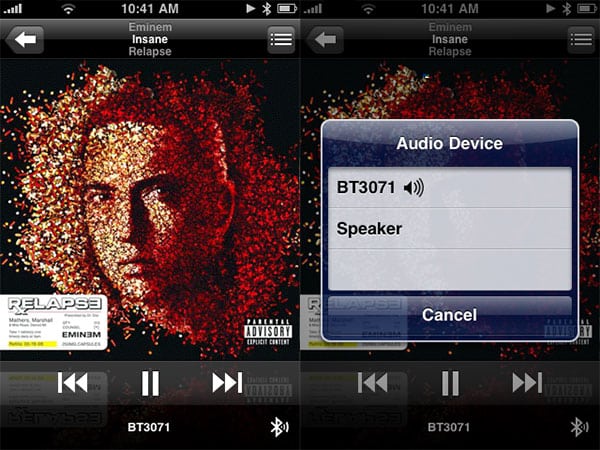

But will they work properly? Or with limitations? We have the answers: here is what users can expect when using stereo Bluetooth accessories with the iPhone 3.0 software.
* Wide compatibility. Stereo-capable A2DP Bluetooth 2.0 accessories have been around for years, and though there will likely be some exceptions, the iPhone 3G appears to pair with and stream to virtually everything without complaint. Pairing is handled through the same buried Settings > General > Bluetooth menu as before, with no differentiation between monaural and stereo devices.
* Near-flawless stereo music and app audio streaming from an actively used iPhone. The iPhone 3G sends a properly separated left- and right-channel audio signal to accessories, with apparent audio quality more often constrained by the speakers or headphones than the signal. Do not expect lossless-quality audio, but rather, very listenable wireless sound. The iPhone 3G will continue to stream iPod mode music even when an app is running, or stream the app’s audio, which means that apps such as Slacker Radio can perform through wireless speakers and headphones. Streaming will continue even when transitions are made from iPod mode to in-app audio, and in-app audio can overlap iPod mode music, as well.
* Seemingly flawless switching between stereo and monaural modes when interrupting music or apps to take phone calls. As with prior accessories, the iPhone fades out its music or other audio to play the ringing sound and then the phone call, complete with microphone support for the phone call.
* Small audio hiccups when apps launch, and infrequently mid-run. Very brief, split-second interruptions can sometimes be heard in playback when audio is streaming while an app is loading; iPod audio continues to be almost perfect when running even device-taxing games, but there are occasionally similarly brief interruptions. This will depend on the app.
* Small audio hiccups when toggling between multiple stereo Bluetooth devices. As with virtually every past iPhone-compatible Bluetooth accessory, switching between two different devices results in a brief audio stutter, but ultimately a working connection to the new device. The iPhone pauses audio playback—when possible, even in apps—when the connection with the original device is cut off, and the new connection is stable from the point you press play.
* Greater potential for audio problems after the iPhone 3G turns off its screen. Bluetooth streaming continues for several minutes without any issues, but sometimes will start stuttering for unknown reasons—possibly just a bug, or the iPhone trying to enter power-conserving deep sleep despite the audio playback. This doesn’t always happen and may be an accessory-specific bug.
* Limited accessory control of music playback. Accessories can include a play-pause button that works to stop and start iPod music—surprisingly even controlling iPod music when an app has its own audio—but their track controls do not appear to work, and they must include their own volume controls for non-calling purposes. The iPhone’s volume controls are disabled in stereo Bluetooth streaming mode, but remain in monaural Bluetooth calling mode; the iPhone’s on-screen track controls remain in stereo Bluetooth mode.

* Odd conflicts between Wi-Fi and monaural Bluetooth functionality. For reasons that aren’t yet clear, iPhone 3G Wi-Fi signal strength drops to 2 of 3 bars when in stereo Bluetooth streaming mode and becomes unpredictable if not unusable for Wi-Fi gaming, and drops to 1 of 3 bars when in monaural Bluetooth phone mode, becoming unusable for web browsing in Wi-Fi mode.











