
iLoungeiLounge
  • News
    • Apple
      • AirPods Pro
      • AirPlay
      • Apps
        • Apple Music
      • iCloud
      • iTunes
      • HealthKit
      • HomeKit
      • HomePod
      • iOS 13
      • Apple Pay
      • Apple TV
      • Siri
    • Rumors
    • Humor
    • Technology
      • CES
    • Daily Deals
    • Articles
    • Web Stories
  • iPhone
    • iPhone Accessories
  • iPad
  • iPod
    • iPod Accessories
  • Apple Watch
    • Apple Watch Accessories
  • Mac
    • MacBook Air
    • MacBook Pro
  • Reviews
    • App Reviews
  • How-to
    • Ask iLounge
Font ResizerAa
iLoungeiLounge
Font ResizerAa
Search
  • News
    • Apple
    • Rumors
    • Humor
    • Technology
    • Daily Deals
    • Articles
    • Web Stories
  • iPhone
    • iPhone Accessories
  • iPad
  • iPod
    • iPod Accessories
  • Apple Watch
    • Apple Watch Accessories
  • Mac
    • MacBook Air
    • MacBook Pro
  • Reviews
    • App Reviews
  • How-to
    • Ask iLounge
Follow US

How-to › Ask iLounge

Ask iLoungeiTunes

Viewing more iTunes data on the screen at once

Last updated: May 12, 2021 7:21 pm UTC
By Jerrod H.
Viewing more iTunes data on the screen at once

Q: I have a 12” iBook, and I often find its 1024×768 resolution too small to efficiently visualize the many data fields iTunes can display in the main Library window. In iTunes’ preferences, I found a font size setting, and can switch between “Large” and “Small” text, but even using “Small,” I find myself scrolling horizontally too often. Is there any way to see more of iTunes’ data at once?


– Anonymous
Viewing more iTunes data on the screen at once

A: Sure – there are a few things you can do:

On either a Mac or PC, you can browse playlists (read: not your Library) in a separate window that doesn’t have the “Source” column, increasing the effective horizontal width of display. To do this, simply double-click on the playlist, and a new window will open, dedicated to it.

Note that this also works for the Music Store, Radio, Podcasts, Party Shuffle, and Videos.

Second, you could export your Library’s data to another program that’s more flexible at data display, like Microsoft Excel. See this Ask iLounge column to find out how.


Finally – and this one only works on MacOS X 10.4 and above – you can scale the entire iTunes user interface down by a certain factor, using a somewhat hidden capability of the Mac’s Quartz Extreme rendering engine.

To do so, first quit iTunes. Then, open “Terminal” from your Mac’s “Applications → Utilities” folder, type or copy in this line of text at the prompt, and hit enter when you’re done:

defaults write com.apple.iTunes AppleDisplayScaleFactor -string "0.5" 

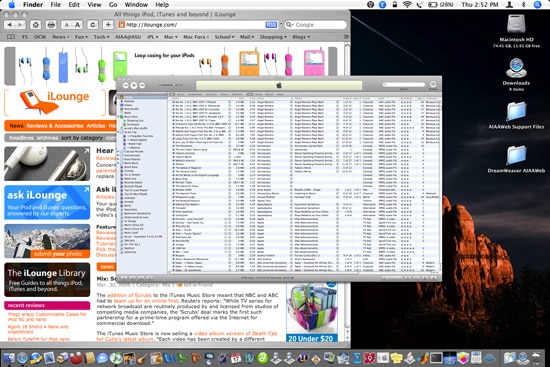
 When relaunched, iTunes will scale to half its normal height and width, as shown below: 

   
While this 50% scale is impressive and allows much more data to fit on the screen, many would certainly consider it a bit beyond the realm of usability. In our testing, we’ve found that 75% works best for readability and the functionality of all of iTunes’ features, but there are still plenty of bugs: using this trick makes the Mac’s menu bar render awkwardly as you switch from one application to another, and Exposé doesn’t properly understand the scaled window. If you’re comfortable with these compromises, a moderate scale factor adjustment can be helpful.

Latest News
The 14-inch MacBook Pro with M5 Chip 16GB RAM/512GB is $250 Off
1 Min Read
Noise and Static on AirPods Pro 3 Still Unfixed
1 Min Read
New iMac with 24-inch OLED Display May be Brighter With 600 Nits
1 Min Read
The 15-inch M4 MacBook Air 256GB Is $250 Off
1 Min Read
Internal Kernel Debug Kit from Apple Reveals Tests for a MacBook with A15 Chip
1 Min Read
Apple Currently In Talks With Suppliers for Chip Assembly & Packaging of iPhones in India
1 Min Read
Apple Allows Easier Battery Replacement For M5 MacBook Pro with 14-inch Display
1 Min Read
The Apple Watch SE 3 44mm GPS is $50 Off
1 Min Read
20th Anniversary iPhone May Launch in Two Years
1 Min Read
Better Image Generation Capabilities and Apple Music Integration Coming to ChatGPT
1 Min Read
A20 Pro Chip Coming to Next Gen iPad Mini OLED
1 Min Read
Amazon has the AirTag 4 Pack Marked $29 off
1 Min Read

iLounge logo

iLounge is an independent resource for all things iPod, iPhone, iPad, and beyond. iPod, iPhone, iPad, iTunes, Apple TV, and the Apple logo are trademarks of Apple Inc.

This website is not affiliated with Apple Inc.
iLounge © 2001 - 2025. All Rights Reserved.
  • Contact Us
  • Submit News
  • About Us
  • Forums
  • Privacy Policy
  • Terms Of Use
Welcome Back!

Sign in to your account

Lost your password?










