
iLoungeiLounge
  • News
    • Apple
      • AirPods Pro
      • AirPlay
      • Apps
        • Apple Music
      • iCloud
      • iTunes
      • HealthKit
      • HomeKit
      • HomePod
      • iOS 13
      • Apple Pay
      • Apple TV
      • Siri
    • Rumors
    • Humor
    • Technology
      • CES
    • Daily Deals
    • Articles
    • Web Stories
  • iPhone
    • iPhone Accessories
  • iPad
  • iPod
    • iPod Accessories
  • Apple Watch
    • Apple Watch Accessories
  • Mac
    • MacBook Air
    • MacBook Pro
  • Reviews
    • App Reviews
  • How-to
    • Ask iLounge
Font ResizerAa
iLoungeiLounge
Font ResizerAa
Search
  • News
    • Apple
    • Rumors
    • Humor
    • Technology
    • Daily Deals
    • Articles
    • Web Stories
  • iPhone
    • iPhone Accessories
  • iPad
  • iPod
    • iPod Accessories
  • Apple Watch
    • Apple Watch Accessories
  • Mac
    • MacBook Air
    • MacBook Pro
  • Reviews
    • App Reviews
  • How-to
    • Ask iLounge
Follow US

How-to › Ask iLounge

ArticlesAsk iLoungeiCloudiPhone

Using Shared Photo Streams on Windows 7

Last updated: May 16, 2021 4:23 pm UTC
By Jesse Hollington
Using Shared Photo Streams on Windows 7

Q: I am using iOS 6 and my brand new iPhone 5 with a Windows 7 PC. I really like them all and the iCloud features. However, I can’t seem to figure out an easy way to do a simple task: What is the best way to store a bunch of photos I have on my PC in iCloud? I have a bunch of folders organized nicely with photos in them on my PC that I would like to put into iCloud, but when I copy folders into the Photo Stream folder on my PC, they don’t seem to upload. From my remedial testing, it appears that ONLY files in the top-level folder upload, not anything inside sub-folders. Is the Photo Stream folder designed this way on purpose? Who the heck wants to put a bunch of photos into one folder with no real organization? Help!


– Anonymous
Using Shared Photo Streams on Windows 7

A: The Photo Stream folder originally introduced in iCloud last year basically worked exactly in that manner, as it was never really intended as a way to organize photos, but merely a way to keep a collection of everything you had recently taken or added to your library.

The good news, however, is that with the release of iOS 6, Apple introduced a new feature known as Shared Photo Streams that allows you to create multiple, named photo streams that automatically synchronize out to all of your iCloud-enabled devices and can even be easily shared with other iCloud users.


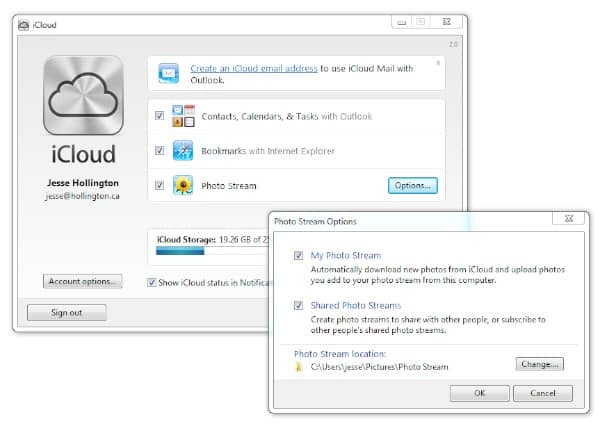
On the desktop side, Shared Photo Streams requires a Mac running OS X Mountain Lion 10.8.2 with iPhoto 9.4 or Aperture 3.4 or later or a PC running Windows 7 or Vista and Apple’s iCloud Control Panel v2.0 or later.

Using Shared Photo Streams on Windows 7

Once you’ve installed the iCloud Control Panel on your Windows PC and enabled the Photo Streams feature, a new Photo Streams section should appear under Computer in Windows Explorer.


Using Shared Photo Streams on Windows 7

Selecting this option opens a virtual folder for all of your Photo Streams. Initially you’ll only see one entry here—My Photo Stream—representing the main stream of photos you’ve taken with your iPhone. Any Shared Photo Streams you create will also appear here.


Using Shared Photo Streams on Windows 7

From here, you can create new Shared Photo Streams simply by clicking the “New Photo Stream” button.

You’ll be prompted to give your new Shared Photo Stream a name and optionally add other iCloud users to share it with or allow public access to it via a web browser.


Using Shared Photo Streams on Windows 7

Note that if you only want to create a Shared Photo Stream between your iPhone and your PC, you can simply give it a name and leave the “TO” field blank. The Shared Photo Stream will be created in your iCloud account and synchronized to your iPhone and any other devices that are using the same account. You will also be able to manage the Shared Photo Stream and add or remove photos from either your PC, iPhone or any other iCloud-enabled device.

If you do choose to invite other users to your Shared Photo Stream, they will only be able to view the photos in your stream, as well as comment on or “like” them. Only the owner can add or remove content from a Shared Photo Stream.



Latest News
The 14-inch MacBook Pro with M5 Chip 16GB RAM/512GB is $250 Off
1 Min Read
Noise and Static on AirPods Pro 3 Still Unfixed
1 Min Read
New iMac with 24-inch OLED Display May be Brighter With 600 Nits
1 Min Read
The 15-inch M4 MacBook Air 256GB Is $250 Off
1 Min Read
Internal Kernel Debug Kit from Apple Reveals Tests for a MacBook with A15 Chip
1 Min Read
Apple Currently In Talks With Suppliers for Chip Assembly & Packaging of iPhones in India
1 Min Read
Apple Allows Easier Battery Replacement For M5 MacBook Pro with 14-inch Display
1 Min Read
The Apple Watch SE 3 44mm GPS is $50 Off
1 Min Read
20th Anniversary iPhone May Launch in Two Years
1 Min Read
Better Image Generation Capabilities and Apple Music Integration Coming to ChatGPT
1 Min Read
A20 Pro Chip Coming to Next Gen iPad Mini OLED
1 Min Read
Amazon has the AirTag 4 Pack Marked $29 off
1 Min Read

iLounge logo

iLounge is an independent resource for all things iPod, iPhone, iPad, and beyond. iPod, iPhone, iPad, iTunes, Apple TV, and the Apple logo are trademarks of Apple Inc.

This website is not affiliated with Apple Inc.
iLounge © 2001 - 2025. All Rights Reserved.
  • Contact Us
  • Submit News
  • About Us
  • Forums
  • Privacy Policy
  • Terms Of Use
Welcome Back!

Sign in to your account

Lost your password?








