
iLoungeiLounge
  • News
    • Apple
      • AirPods Pro
      • AirPlay
      • Apps
        • Apple Music
      • iCloud
      • iTunes
      • HealthKit
      • HomeKit
      • HomePod
      • iOS 13
      • Apple Pay
      • Apple TV
      • Siri
    • Rumors
    • Humor
    • Technology
      • CES
    • Daily Deals
    • Articles
    • Web Stories
  • iPhone
    • iPhone Accessories
  • iPad
  • iPod
    • iPod Accessories
  • Apple Watch
    • Apple Watch Accessories
  • Mac
    • MacBook Air
    • MacBook Pro
  • Reviews
    • App Reviews
  • How-to
    • Ask iLounge
Font ResizerAa
iLoungeiLounge
Font ResizerAa
Search
  • News
    • Apple
    • Rumors
    • Humor
    • Technology
    • Daily Deals
    • Articles
    • Web Stories
  • iPhone
    • iPhone Accessories
  • iPad
  • iPod
    • iPod Accessories
  • Apple Watch
    • Apple Watch Accessories
  • Mac
    • MacBook Air
    • MacBook Pro
  • Reviews
    • App Reviews
  • How-to
    • Ask iLounge
Follow US

How-to › Ask iLounge

ArticlesAsk iLoungeiCloudiPhoneMac

Using Find My iPhone from a PC or Mac

Last updated: May 16, 2021 4:25 pm UTC
By Jesse Hollington
Using Find My iPhone from a PC or Mac

Q: I have the Find My iPhone App on my iPhone and can use it from my iPhone, but I would like to know how to use it from my computer. It doesn’t do me any good to use it if I know where my iPhone already is.


– Darlene
Using Find My iPhone from a PC or Mac

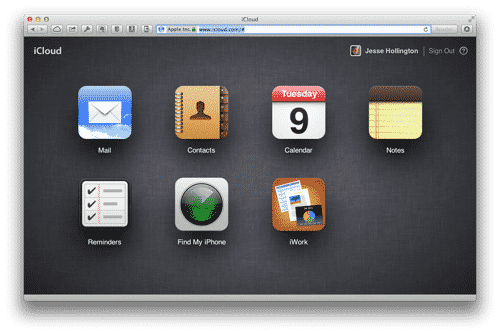
A: Although there is no standalone “Find my iPhone” application for the Mac or PC, you can easily access this service simply by logging into your iCloud account at http://www.icloud.com from just about any modern web browser.

Using Find My iPhone from a PC or Mac

Once logged in, simply select the “Find My iPhone” icon.

You may be asked to supply your password again for additional security and privacy after which you will be taken to a map view. The Devices button in the top-right corner will drop down a list of all of the iOS devices and Macs associated with the current iCloud account, and the location status of each.


Using Find My iPhone from a PC or Mac

Clicking on any of your devices will centre the map on that particular device, with controls for zooming in and out and options to play a sound to help you locate the device, remotely erase the device, or lock the device in iOS 5 and earlier or enable “Lost Mode”  if the device is running iOS 6. The latter option locks the iPhone and allows you to enter a phone number and message that will be displayed on the screen to assist an honest finder in getting your iPhone back to you.


“Lost Mode” also begins tracking the movement of your device so that you can see where it’s been while it’s lost, rather than merely reporting its current location.


Using Find My iPhone from a PC or Mac

If the selected device is offline (e.g. out of network coverage or turned off), then instead of a map you will be shown a screen with the same options along with a checkbox to send you a notification once your device comes back online. Any other options you choose here—Play Sound, Lost Mode, Erase—will also be performed as soon as your device comes back online.



Latest News
The 14-inch MacBook Pro with M5 Chip 16GB RAM/512GB is $250 Off
1 Min Read
Noise and Static on AirPods Pro 3 Still Unfixed
1 Min Read
New iMac with 24-inch OLED Display May be Brighter With 600 Nits
1 Min Read
The 15-inch M4 MacBook Air 256GB Is $250 Off
1 Min Read
Internal Kernel Debug Kit from Apple Reveals Tests for a MacBook with A15 Chip
1 Min Read
Apple Currently In Talks With Suppliers for Chip Assembly & Packaging of iPhones in India
1 Min Read
Apple Allows Easier Battery Replacement For M5 MacBook Pro with 14-inch Display
1 Min Read
The Apple Watch SE 3 44mm GPS is $50 Off
1 Min Read
20th Anniversary iPhone May Launch in Two Years
1 Min Read
Better Image Generation Capabilities and Apple Music Integration Coming to ChatGPT
1 Min Read
A20 Pro Chip Coming to Next Gen iPad Mini OLED
1 Min Read
Amazon has the AirTag 4 Pack Marked $29 off
1 Min Read

iLounge logo

iLounge is an independent resource for all things iPod, iPhone, iPad, and beyond. iPod, iPhone, iPad, iTunes, Apple TV, and the Apple logo are trademarks of Apple Inc.

This website is not affiliated with Apple Inc.
iLounge © 2001 - 2025. All Rights Reserved.
  • Contact Us
  • Submit News
  • About Us
  • Forums
  • Privacy Policy
  • Terms Of Use
Welcome Back!

Sign in to your account

Lost your password?








