
iLoungeiLounge
  • News
    • Apple
      • AirPods Pro
      • AirPlay
      • Apps
        • Apple Music
      • iCloud
      • iTunes
      • HealthKit
      • HomeKit
      • HomePod
      • iOS 13
      • Apple Pay
      • Apple TV
      • Siri
    • Rumors
    • Humor
    • Technology
      • CES
    • Daily Deals
    • Articles
    • Web Stories
  • iPhone
    • iPhone Accessories
  • iPad
  • iPod
    • iPod Accessories
  • Apple Watch
    • Apple Watch Accessories
  • Mac
    • MacBook Air
    • MacBook Pro
  • Reviews
    • App Reviews
  • How-to
    • Ask iLounge
Font ResizerAa
iLoungeiLounge
Font ResizerAa
Search
  • News
    • Apple
    • Rumors
    • Humor
    • Technology
    • Daily Deals
    • Articles
    • Web Stories
  • iPhone
    • iPhone Accessories
  • iPad
  • iPod
    • iPod Accessories
  • Apple Watch
    • Apple Watch Accessories
  • Mac
    • MacBook Air
    • MacBook Pro
  • Reviews
    • App Reviews
  • How-to
    • Ask iLounge
Follow US

How-to › Ask iLounge

Ask iLoungeiPhone

Using FaceTime while abroad

Last updated: May 16, 2021 4:19 pm UTC
By Jesse Hollington
Using FaceTime while abroad

Q: Please help! I’ll be going to Italy in 3 weeks. I don’t want to incur any roaming and phone call charges when calling back to the U.S. from my iPhone 4S. I know that I can use FaceTime since it uses a Wi-Fi connection, but how do I set it up when I go to Settings? Do I need to select my email address instead of my phone number so that it works while I’m overseas. Please guide me step by step. Thanks!


– Alicia
Using FaceTime while abroad

A: Actually, one of the great things about FaceTime is that there’s actually nothing special you need to do under normal circumstances—it should just work fine wherever you happen to be as long as you’re on a Wi-Fi connection. This even applies to using your phone number, since FaceTime calls don’t actually ever travel across the cellular voice network; Apple’s FaceTime servers simply treat this as just another “address” that you can be reached at just like an e-mail address.


In other words, there is no need to switch to an e-mail address—you can continue to use your phone number to place and receive FaceTime calls no matter where you are with no additional charges as long as you are on a Wi-Fi network.

The only exception to this is if you plan to get a local SIM card while you are in Italy. In this case, you’re essentially changing the phone number on your iPhone, so of course this new number would be registered on the FaceTime network, replacing your existing U.S. number. In this case you would either need to switch to an e-mail address to receive FaceTime calls or simply give out your temporary Italian number. Note that using a local SIM card is only an option if your iPhone is carrier unlocked, which most U.S. iPhones are not unless you have bought one at an Apple Store for a full, off-contract price or arranged for your carrier to unlock it.


If you don’t know if your iPhone is unlocked, most likely it is not.

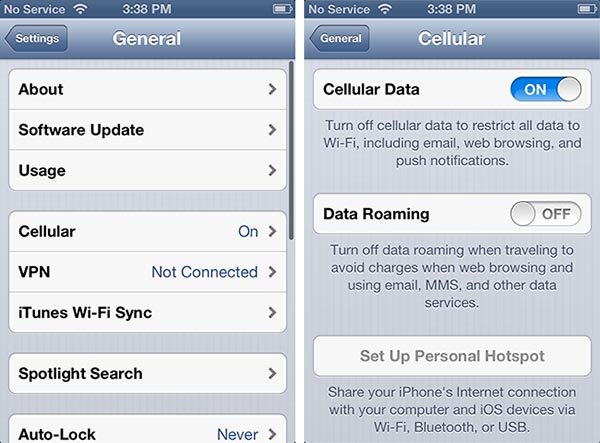
If you’re simply going to keep your U.S. account active in your iPhone 4S, then the only other thing you’ll want to make absolutely certain of is that “Data Roaming” is disabled. This should be the case by default, but it’s always a good idea to check just to be certain it hasn’t inadvertently been switched on. This will prevent your iPhone from attempting to use cellular data while you are away from your “home” network. You can find this in your Settings app under General, Cellular.

FaceTime is capable of being used over a cellular data connection on the iPhone 4S and iPhone 5, so making sure that Data Roaming is switched OFF will ensure that you don’t accidentally place or receive a FaceTime call over a considerably more expensive 3G data connection while abroad, not to mention automatically using cellular data for other things such as checking e-mail.



Latest News
The 14-inch MacBook Pro with M5 Chip 16GB RAM/512GB is $250 Off
1 Min Read
Noise and Static on AirPods Pro 3 Still Unfixed
1 Min Read
New iMac with 24-inch OLED Display May be Brighter With 600 Nits
1 Min Read
The 15-inch M4 MacBook Air 256GB Is $250 Off
1 Min Read
Internal Kernel Debug Kit from Apple Reveals Tests for a MacBook with A15 Chip
1 Min Read
Apple Currently In Talks With Suppliers for Chip Assembly & Packaging of iPhones in India
1 Min Read
Apple Allows Easier Battery Replacement For M5 MacBook Pro with 14-inch Display
1 Min Read
The Apple Watch SE 3 44mm GPS is $50 Off
1 Min Read
20th Anniversary iPhone May Launch in Two Years
1 Min Read
Better Image Generation Capabilities and Apple Music Integration Coming to ChatGPT
1 Min Read
A20 Pro Chip Coming to Next Gen iPad Mini OLED
1 Min Read
Amazon has the AirTag 4 Pack Marked $29 off
1 Min Read

iLounge logo

iLounge is an independent resource for all things iPod, iPhone, iPad, and beyond. iPod, iPhone, iPad, iTunes, Apple TV, and the Apple logo are trademarks of Apple Inc.

This website is not affiliated with Apple Inc.
iLounge © 2001 - 2025. All Rights Reserved.
  • Contact Us
  • Submit News
  • About Us
  • Forums
  • Privacy Policy
  • Terms Of Use
Welcome Back!

Sign in to your account

Lost your password?








