
Q: What is the purpose of the compilation check box in iTunes? What changes in iTunes and my iPod if the box is checked versus unchecked?
– Mark
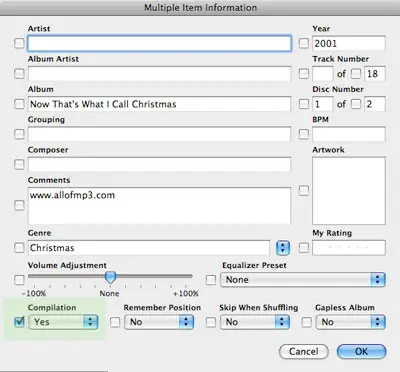
A: The purpose of the “Part of a Compilation” checkbox in your track information in iTunes is to flag a given track as belonging to a “compilation” album rather than a traditional album. This is normally used for albums that contain multiple artists, and can also be used for albums with “featured” artists.
Tracks marked as “Part of a Compilation” can be grouped separately and omitted from the normal artist listings. This can be used, for instance, to prevent “one-hit wonders” from appearing in your artists list simply because they have a single track that is part of a soundtrack album, or happen to have been featured on another artist’s album.
There are actually two steps required for this feature to work: First, the tracks themselves must be marked as “Part of a compilation”—ideally, this should include the whole album and not just individual tracks. This setting can be enabled for individual tracks, or for multiple tracks at once simply by selecting the track(s) and choosing File, Get Info:
Once the appropriate tracks have been marked as “Part of a Compilation” the option to read and use this flag must then be enabled in iTunes and/or on the iPod.
Note that this is a separate setting for each, and it is possible to have this option enabled in iTunes but not on your iPod, or vice-versa.
In iTunes, this option is found under iTunes’ preferences, on the “General” tab:

Once this option is enabled in iTunes, you will see an additional entry for “Compilations” in the Artist column when browsing your music library:

Any tracks flagged as “Part of a Compilation” will be displayed under this heading, grouped by album.
Note that if all of the tracks by a given artist are flagged as “Part of a Compilation” that artist’s name will be omitted from the list of artists. This prevents the artist listing being cluttered up with artists who may only have a single obscure track on a soundtrack album, for example.
On the other hand, if the artist is still listed on even a single track that is not flagged as “Part of a Compilation” then the artist’s name will still appear in the “Artists” listing, and all of that artist’s tracks will still be listed under the artist’s name. Note that this is a relatively recent change in iTunes, which in our opinion offers a more intuitive approach to listing tracks (ie, if you select an artist by name, you generally want to see ALL of that artist’s tracks).
In versions of iTunes prior to 7.4, however, tracks flagged as “Part of a Compilation” were never listed under the Artist name, even if the artist otherwise appeared in the listing.
The method of enabling compilations on the iPod itself varies between models. Pre-2007 iPod models had a Compilations setting under the Settings menu that could be toggled on or off. The 2007 iPod classic and iPod nano (video) have removed this specific setting. Instead, on these newer models, grouping by compilation is controlled based on whether or not the “Compilations” menu option is enabled, under Settings, Music Menu, Compilations:

Logically, if you choose to display the “Compilations” menu, the iPod assumes that it should group the artist listing by compilations as well, filtering out those tracks that are flagged as “Part of a Compilation” in the same way that iTunes does. If the “Compilations” menu is hidden, the iPod will list all artists in the artist listing, and ignore the “Part of a Compilation” setting in each track.











