
Q: I recently bought an Apple TV, which I use mostly for listening to music from my iTunes library and renting movies as it seems to be easier to use and have more content than my Comcast “on-demand” service. With summer coming up, however, I’m wondering about whether or not I can bring it with me to the cottage and use it there, since I usually spend quite a bit of time up there in the nicer weather. I have basic Internet at the cottage, so can I just unplug it and take it with me, or should I just buy another one for the cottage? What’s the best option here and will I be able to access all of my music and any movies I’ve already rented if I take it to the cottage? What about if I’m using a second one instead and leave the first one at home?
– Brian
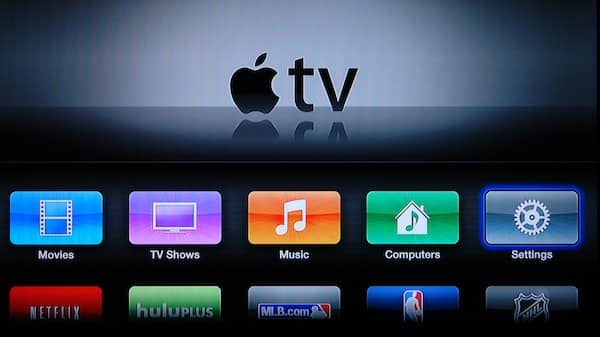
A: The Apple TV provides access to two different types of content. Movies, TV shows, and music that you’ve purchased or rented from the iTunes Store is available via a feature known as iTunes in the Cloud, and can be accessed from anywhere that you have an Internet connection, with any Apple TV signed into the same iTunes Store account. This is the content accessed from the first three sections: Movies, TV Shows, and Music.
On the other hand, content streamed from your iTunes library, under the Computers section, is only available to an Apple TV on the same wired or wireless network as the computer running iTunes; it cannot be accessed remotely over the Internet.
So with an Apple TV at your cottage will be able to access all of your movie rentals, including any movies you’ve already rented that haven’t yet expired, as well as purchased movies, TV shows, and music. You will also of course be able to use other Internet-connected features such as Hulu Plus, Netflix, and Podcasts.

Note that this is the case regardless of whether you take your current Apple TV to the cottage with you or purchase a second one and set it up there. As long as both are logged into the same iTunes Store account, all of your iTunes in the Cloud content will be available on both devices, including movie rentals.
In fact, iTunes in the Cloud will even sync watched/unwatched status and playback position between the two devices, so if you watch half a movie at home and then travel to the cottage you should be able to pick up exactly where you left off when you get there.
Unless you’ve purchased all of your music from the iTunes Store, the problem here will be listening to your music from your iTunes library, since that requires the computer running iTunes to be available on the same local network. If you keep your iTunes library on a laptop that you will be bringing to the cottage with you, then this will work in much the same way as it does at home, but if your iTunes library is on a desktop computer, your Apple TV at the cottage will have no way to access it.
The Apple TV has no local storage, so there’s no way to store music on it to take with you, however if you have an iPhone, iPad, or iPod touch with your music library on it, you can stream your music to your Apple TV from there using AirPlay, which is an effective solution if you carry enough music on your device(s) to suit your cottage listening.


Another alternative is to subscribe to Apple’s iTunes Match service.











