
Q: Can iTunes allow me to tag my home videos and photos and feed that into Apple TV for streaming to my TV? I know iTunes can do music and purchased videos but what about ripped DVDs and my own home videos? I own the DVD but I want to put it on disk so I can have one device (the Apple TV) from where I can get access to all of my digital content: my family videos and photos, my ripped DVDs, my CDs, my purchased digital videos from Amazon and so forth. I want iTunes to allow me to tag them as year/month, whether home video, movie, TV show, song/album, event (e.g. birthday videos/photos) and so forth and then use my Apple TV to access these from my TV. Is this doable?
– Anonymous
A: This is definitely doable, but is not without a few limitations due to the type of content that iTunes is actually designed for. Videos and Photos are actually handled quite differently by both iTunes and the Apple TV, so it’s worth discussing each of these individually.
The first thing to keep in mind is that you will only be able to use videos that are in an Apple TV compatible format. This basically boils down to H.264 or MPEG-4 videos with specific parameters. Note that the iTunes application has broader format support than the Apple TV and iOS devices, so just because a video can be imported and played in iTunes doesn’t mean that it will work on your Apple TV. Our Complete Guide to iPod, Apple TV and iPhone Video Formats will provide you with some guidance on this; although the article was written in 2007, with the exception of the very recent addition of 1080p content support on the third-generation Apple TV, the information there still applies today.
There are a number of third-party utilities that you can use to convert your own DVDs and video files into an Apple TV compatible format.
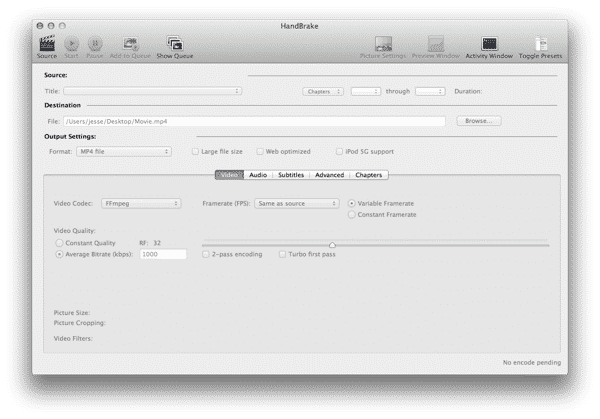
One good option for this is Handbrake, a popular free utility available for both Mac and Windows that includes a number of advanced features and configuration options for handling additional information such as subtitles, chapter markers and alternate audio tracks. Note that by itself Handbrake will not convert copy-protected commercial DVDs, however if you’re a Mac user you can simply install a pre-2.0 version of the free VLC app and Handbrake will use the appropriate decryption libraries from it; Windows users can either manually download the appropriate DLL file from VLC’s web site here or can use a third-party decryption tool such as AnyDVD or DVD43.

Note that it is illegal in many countries, including the U.S., to circumvent digital copy protection, even to make copies of items you own for your own personal use. This is likely the main reason why Apple has not included the ability to import DVD video into iTunes in the same way CDs are handled; virtually all commercial DVDs are copy-protected, music CDs are not.
If you have your own home movies in a digital video format, Handbrake can also take care of converting these into an Apple TV compatible format; camcorders that use digital memory cards, hard drives or recordable DVDs should produce digital files that can be copied onto your computer and then converted using Handbrake. Movies from Digital Video (DV) camcorders will first need to be imported via FireWire into an application such as iMovie and then exported to a file on your computer which can then be run through Handbrake. Lastly, home movies in older, analog formats such as VHS tapes, will need to be converted into a digital format by using specialized video capture hardware that basically “records” them onto your computer or by taking them to a third-party service that can convert them to DVD or another digital format for you.
Once you’ve converted the videos into an Apple TV compatible format, you can import them into iTunes in much the same way you would import any file—simply drag-and-drop them onto the iTunes window, or use the Add to Library option found on the File menu in iTunes. Videos will be imported into the Movies section in iTunes by default; from there you can tag and reorganize them into another category such as TV Shows or Podcasts.
Unfortunately, home video support is another area where you may find iTunes to be somewhat limited; iTunes expects video content to fit into specific, pre-determined categories such as “Movies” and “TV Shows” and doesn’t really create a category for home videos.
This means you’ll basically need to decide how to make your home videos fit into iTunes’ organizational system. For example, you could leave them in the Movies section and identify them as home videos by genre, or you could basically turn them into “episodes” of a “TV Show” called something like “My Home Videos.” See our Guide to Managing iTunes Videos for more information on how to tag and organize video files in iTunes.
Alternatively, you can share your own personal video clips as part of your photo collections instead. This works best for shorter video clips as opposed to lengthy home videos. More information on this is in the next section.
Lastly, note that iTunes does not support DRM protected content from any source other than the iTunes Store. This means that purchases from other online video services such as Amazon will not be compatible with iTunes regardless of their actual format.
Photos are somewhat easier to handle with the Apple TV as it is specifically designed to provide access to your personal photo collections. Photos form part of your iTunes library as far as the Apple TV is concerned, but they are not really managed or stored by iTunes itself; the iTunes application merely provides the conduit by which a library of photos are made available to the Apple TV.
If you’re a Mac user, iTunes can share your photo albums from either iPhoto or Aperture or you can simply point it to a folder full of photos.











