
iLoungeiLounge
  • News
    • Apple
      • AirPods Pro
      • AirPlay
      • Apps
        • Apple Music
      • iCloud
      • iTunes
      • HealthKit
      • HomeKit
      • HomePod
      • iOS 13
      • Apple Pay
      • Apple TV
      • Siri
    • Rumors
    • Humor
    • Technology
      • CES
    • Daily Deals
    • Articles
    • Web Stories
  • iPhone
    • iPhone Accessories
  • iPad
  • iPod
    • iPod Accessories
  • Apple Watch
    • Apple Watch Accessories
  • Mac
    • MacBook Air
    • MacBook Pro
  • Reviews
    • App Reviews
  • How-to
    • Ask iLounge
Font ResizerAa
iLoungeiLounge
Font ResizerAa
Search
  • News
    • Apple
    • Rumors
    • Humor
    • Technology
    • Daily Deals
    • Articles
    • Web Stories
  • iPhone
    • iPhone Accessories
  • iPad
  • iPod
    • iPod Accessories
  • Apple Watch
    • Apple Watch Accessories
  • Mac
    • MacBook Air
    • MacBook Pro
  • Reviews
    • App Reviews
  • How-to
    • Ask iLounge
Follow US

How-to › Ask iLounge

Ask iLoungeiPhone

User not available for FaceTime when calling overseas

Last updated: May 16, 2021 4:13 pm UTC
By Jesse Hollington
User not available for FaceTime when calling overseas

Q: My son in Germany has an iPhone with Wi-Fi. I tried calling the correct number—overseas, country and locality codes. When I try to call him I get a message that he is “not available for FaceTime.” That means he can’t receive I think. What am I doing wrong?


– Jim
User not available for FaceTime when calling overseas

A: Unfortunately, the message that a user is “Not Available for FaceTime” can several things, including an incorrect number, the user being out of appropriate network coverage, or the user simply declining or not answering the FaceTime call. Calling the wrong number usually results in a different message that the user is not registered for FaceTime, but we have seen situations where the user is simply shown as “not available” instead.

So you should first ensure that you are calling your son’s FaceTime number using a proper mobile number format; although most North American landlines require you to prefix an international call with “011”, this is not the case when calling via a mobile network—instead of “011” the “+” sign is used.


So to call Germany, instead of beginning your number with “01149” you would need to dial “+49”; the “+” key can be accessed by holding down the “0” key on the iPhone dialling keypad, or entering it into the phone number field in a contact record using the standard iPhone keyboard. Note that many cellular carriers will accept a “011” prefix for compatibility with landlines, however Apple’s FaceTime servers don’t know how to handle this and simply look for the actual number: country code + local number.


Alternatively, if your son has signed up for FaceTime using an Apple ID, you may be able to reach him by “calling” his e-mail address via FaceTime instead of his phone number. See our Guide to FaceTime + iMessage: Setup, Use, and Troubleshooting for more information on how to set this up.

You may also want to have your son call you via FaceTime, which will display the correct FaceTime address from his iPhone as the caller ID. You can then add to your address book just to make sure you’re using the correct phone number or e-mail address for him.


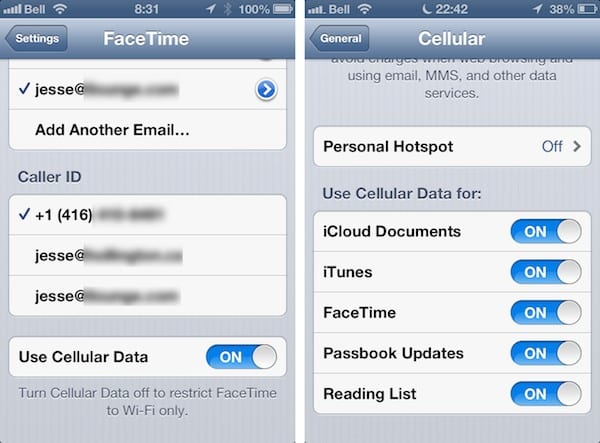
Also, depending on the model of iPhone your son is using and how he has it configured, he may only be able to receive FaceTime calls when he is actually on a Wi-Fi network. Only the iPhone 4S and iPhone 5 allow FaceTime over a cellular data connection, and even with those models the feature can be disabled by the user to minimize cellular data expenses. If your son does not have FaceTime over Cellular enabled, then he will not receive any FaceTime calls while away from a Wi-Fi network, and caller will simply receive a message that he is not available. The option to enable of disable FaceTime over a cellular data connection can be found either under Settings, FaceTime, or Settings, General, Cellular.


If you’ve confirmed that you are calling the correct number or e-mail address and that your son is on a Wi-Fi network when you are trying to call, yet he is still not receiving your FaceTime calls at all, then the problem likely lies with whatever Wi-Fi network he is on. Certain firewall and router configurations can block FaceTime calls, and in many cases this may even only block incoming FaceTime communications, allowing his calls to reach you but preventing your calls from reaching him.



Latest News
The 14-inch MacBook Pro with M5 Chip 16GB RAM/512GB is $250 Off
1 Min Read
Noise and Static on AirPods Pro 3 Still Unfixed
1 Min Read
New iMac with 24-inch OLED Display May be Brighter With 600 Nits
1 Min Read
The 15-inch M4 MacBook Air 256GB Is $250 Off
1 Min Read
Internal Kernel Debug Kit from Apple Reveals Tests for a MacBook with A15 Chip
1 Min Read
Apple Currently In Talks With Suppliers for Chip Assembly & Packaging of iPhones in India
1 Min Read
Apple Allows Easier Battery Replacement For M5 MacBook Pro with 14-inch Display
1 Min Read
The Apple Watch SE 3 44mm GPS is $50 Off
1 Min Read
20th Anniversary iPhone May Launch in Two Years
1 Min Read
Better Image Generation Capabilities and Apple Music Integration Coming to ChatGPT
1 Min Read
A20 Pro Chip Coming to Next Gen iPad Mini OLED
1 Min Read
Amazon has the AirTag 4 Pack Marked $29 off
1 Min Read

iLounge logo

iLounge is an independent resource for all things iPod, iPhone, iPad, and beyond. iPod, iPhone, iPad, iTunes, Apple TV, and the Apple logo are trademarks of Apple Inc.

This website is not affiliated with Apple Inc.
iLounge © 2001 - 2025. All Rights Reserved.
  • Contact Us
  • Submit News
  • About Us
  • Forums
  • Privacy Policy
  • Terms Of Use
Welcome Back!

Sign in to your account

Lost your password?








