
iLoungeiLounge
  • News
    • Apple
      • AirPods Pro
      • AirPlay
      • Apps
        • Apple Music
      • iCloud
      • iTunes
      • HealthKit
      • HomeKit
      • HomePod
      • iOS 13
      • Apple Pay
      • Apple TV
      • Siri
    • Rumors
    • Humor
    • Technology
      • CES
    • Daily Deals
    • Articles
    • Web Stories
  • iPhone
    • iPhone Accessories
  • iPad
  • iPod
    • iPod Accessories
  • Apple Watch
    • Apple Watch Accessories
  • Mac
    • MacBook Air
    • MacBook Pro
  • Reviews
    • App Reviews
  • How-to
    • Ask iLounge
Font ResizerAa
iLoungeiLounge
Font ResizerAa
Search
  • News
    • Apple
    • Rumors
    • Humor
    • Technology
    • Daily Deals
    • Articles
    • Web Stories
  • iPhone
    • iPhone Accessories
  • iPad
  • iPod
    • iPod Accessories
  • Apple Watch
    • Apple Watch Accessories
  • Mac
    • MacBook Air
    • MacBook Pro
  • Reviews
    • App Reviews
  • How-to
    • Ask iLounge
Follow US

How-to › Ask iLounge

Ask iLoungeiCloudiPadiPhoneiPodiTunes

Transitioning purchased apps to a new iTunes account

Last updated: May 16, 2021 4:19 pm UTC
By Jesse Hollington
Transitioning purchased apps to a new iTunes account

Q: I have a question related to iCloud backups and application data. My family shares an iTunes store account which we have used to buy apps. My credit card is in this account, and only I have the password. Each family member has their own iCloud account for backups and all else. My oldest son will be going to college in the fall, and wants to be responsible for his own phone and app store account. If he deletes apps we bought on the family account, and buys them using his own iCloud account, will his existing app data be restored?


– Chris
Transitioning purchased apps to a new iTunes account

A: Unfortunately, this can be a bit complicated. Although application data—in iCloud/iTunes backups or on an iOS device—is not tied to the iTunes Store account that was used to purchase a given app, the applications themselves of course are.

Deleting an app from your iPhone will remove all of that application’s data, and reinstalling it does not restore any app data from iCloud. This is the case regardless of the iTunes Store or iCloud accounts involved. iCloud backups are only restored during a full restore of the device, and in fact this is the only way to access the iCloud Restore option.


There’s really no easy way to replace existing apps on an iOS device without deleting them—and their data—and then reinstalling them fresh. For apps that store their information in cloud-based services, such as Dropbox, Evernote, or any app that uses iCloud for storage, this may not be a big problem, as there isn’t any local data to worry about other than perhaps some configuration settings. For other apps that store everything locally, however, this could be a problem.

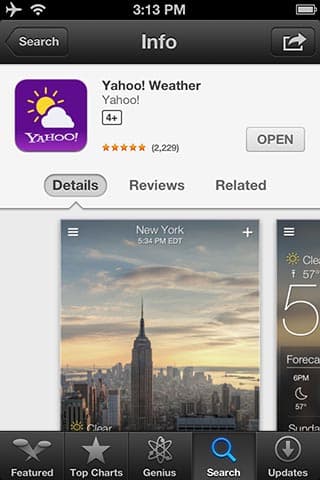
Your son won’t be able to repurchase apps directly on his iPhone, since the App Store knows they’re already installed and replaces the purchasing options with an “Open” button, even when using a different iTunes Store account.


He can, however, repurchase the apps using iTunes on his Mac or PC. If the apps aren’t already on his computer, it’s simply a matter of purchasing them through iTunes normally. If the apps purchased with your account are loaded into his iTunes library, he will need to delete them from there before he can purchase them again, but this will not affect any data, since the apps will remain on the iPhone.

These newly purchased versions will be downloaded to the local iTunes library, and will then be available to be re-synced onto the iPhone over a USB connection. Even in this case, however, these new purchases will not replace the apps that are already on his iPhone until an update for a given app comes in, since iTunes doesn’t bother to recopy information that it thinks is already present on a device. Apps already installed will show a “Remove” button in iTunes, and removing the apps via iTunes and trying to reinstall them from there would also result in any data in the apps being deleted, in the same way as deleting them directly on the device would


Transitioning purchased apps to a new iTunes account

Keep in mind that with iOS 6, it may be not be as necessary as you think for your son to repurchase apps that were originally purchased under your account. For example, as of iOS 6 your iTunes Store password is no longer required to download and install updates for apps that are already on a user’s device.



Latest News
The 14-inch MacBook Pro with M5 Chip 16GB RAM/512GB is $250 Off
1 Min Read
Noise and Static on AirPods Pro 3 Still Unfixed
1 Min Read
New iMac with 24-inch OLED Display May be Brighter With 600 Nits
1 Min Read
The 15-inch M4 MacBook Air 256GB Is $250 Off
1 Min Read
Internal Kernel Debug Kit from Apple Reveals Tests for a MacBook with A15 Chip
1 Min Read
Apple Currently In Talks With Suppliers for Chip Assembly & Packaging of iPhones in India
1 Min Read
Apple Allows Easier Battery Replacement For M5 MacBook Pro with 14-inch Display
1 Min Read
The Apple Watch SE 3 44mm GPS is $50 Off
1 Min Read
20th Anniversary iPhone May Launch in Two Years
1 Min Read
Better Image Generation Capabilities and Apple Music Integration Coming to ChatGPT
1 Min Read
A20 Pro Chip Coming to Next Gen iPad Mini OLED
1 Min Read
Amazon has the AirTag 4 Pack Marked $29 off
1 Min Read

iLounge logo

iLounge is an independent resource for all things iPod, iPhone, iPad, and beyond. iPod, iPhone, iPad, iTunes, Apple TV, and the Apple logo are trademarks of Apple Inc.

This website is not affiliated with Apple Inc.
iLounge © 2001 - 2025. All Rights Reserved.
  • Contact Us
  • Submit News
  • About Us
  • Forums
  • Privacy Policy
  • Terms Of Use
Welcome Back!

Sign in to your account

Lost your password?








