
iLoungeiLounge
  • News
    • Apple
      • AirPods Pro
      • AirPlay
      • Apps
        • Apple Music
      • iCloud
      • iTunes
      • HealthKit
      • HomeKit
      • HomePod
      • iOS 13
      • Apple Pay
      • Apple TV
      • Siri
    • Rumors
    • Humor
    • Technology
      • CES
    • Daily Deals
    • Articles
    • Web Stories
  • iPhone
    • iPhone Accessories
  • iPad
  • iPod
    • iPod Accessories
  • Apple Watch
    • Apple Watch Accessories
  • Mac
    • MacBook Air
    • MacBook Pro
  • Reviews
    • App Reviews
  • How-to
    • Ask iLounge
Font ResizerAa
iLoungeiLounge
Font ResizerAa
Search
  • News
    • Apple
    • Rumors
    • Humor
    • Technology
    • Daily Deals
    • Articles
    • Web Stories
  • iPhone
    • iPhone Accessories
  • iPad
  • iPod
    • iPod Accessories
  • Apple Watch
    • Apple Watch Accessories
  • Mac
    • MacBook Air
    • MacBook Pro
  • Reviews
    • App Reviews
  • How-to
    • Ask iLounge
Follow US

How-to › Ask iLounge

Ask iLoungeiCloud

Transferring data when moving to a new iCloud account

Last updated: May 16, 2021 4:19 pm UTC
By Jesse Hollington
Transferring data when moving to a new iCloud account

Q: I was reading your article on Moving from a shared iCloud to individual accounts, which looks like what I want to do. However, will this transfer all of my apps, pictures and calendars to my new iCloud account?


– Stephen
Transferring data when moving to a new iCloud account

A: Unfortunately there is no way to automatically transfer information between two iCloud accounts on the back end, so when you create a new iCloud account, it essentially begins as an empty shell. Transferring your information into it must be done from a computer or iOS device.

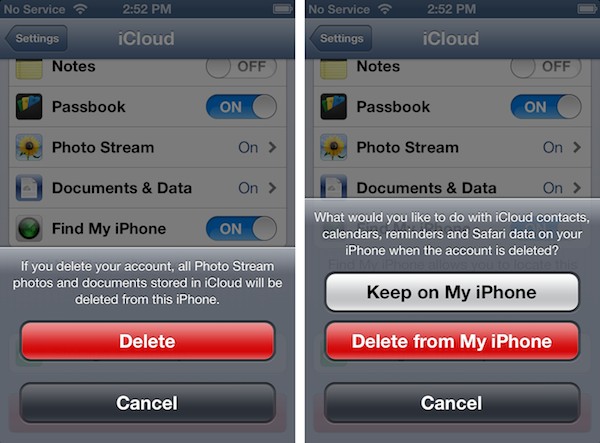
Personal information such as contacts, calendars, bookmarks, and reminders would need to be re-uploaded to the new iCloud account from your iOS device or your Mac or PC. If you’re a Mac user, the Calendar and Contacts apps in OS X Mountain Lion are the easiest way to do this, but it can be done from an iOS device as well. When disabling or deleting your current iCloud account, simply be sure to choose the option to keep these items on your device; any information in these categories found on your device will automatically be synced up to your new iCloud account once you’ve created it and signed in on your device.


Your Photo Streams, including Shared Photo Streams, will simply be removed from your device once you’ve signed out of your old iCloud account. If you’re using iPhoto or Aperture on a Mac or the iCloud Control Panel for Windows on a PC these photos should have already been downloaded to your computer. You can later manually push these back into your Photo Stream and re-create any Shared Photo Streams using these apps, or simply start over. Since the Photo Stream isn’t designed to be a permanent repository of your photos—only a maximum of 1,000 photos or 30 days of photos are retained—you should be saving them on your Mac or PC anyway. Note that local photos stored in your Camera Roll on your iOS devices or synced from iTunes are unrelated to iCloud and will be untouched.


iCloud Documents & Data is a special case.

This data will be removed when you delete your iCloud account from your iOS device, however the impact of this will depend on the specific applications that you’re using on your iPhone, iPad, or iPod touch. Applications that provide local storage and simply sync their data with iCloud should be able to push that data back up again, while other appellations may rely on iCloud completely. In the latter case, if at all possible you should export your data from these apps and save it elsewhere until you have setup the new iCloud account. This is unfortunately an app-by-app situation so there’s no standard answer as to how this will be handled, although many apps do provide the option for both iCloud-based and local storage, so simply ensure that any important data such as saved games or documents are in a non-iCloud storage area.

If you’re using iCloud for e-mail, this is a particularly special case. Your e-mail is not stored locally on your iOS device, and deleting or disabling your iCloud account will simply delete the mail from your device, although it will still remain on the iCloud servers.



Latest News
The 14-inch MacBook Pro with M5 Chip 16GB RAM/512GB is $250 Off
1 Min Read
Noise and Static on AirPods Pro 3 Still Unfixed
1 Min Read
New iMac with 24-inch OLED Display May be Brighter With 600 Nits
1 Min Read
The 15-inch M4 MacBook Air 256GB Is $250 Off
1 Min Read
Internal Kernel Debug Kit from Apple Reveals Tests for a MacBook with A15 Chip
1 Min Read
Apple Currently In Talks With Suppliers for Chip Assembly & Packaging of iPhones in India
1 Min Read
Apple Allows Easier Battery Replacement For M5 MacBook Pro with 14-inch Display
1 Min Read
The Apple Watch SE 3 44mm GPS is $50 Off
1 Min Read
20th Anniversary iPhone May Launch in Two Years
1 Min Read
Better Image Generation Capabilities and Apple Music Integration Coming to ChatGPT
1 Min Read
A20 Pro Chip Coming to Next Gen iPad Mini OLED
1 Min Read
Amazon has the AirTag 4 Pack Marked $29 off
1 Min Read

iLounge logo

iLounge is an independent resource for all things iPod, iPhone, iPad, and beyond. iPod, iPhone, iPad, iTunes, Apple TV, and the Apple logo are trademarks of Apple Inc.

This website is not affiliated with Apple Inc.
iLounge © 2001 - 2025. All Rights Reserved.
  • Contact Us
  • Submit News
  • About Us
  • Forums
  • Privacy Policy
  • Terms Of Use
Welcome Back!

Sign in to your account

Lost your password?








