
Q: My wife and I are both AT&T wireless customers. We have separate AT&T wireless accounts. I currently use an iPhone 4s, and she uses a BlackBerry Torch 9800. I recently purchased an iPhone 5s, discounted by the 2-year AT&T contract. When the iPhone 5s arrives, I plan to setup/activate the iPhone 5s for me to use, then factory reset the iPhone 4s, for my wife to use.
Would the iPhone 4s require a new SIM card for my wife to use it? Could she use the SIM card that’s already in the phone now (that I’ve been using), or would she need a new SIM card? Is it possible to set-up and activate the iPhone 4s for my wife to use with iTunes, or would this require a trip to the AT&T store?
– Adam
A: It should definitely not be necessary to actually go to an AT&T carrier store to do any of this. You may need to call AT&T or visit their website to deal with changing over the actual SIM card itself, the iPhone activation and setup procedure is done either over-the-air or via a connection to iTunes and doesn’t actually involve AT&T at all.
Once of the great advantages of GSM networks such as AT&T is that when you change phones you can—in theory—simply move your SIM card from your old phone to your new one. Your account is actually assigned to your SIM card, not your device, so there’s no need to call AT&T to activate anything at all if you’re simply moving the SIM card to a new device; the SIM card remains active and it doesn’t technically matter to AT&T what specific phone your SIM card is actually in.
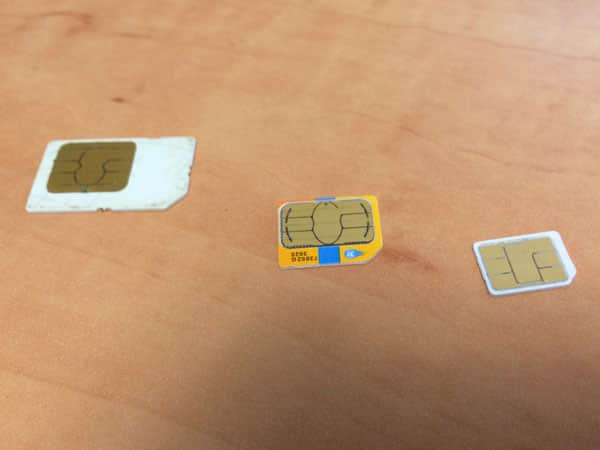
Unfortunately, the new generation of micro- and nano-SIM cards has complicated this process, as there are now three different sizes of SIM cards to deal with. Your wife’s BlackBerry Torch uses a standard, full-sized SIM, your iPhone 4s uses a micro-SIM, and your new iPhone 5s will use a nano-SIM.
All of these formats are electronically compatible, however—the only difference is their size. If you’re the do-it-yourself type, you can actually pretty easily cut down your larger SIMs for the new devices—your iPhone 4s micro-SIM to a nano-SIM for your iPhone 5s, and your wife’s BlackBerry Torch SIM down to a micro-SIM for your iPhone 4s. A quick Google search will turn up a number of tutorials on how to do this, and some sites even have paper templates that you can print out as cutting guides.
Although your existing iPhone 4s micro-SIM would work fine to provide basic network access in your iPhone 5s, you may need to use a newer SIM to actually get LTE support; without it your iPhone 5s would be limited to 3G/4G speeds. Depending on network coverage where you live and the nature of your data plan, you may not care about this, but if you’re looking to use LTE on the iPhone 5s you will likely need to activate the SIM card that comes with the new iPhone. This would not be a concern in your wife’s case, however, as the iPhone 4s is not an LTE-capable device.
If you don’t want to deal with cutting down your SIM cards, you should be able to simply leave your old iPhone 4s micro-SIM in place and call AT&T to have them switch her account over to it. In order to do this, they will need the number from the SIM card, known as an ICCID. This is often printed on the SIM card itself, and can also be accessed from the iPhone by going to Settings, General, About and looking for the “ICCID” entry. You can also find this information in iTunes by clicking on your phone number in the “Summary” screen shown for your device to cycle through the IMEI and ICCID fields.











