
iLoungeiLounge
  • News
    • Apple
      • AirPods Pro
      • AirPlay
      • Apps
        • Apple Music
      • iCloud
      • iTunes
      • HealthKit
      • HomeKit
      • HomePod
      • iOS 13
      • Apple Pay
      • Apple TV
      • Siri
    • Rumors
    • Humor
    • Technology
      • CES
    • Daily Deals
    • Articles
    • Web Stories
  • iPhone
    • iPhone Accessories
  • iPad
  • iPod
    • iPod Accessories
  • Apple Watch
    • Apple Watch Accessories
  • Mac
    • MacBook Air
    • MacBook Pro
  • Reviews
    • App Reviews
  • How-to
    • Ask iLounge
Font ResizerAa
iLoungeiLounge
Font ResizerAa
Search
  • News
    • Apple
    • Rumors
    • Humor
    • Technology
    • Daily Deals
    • Articles
    • Web Stories
  • iPhone
    • iPhone Accessories
  • iPad
  • iPod
    • iPod Accessories
  • Apple Watch
    • Apple Watch Accessories
  • Mac
    • MacBook Air
    • MacBook Pro
  • Reviews
    • App Reviews
  • How-to
    • Ask iLounge
Follow US

How-to › Ask iLounge

Ask iLoungeiTunes

Track Info greyed out in iTunes

Last updated: May 16, 2021 4:39 pm UTC
By Jesse Hollington
Track Info greyed out in iTunes

Q: I recently re-installed Windows 7 on my computer and I have also installed the latest iTunes. If I right-click a song, choose “Get Info” and go to the “Info” tab, everything is greyed out. I searched your forums, but none of the solutions there worked for me. My computer is authorized. Any ideas why this is happening?


– Josh
Track Info greyed out in iTunes

A: There are two main reasons why you may not be able to edit the info in a track from within iTunes: Either the underlying file itself is not writable or there is a problem with the internal tags.

The first problem is much more common, and occurs when working with files that iTunes does not have the ability to write to. When iTunes updates track information, it writes this both into its own database as well as into the tags of the files themselves. If it can’t write these tags, it presents the information as being uneditable, rather than allowing you to edit it and then presenting you with an error only after you try and save your changes.


This can occur due to the files being flagged read-only, or Windows permissions being set in such a way that your user account doesn’t have write access to them. You can check this by selecting an affected track in the Windows file system and checking its Properties to ensure that the read-only flag is not set and that you have the necessary write permissions on the Security tab.

You can also do a brute-force test by simply trying to move or delete a track (make a copy somewhere else first). If the track is read-only or you don’t have the necessary permissions, Windows should respond with an error message.


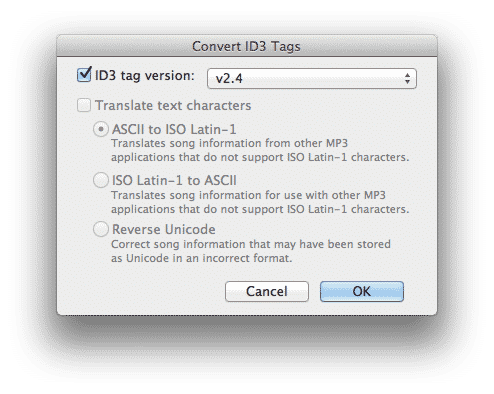
If everything looks okay in terms of the read-only status and file permissions, then it is possible that the tags themselves have become corrupted. This is a much more uncommon situation, and rarely affects an entire library, but if these are MP3 files, try converting the ID3 tags to a newer version by right-clicking on the track and selecting the “Convert ID3 Tags” option from the pop-up menu.

Converting the tags to iD3 v2.3 or v2.4 should alleviate any problems with iTunes accessing the metadata.



Latest News
The Apple Watch Series 11 46mm GPS Is $100 Off
1 Min Read
Clamshell Style iPhone Being Looked Into By Apple
1 Min Read
Foldable iPhones May Have the Largest Battery Ever
1 Min Read
Apple and TSMC’s 10-Year Collaboration May Be Ending
1 Min Read
The 13-inch M5 iPad Pro 256GB Wi-Fi Is $149 Off
1 Min Read
M5 Pro and M5 Max Chips for the MacBook Pro could Roll Out with macOS 26.3
1 Min Read
Mac Ordering Process Revamped
1 Min Read
Check Signed By Steve Wozniak and Steve Jobs Sold For $2.4 Million
1 Min Read
The Anker 140W 4-Port GaN USB-C Charger is $35 Off
1 Min Read
No iPhone Air 2 This Year, according to Latest Report
1 Min Read
New Report Corroborates Split iPhone Release Dates
1 Min Read
Apple Losing More Researchers As They Plan To Release 2 Siri Versions
1 Min Read

iLounge logo

iLounge is an independent resource for all things iPod, iPhone, iPad, and beyond. iPod, iPhone, iPad, iTunes, Apple TV, and the Apple logo are trademarks of Apple Inc.

This website is not affiliated with Apple Inc.
iLounge © 2001 - 2025. All Rights Reserved.
  • Contact Us
  • Submit News
  • About Us
  • Forums
  • Privacy Policy
  • Terms Of Use
Welcome Back!

Sign in to your account

Lost your password?








