
iLoungeiLounge
  • News
    • Apple
      • AirPods Pro
      • AirPlay
      • Apps
        • Apple Music
      • iCloud
      • iTunes
      • HealthKit
      • HomeKit
      • HomePod
      • iOS 13
      • Apple Pay
      • Apple TV
      • Siri
    • Rumors
    • Humor
    • Technology
      • CES
    • Daily Deals
    • Articles
    • Web Stories
  • iPhone
    • iPhone Accessories
  • iPad
  • iPod
    • iPod Accessories
  • Apple Watch
    • Apple Watch Accessories
  • Mac
    • MacBook Air
    • MacBook Pro
  • Reviews
    • App Reviews
  • How-to
    • Ask iLounge
Font ResizerAa
iLoungeiLounge
Font ResizerAa
Search
  • News
    • Apple
    • Rumors
    • Humor
    • Technology
    • Daily Deals
    • Articles
    • Web Stories
  • iPhone
    • iPhone Accessories
  • iPad
  • iPod
    • iPod Accessories
  • Apple Watch
    • Apple Watch Accessories
  • Mac
    • MacBook Air
    • MacBook Pro
  • Reviews
    • App Reviews
  • How-to
    • Ask iLounge
Follow US

Articles

Articles

The New shuffle: Seven Facts Worth Knowing

Last updated: May 15, 2021 7:58 pm UTC
By Jeremy Horwitz
The New shuffle: Seven Facts Worth Knowing

Based on numerous questions from our readers, we’ve put together this short list of new facts on the second-generation iPod shuffle in advance of our upcoming comprehensive review. Enjoy!

The New shuffle: Seven Facts Worth Knowing

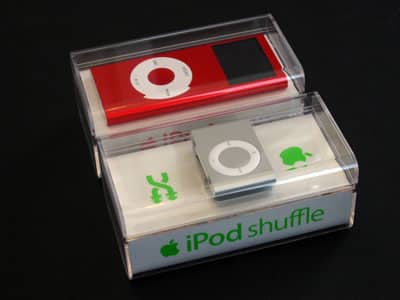
(1) Packaging: The second-generation iPod shuffle comes in a clear hard plastic box that’s identical in size and shape to the ones used for second-generation iPod nanos; all that’s different is the white card stock insert, the manuals, and the accessories.


The New shuffle: Seven Facts Worth Knowing

(2) Lights: Wondering about indicator lights? Apple has hidden them in pinhole-sized dots on the top and bottom right sides of the new shuffle. But instead of using one light to show you battery status and the other to indicate the shuffle’s responses to commands or synchronization, both of the new lights flash at the same time and tell you the same thing.


The New shuffle: Seven Facts Worth Knowing

The New shuffle: Seven Facts Worth Knowing

(3) Battery: Since there’s no battery check button on the new shuffle, you can check the shuffle’s battery charge only by flipping the power off and then on again.

The indicator will flash green for a “good” charge, amber for a “low” charge, red for a “very low” charge, or nothing for no charge.


The New shuffle: Seven Facts Worth Knowing

The New shuffle: Seven Facts Worth Knowing

(4) Clip: There is no obvious way to remove the rear clip – it does not use an exposed, easily removable pin. And it’s thicker and a little larger than the clip found in Apple’s iPod Radio Remote, though otherwise very similar. You may wonder if the clip is really made from metal, or from coated plastic.


The New shuffle: Seven Facts Worth Knowing

(5) Size and Build: Though the new shuffle does indeed inspire “wow, that’s small” reactions from first-time viewers, it’s actually thicker and a hair wider than the current-generation iPod nano.

Its metal casing feels substantial and strong in your hand; the aluminum appears to be at least as thick as the nano’s shell.


The New shuffle: Seven Facts Worth Knowing

(6) Earphones: It comes with Apple’s old, less impressive earphones. We’re not happy about this.


The New shuffle: Seven Facts Worth Knowing

(7) Dock: The new, packed-in dock has no moving parts – the plastic piece in the well appears to be there as a spacer to guarantee that the proprietary charging and syncing headphone port plug (with three white rings) aligns properly with the shuffle’s charging and syncing connector. Apple’s second indicator light – the one on the shuffle’s bottom – is there to be seen when you’ve flipped the shuffle over for docking, and want to see battery or data transfer status.



Latest News
The 14-inch MacBook Pro with M5 Chip 16GB RAM/512GB is $250 Off
1 Min Read
Noise and Static on AirPods Pro 3 Still Unfixed
1 Min Read
New iMac with 24-inch OLED Display May be Brighter With 600 Nits
1 Min Read
The 15-inch M4 MacBook Air 256GB Is $250 Off
1 Min Read
Internal Kernel Debug Kit from Apple Reveals Tests for a MacBook with A15 Chip
1 Min Read
Apple Currently In Talks With Suppliers for Chip Assembly & Packaging of iPhones in India
1 Min Read
Apple Allows Easier Battery Replacement For M5 MacBook Pro with 14-inch Display
1 Min Read
The Apple Watch SE 3 44mm GPS is $50 Off
1 Min Read
20th Anniversary iPhone May Launch in Two Years
1 Min Read
Better Image Generation Capabilities and Apple Music Integration Coming to ChatGPT
1 Min Read
A20 Pro Chip Coming to Next Gen iPad Mini OLED
1 Min Read
Amazon has the AirTag 4 Pack Marked $29 off
1 Min Read

iLounge logo

iLounge is an independent resource for all things iPod, iPhone, iPad, and beyond. iPod, iPhone, iPad, iTunes, Apple TV, and the Apple logo are trademarks of Apple Inc.

This website is not affiliated with Apple Inc.
iLounge © 2001 - 2025. All Rights Reserved.
  • Contact Us
  • Submit News
  • About Us
  • Forums
  • Privacy Policy
  • Terms Of Use
Welcome Back!

Sign in to your account

Lost your password?








