
iLoungeiLounge
  • News
    • Apple
      • AirPods Pro
      • AirPlay
      • Apps
        • Apple Music
      • iCloud
      • iTunes
      • HealthKit
      • HomeKit
      • HomePod
      • iOS 13
      • Apple Pay
      • Apple TV
      • Siri
    • Rumors
    • Humor
    • Technology
      • CES
    • Daily Deals
    • Articles
    • Web Stories
  • iPhone
    • iPhone Accessories
  • iPad
  • iPod
    • iPod Accessories
  • Apple Watch
    • Apple Watch Accessories
  • Mac
    • MacBook Air
    • MacBook Pro
  • Reviews
    • App Reviews
  • How-to
    • Ask iLounge
Font ResizerAa
iLoungeiLounge
Font ResizerAa
Search
  • News
    • Apple
    • Rumors
    • Humor
    • Technology
    • Daily Deals
    • Articles
    • Web Stories
  • iPhone
    • iPhone Accessories
  • iPad
  • iPod
    • iPod Accessories
  • Apple Watch
    • Apple Watch Accessories
  • Mac
    • MacBook Air
    • MacBook Pro
  • Reviews
    • App Reviews
  • How-to
    • Ask iLounge
Follow US

How-to

How-to

The Complete Guide to Converting Video to iPod Format (Mac)

Last updated: May 12, 2021 7:22 pm UTC
By Jerrod H.
The Complete Guide to Converting Video to iPod Format (Mac)

Editor’s Note

A new version of this article is now available. 
The Complete Guide to Converting Video to iPod Format (Mac)

Please see our new Complete Guide to iPod, iPhone and Apple TV Video Conversion (Mac).

For years, iTunes has provided a complete, one-stop solution for the migration of digital audio from the original media source (CD) to the iPod. In fact, one of Apple’s early slogans for its digital audio software was “Rip. Mix. Burn.,” a succinct catch phrase indicative of the simplicity that iTunes created.


Unfortunately, with the introduction of the fifth-generation iPod – the first that can play back various types of video – Apple doesn’t make it equally easy to prepare iPod-ready content. If you’re accustomed to the elegance of “Rip. Mix. Burn.,” you’ll find that the analogous tag line for the importing of video is more like:

“Find Software. Rip. Wait. Find Software. Encode. Wait. Sleep. Wake Up. Enjoy… Maybe.”

Why? iTunes 6 doesn’t offer video conversion.

Instead, you’ll need to find and learn to use software that doesn’t come in the box. Second, video conversion is generally a very time-consuming process, regardless of the software used. In this article, iLounge aims to remedy the former issue, though you’ll likely find that the latter issue will remain until you buy a new computer or piece of hardware optimized for video encoding.


Editor’s Note 1-17-06: The recently-released iTunes 6.0.2 does include video conversion to iPod format, rendering this article much less relevant for most casual users. However, this article remains authoritative and useful for users desiring more control over the video formats used. Read in detail about iTunes 6.0.2’s video conversion features here.

Today, iLounge has launched three tutorials to help you convert your videos to an iPod-viewable format. This piece deals with conversion of video files already on your computer. Another piece discusses conversion of DVDs – ones you are legally entitled to rip. And the last piece looks at the technicalities of the iPod’s video capabilities to help you make educated choices when you’re ready to convert videos or DVDs. It’s easy to just pick the iPod’s native 320×240 resolution and either H.264 or MPEG-4 encoding, but this last tutorial will explain why you might not want to do this. A separate article on PC video encoding and more will go up shortly.


Converting Existing Digital Video Files:

If we had published this tutorial immediately after the release of the iPod, we would not have been happy with what we had to say. At the time, very few pieces of video conversion software were available, and the most prominent – Apple’s own QuickTime Pro 7 ($29) – was extraordinarily slow at converting video, and significantly more expensive than we would have preferred.

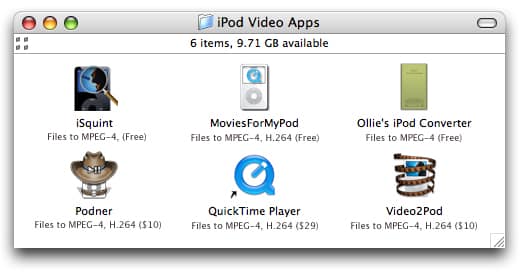
Today, we have many more options to discuss, which happen to be cheaper, faster, more versatile, and, in some cases, easier to use than Apple’s QuickTime Pro. Four of them, in fact, are free.


The application icons in the graphic below are clickable links to their respective websites.

Each option (save QuickTime Pro) is available for download and at least some period of trial use. If you don’t want to go with our recommended option (Podner), we encourage you to give each program a try, as you may find that one works better than the others for your existing video content, your computer, and your personal preference. Read on for a quick overview of each application’s abilities, and how to use them.



 

Video2Pod QuickTime Pro Podner Ollie's iPod Converter MoviesForMyPod iSquint

iSquint (Free, link) is a free utility designed to convert existing video files into iPod-ready MPEG-4 format. In our testing, we found iSquint to be fast and easy to use: a 2-minute MPEG-1 video clip took the same amount of time to convert on our test 1.5GHz Powerbook G4. This real-time encoding was roughly three times the speed of conversion as QuickTime Pro at the same task. iSquint features extremely easy-to-use controls (see screenshot below), can batch convert a folder of videos, and can also automatically add converted video files into iTunes once it has finished.

image

However, beware – iSquint is still in the beta stages of development, and we occasionally had encoding procedures go awry, with the resulting video and audio being horribly out of sync. Also, iSquint cannot yet let the user manually tweak technical details of the video formats, or convert video clips into H.264, though the features are on the developer’s to-do list.

MoviesForMyPod (Free, link), another free video conversion program, features both H.264 encoding and more control over the encoding process. Here also, the conversion process is simple. Select a file using the “Open File�? button, select your desired video format, and click “Convert to iPod video.�?


image

If you’d like to set additional options for MPEG-4 video such as bitrate or image resolution, select “MPEG-4 Custom…�? from the format pulldown menu:


image

We found MoviesForMyPod to be as fast as iSquint when converting MPEG-4 video, and 2 to 3 times faster than QuickTime at converting H.264 video. For comparison, this program does not add the completed file into iTunes.

Although Ollie’s iPod Converter (Free, link) is a very premature product (we couldn’t get it to work on many of our files), we’re intrigued by its supremely simple two-button interface. Simply “Choose�? your source file, and “Convert�? it!


image

If you’re looking for the easiest possible solution for converting video, and aren’t interested in maintaining detailed control in the conversion process, keep a close eye on this product in the near future, when the product becomes more reliable.

These three free options are indeed helpful for those on a tight budget, but for a small fee, we found software quality and reliability to increase dramatically.


Latest News
The 14-inch MacBook Pro with M5 Chip 16GB RAM/512GB is $250 Off
1 Min Read
Noise and Static on AirPods Pro 3 Still Unfixed
1 Min Read
New iMac with 24-inch OLED Display May be Brighter With 600 Nits
1 Min Read
The 15-inch M4 MacBook Air 256GB Is $250 Off
1 Min Read
Internal Kernel Debug Kit from Apple Reveals Tests for a MacBook with A15 Chip
1 Min Read
Apple Currently In Talks With Suppliers for Chip Assembly & Packaging of iPhones in India
1 Min Read
Apple Allows Easier Battery Replacement For M5 MacBook Pro with 14-inch Display
1 Min Read
The Apple Watch SE 3 44mm GPS is $50 Off
1 Min Read
20th Anniversary iPhone May Launch in Two Years
1 Min Read
Better Image Generation Capabilities and Apple Music Integration Coming to ChatGPT
1 Min Read
A20 Pro Chip Coming to Next Gen iPad Mini OLED
1 Min Read
Amazon has the AirTag 4 Pack Marked $29 off
1 Min Read

iLounge logo

iLounge is an independent resource for all things iPod, iPhone, iPad, and beyond. iPod, iPhone, iPad, iTunes, Apple TV, and the Apple logo are trademarks of Apple Inc.

This website is not affiliated with Apple Inc.
iLounge © 2001 - 2025. All Rights Reserved.
  • Contact Us
  • Submit News
  • About Us
  • Forums
  • Privacy Policy
  • Terms Of Use
Welcome Back!

Sign in to your account

Lost your password?








