
iLoungeiLounge
  • News
    • Apple
      • AirPods Pro
      • AirPlay
      • Apps
        • Apple Music
      • iCloud
      • iTunes
      • HealthKit
      • HomeKit
      • HomePod
      • iOS 13
      • Apple Pay
      • Apple TV
      • Siri
    • Rumors
    • Humor
    • Technology
      • CES
    • Daily Deals
    • Articles
    • Web Stories
  • iPhone
    • iPhone Accessories
  • iPad
  • iPod
    • iPod Accessories
  • Apple Watch
    • Apple Watch Accessories
  • Mac
    • MacBook Air
    • MacBook Pro
  • Reviews
    • App Reviews
  • How-to
    • Ask iLounge
Font ResizerAa
iLoungeiLounge
Font ResizerAa
Search
  • News
    • Apple
    • Rumors
    • Humor
    • Technology
    • Daily Deals
    • Articles
    • Web Stories
  • iPhone
    • iPhone Accessories
  • iPad
  • iPod
    • iPod Accessories
  • Apple Watch
    • Apple Watch Accessories
  • Mac
    • MacBook Air
    • MacBook Pro
  • Reviews
    • App Reviews
  • How-to
    • Ask iLounge
Follow US

How-to › Ask iLounge

Ask iLoungeiPadiPhoneiPod

Syncing music playback between two iPhones

Last updated: May 16, 2021 4:24 pm UTC
By Jesse Hollington
Syncing music playback between two iPhones

Q: We often use an iPhone in some sort of bowl or flower vase as an impromptu speaker for picnics or dinner on the patio. This gives zero stereo separation of course. I understand that the iPhone 4 and newer allow adjustment of volume left and right, so if we had two iPhones to set up as left and right, how can I get the same music to come out of both completely in sync?


– Joe
Syncing music playback between two iPhones

A: There are a couple of different ways to accomplish synchronized music playback between two or more iOS devices, but unfortunately they each require the use of third-party apps.

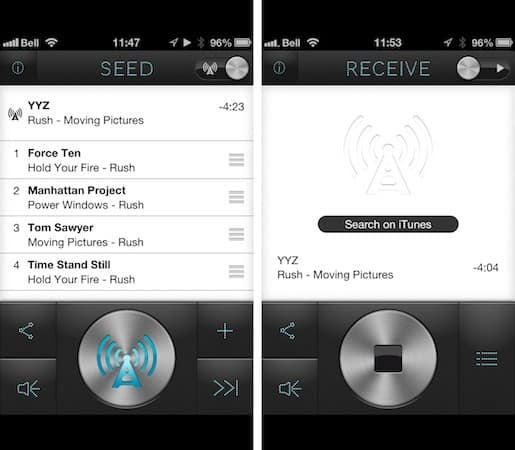
The most straightforward is to use a third-party iOS app called Seedio ($3), which is designed specifically to stream and sync music between multiple iOS devices. In this case, you would install the Seedio app on each of your devices, select the music from your iOS Music library on the first iPhone and setup the second one to receive the stream.


Both devices must be on the same Wi-Fi network, however Seedio also supports using the iPhone “Personal Hotspot” feature to create an ad-hoc network if you’re somewhere that a local Wi-Fi network isn’t available.

Note that you only need to purchase a single copy of Seedio for all of your iOS devices that share the same iTunes Store account, however the developer also makes a free version available designed primarily as a receiver so that you friends can install the app to receive music streamed from your device without needing to purchase their own copy. The free version also provides limited broadcasting so that you can try the app out to see if it works for you before purchasing it.


Seedio works quite well as long as your music is already on your device, however it does not support DRM-protected music purchased from the iTunes Store nor does it directly support iTunes Match; in the latter case you’ll have to specifically download any playlists or albums that you want to listen to via the Seedio app.

Another option is to stream music from your iTunes library via Wi-Fi to your iPhone devices using Rogue Amoeba’s Airfoil ($25) combined with the free Airfoil Speakers Touch app running on each of your iPhones.


Unfortunately, iOS devices cannot act as AirPlay receivers, and an earlier attempt by Rogue Amoeba to add this capability to Airfoil Speakers Touch met with Apple’s disapproval, so the full Airfoil app must be running on your Mac or Windows PC in order to redirect the audio to your iOS device.

This has the obvious disadvantage of being considerably more expensive unless you already own a copy of Airfoil, but has the advantage of supporting DRM music and an iTunes Match streamed library. In fact, using this method you can play any audio that your computer itself is capable of playing, sending it to multiple iOS devices and even other AirPlay devices.

Keep in mind that the iPhone does not actually allow you to filter left and right volume channels separately—at least not in the native Music app. The option in the Accessibility settings to adjust left/right balance is for adjusting output levels through a connected set of headphones, and does not filter source audio.



Latest News
The 14-inch MacBook Pro with M5 Chip 16GB RAM/512GB is $250 Off
1 Min Read
Noise and Static on AirPods Pro 3 Still Unfixed
1 Min Read
New iMac with 24-inch OLED Display May be Brighter With 600 Nits
1 Min Read
The 15-inch M4 MacBook Air 256GB Is $250 Off
1 Min Read
Internal Kernel Debug Kit from Apple Reveals Tests for a MacBook with A15 Chip
1 Min Read
Apple Currently In Talks With Suppliers for Chip Assembly & Packaging of iPhones in India
1 Min Read
Apple Allows Easier Battery Replacement For M5 MacBook Pro with 14-inch Display
1 Min Read
The Apple Watch SE 3 44mm GPS is $50 Off
1 Min Read
20th Anniversary iPhone May Launch in Two Years
1 Min Read
Better Image Generation Capabilities and Apple Music Integration Coming to ChatGPT
1 Min Read
A20 Pro Chip Coming to Next Gen iPad Mini OLED
1 Min Read
Amazon has the AirTag 4 Pack Marked $29 off
1 Min Read

iLounge logo

iLounge is an independent resource for all things iPod, iPhone, iPad, and beyond. iPod, iPhone, iPad, iTunes, Apple TV, and the Apple logo are trademarks of Apple Inc.

This website is not affiliated with Apple Inc.
iLounge © 2001 - 2025. All Rights Reserved.
  • Contact Us
  • Submit News
  • About Us
  • Forums
  • Privacy Policy
  • Terms Of Use
Welcome Back!

Sign in to your account

Lost your password?








