
iLoungeiLounge
  • News
    • Apple
      • AirPods Pro
      • AirPlay
      • Apps
        • Apple Music
      • iCloud
      • iTunes
      • HealthKit
      • HomeKit
      • HomePod
      • iOS 13
      • Apple Pay
      • Apple TV
      • Siri
    • Rumors
    • Humor
    • Technology
      • CES
    • Daily Deals
    • Articles
    • Web Stories
  • iPhone
    • iPhone Accessories
  • iPad
  • iPod
    • iPod Accessories
  • Apple Watch
    • Apple Watch Accessories
  • Mac
    • MacBook Air
    • MacBook Pro
  • Reviews
    • App Reviews
  • How-to
    • Ask iLounge
Font ResizerAa
iLoungeiLounge
Font ResizerAa
Search
  • News
    • Apple
    • Rumors
    • Humor
    • Technology
    • Daily Deals
    • Articles
    • Web Stories
  • iPhone
    • iPhone Accessories
  • iPad
  • iPod
    • iPod Accessories
  • Apple Watch
    • Apple Watch Accessories
  • Mac
    • MacBook Air
    • MacBook Pro
  • Reviews
    • App Reviews
  • How-to
    • Ask iLounge
Follow US

How-to › Ask iLounge

ArticlesAsk iLoungeiTunes

Syncing Lossless tracks to iPod as AAC files

Last updated: May 16, 2021 4:30 pm UTC
By Jesse Hollington
Syncing Lossless tracks to iPod as AAC files

Q: I originally imported my entire music library at 256kbps AAC. Over time I became aware of the degraded ambience this caused. It was fine for the car and on the go, however when I purchased a Sonos system and streamed uncompressed it was apparent that I was losing something on my top shelf system. Realizing it was time to import everything lossless and store my CD collection, I did so. However, now where I used to fill my iPod classics at 256kbps compression and have great sound in my car, headphones, etc, now I am stuck with either lossless or 128kbps.


How can I load my music onto my iPhone and iPod at 256kbps from the lossless iTunes library?
Syncing Lossless tracks to iPod as AAC files

– John

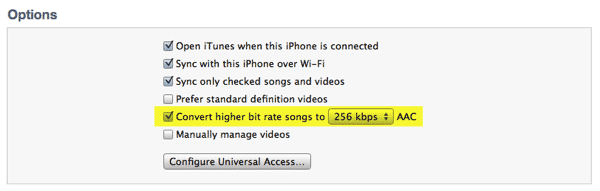
A: The simplest answer to this is to upgrade to the very recently released iTunes 10.6. With this latest version of iTunes, Apple has now added the ability to choose which bit-rate to convert tracks to when syncing them to an iOS device or iPod. As you’re probably aware, prior versions limited this to 128kbps only; iTunes 10.6 adds 192kbps and 256kbps options.


Syncing Lossless tracks to iPod as AAC files

This settings is found on the Summary screen for of your devices, meaning that you can also configure it on a per-device basis, perhaps choosing a slightly lower bit-rate for lower-capacity models.

If for whatever reason updating to iTunes 10.6 isn’t an option, Mac users can check out the Lossless to AAC Workflow AppleScript at Doug’s AppleScripts for iTunes.

This script works best with traditional iPod models such as the iPod classic and provides two workflows. The CD workflow allows you to import CDs as a lossless and AAC pair of files—the lossless copy goes into the iTunes library and the lossless directly onto the iPod. The iTunes workflow converts files in place to your chosen settings, transfer them to your iPod and then removes the converted files from your iTunes library. For CD import, both Apple Lossless and AIFF formats are supported.

The AppleScript solution has the advantage of allowing you to choose custom encoder settings beyond the (still) relatively limited options provided by iTunes.



Latest News
The Apple Watch Series 11 46mm GPS Is $100 Off
1 Min Read
Clamshell Style iPhone Being Looked Into By Apple
1 Min Read
Foldable iPhones May Have the Largest Battery Ever
1 Min Read
Apple and TSMC’s 10-Year Collaboration May Be Ending
1 Min Read
The 13-inch M5 iPad Pro 256GB Wi-Fi Is $149 Off
1 Min Read
M5 Pro and M5 Max Chips for the MacBook Pro could Roll Out with macOS 26.3
1 Min Read
Mac Ordering Process Revamped
1 Min Read
Check Signed By Steve Wozniak and Steve Jobs Sold For $2.4 Million
1 Min Read
The Anker 140W 4-Port GaN USB-C Charger is $35 Off
1 Min Read
No iPhone Air 2 This Year, according to Latest Report
1 Min Read
New Report Corroborates Split iPhone Release Dates
1 Min Read
Apple Losing More Researchers As They Plan To Release 2 Siri Versions
1 Min Read

iLounge logo

iLounge is an independent resource for all things iPod, iPhone, iPad, and beyond. iPod, iPhone, iPad, iTunes, Apple TV, and the Apple logo are trademarks of Apple Inc.

This website is not affiliated with Apple Inc.
iLounge © 2001 - 2025. All Rights Reserved.
  • Contact Us
  • Submit News
  • About Us
  • Forums
  • Privacy Policy
  • Terms Of Use
Welcome Back!

Sign in to your account

Lost your password?








