
Q: First I would like to thank you for sharing your wisdom about iTunes. Very much appreciated as it saves us non-hackers a lot of headache. Secondly I would appreciate a short comment or a link to information concerning using network hard drive (Airport Extreme) for storage of movies. Maybe the answer to my particular problem is out there but I have not found it.
I have a Macbook, iPad 2, Airport Extreme and Apple TV and I do not want to overload my Macbook or iPad with a lot of movies but instead link to the moves being stored on my Airport Extreme. I have unselected “Copy files to iTunes Media folder when adding to library” when copying movies to iTunes from Airport Extreme. Watching movies on my Macbook or on Apple TV works fine when connected to the Airport Extreme.
So far all good! However, when syncing my iPad with iTunes, having selected “Sync Movies” (automatically include all), the complete movie is being transferred to the iPad, not only the “link” as is done when copying from Airport Extreme to iTunes on the Macbook. Is what I would like to do possible and if not can you suggest a workaround that let me store movies on the Airport Extreme instead of on my Macbook AND iPad?
– Max
A: The problem here is that your MacBook is capable of directly accessing remote network drives, such as the one on your AirPort Extreme; in essence the movies that are on the AirPort Extreme hard drive are simply seen by iTunes as being at a different path and are still accessed in the same way regardless of what drive or device they’re located on.
Unlike Mac OS X, iOS does not have the native ability to read a network file system, and iTunes is therefore not designed to simply sync links to your content—the entire media file is transferred to your device. Of course, with the iPad being a portable device, this offers the advantage of providing you with access to that content even when you are away from home or when no network connection is available.
The Apple TV is able to stream your content as it accesses it through iTunes Home Sharing; since second- and third-generation Apple TV devices don’t actually sync content, Home Sharing streaming is the default behaviour for these. The good news is that it’s actually possible to use this feature on an iPad, iPhone or iPod touch as well, as long as you’re using iOS 4.3 or later and iTunes 10.2 or later.
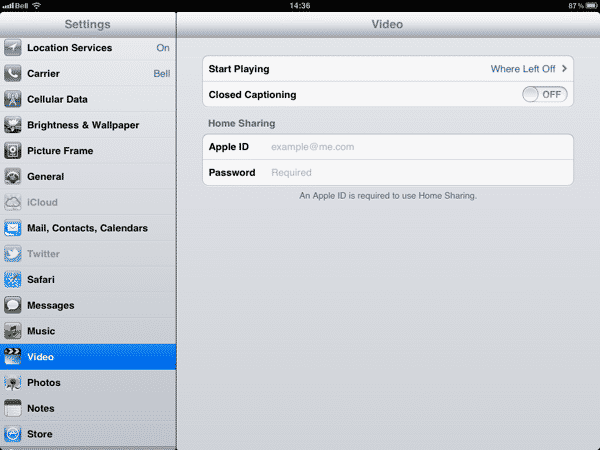
Go into the Settings app on your iPad and select either Music or Videos and you will see a place to enter your Apple ID and password to configure Home Sharing.
Simply enter the same credentials here that you used to setup Home Sharing between your iTunes library and your Apple TV; note that you only need to enter this is one of the two sections—either Music or Videos.
You won’t receive any confirmation after entering your Home Sharing account information unless there’s a problem with your Apple ID or password, but if you then go to the Videos app on your iPad you should see a new “Shared” section that appears beside the sections for any video content you have already synced to your device. Selecting this tab will display a list of iTunes libraries on your local home network that have Home Sharing enabled with the same account, in much the same way this works for the Apple TV.

Select your main library, and you’re taken to a new Videos section that now displays all of the video content from your iTunes library in the same way as if it were synced to your device. You can select any item from here as you normally would and it will begin playing back, streaming from your iTunes library over your Wi-Fi network.

The Home Sharing feature is independent of the sync settings in iTunes, so you can actually disable syncing movies and TV shows to your device entirely—Home Sharing will always make your entire library available to your device. However, as with your Apple TV, you will only be able to use this feature while connected to your home Wi-Fi network and while iTunes is running; Home Sharing is not available outside of a local network, regardless of your firewall or network settings, and neither the Apple TV nor your iPad can access the content directly from the Airport Extreme.











