
iLoungeiLounge
  • News
    • Apple
      • AirPods Pro
      • AirPlay
      • Apps
        • Apple Music
      • iCloud
      • iTunes
      • HealthKit
      • HomeKit
      • HomePod
      • iOS 13
      • Apple Pay
      • Apple TV
      • Siri
    • Rumors
    • Humor
    • Technology
      • CES
    • Daily Deals
    • Articles
    • Web Stories
  • iPhone
    • iPhone Accessories
  • iPad
  • iPod
    • iPod Accessories
  • Apple Watch
    • Apple Watch Accessories
  • Mac
    • MacBook Air
    • MacBook Pro
  • Reviews
    • App Reviews
  • How-to
    • Ask iLounge
Font ResizerAa
iLoungeiLounge
Font ResizerAa
Search
  • News
    • Apple
    • Rumors
    • Humor
    • Technology
    • Daily Deals
    • Articles
    • Web Stories
  • iPhone
    • iPhone Accessories
  • iPad
  • iPod
    • iPod Accessories
  • Apple Watch
    • Apple Watch Accessories
  • Mac
    • MacBook Air
    • MacBook Pro
  • Reviews
    • App Reviews
  • How-to
    • Ask iLounge
Follow US

How-to › Ask iLounge

Ask iLoungeiTunes

Storing iTunes Library outside of My Documents folder

Last updated: May 16, 2021 4:27 pm UTC
By Jesse Hollington
Storing iTunes Library outside of My Documents folder

Q: For many years I’ve had a number of XP machines in my house, one of which is used as a file server for the rest. All of the XP machines use the same My Documents folder on the server. I only installed iTunes on one machine and it wrote everything that it puts into My Documents on the server’s shared drive. I keep all of my music files on a USB drive attached to the iTunes machine. I completely lost that machine and I needed to rebuild it using Windows 7-64. When I replaced this machine in the past, I connected the USB drive and told XP to use the shared My Documents directory. I found that iTunes reinstalled successfully and I still had all of my music, cover art, iPods and playlists.

Storing iTunes Library outside of My Documents folder

Now, I’m having a problem with Win7; it won’t let me choose the shared folder as its Documents folder. I am looking for guidance on how to reinstall iTunes and not loose setups that took years to put together. Possibly I could temporarily install iTunes on one of my other machines and have a chance to export some type of config file that could be used when I install on the Win7 machine. As far as I know, when installing you can point to a folder with the music files, but you can’t avoid using the My Documents folder. I would greatly appreciate any suggestions on how to go about this. Thank you.


– Dadrian

A: The first piece of good news here is that you can uninstall and reinstall iTunes as often as you like without actually affecting any of your iTunes database files or media content.

Removing iTunes using the standard uninstallation tools simply removes the application—all of your data is left intact. Similarly, reinstalling iTunes will only create a new iTunes database if one is not already present on your computer.

However, from the description of the problem you’re having, it sounds like you don’t even need to go this far. While iTunes wants to store it’s library database under your Windows XP “My Documents” folder by default, this is by no means your only option. You can easily tell iTunes to open a library database from any location you like—even a network location—simply by holding down the SHIFT key when starting iTunes.

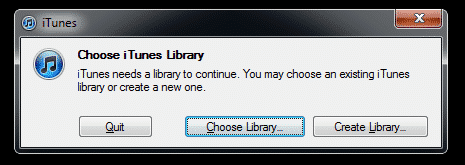
Instead of starting iTunes right away, this will display a dialog box providing you with the opportunity to either create a new library database or choose an existing one in another location. Simply click the “Choose Library” button and a standard Windows file selection dialog will appear where you should then be able to select the shared “My Documents” folder.



Latest News
The 14-inch MacBook Pro with M5 Chip 16GB RAM/512GB is $250 Off
1 Min Read
Noise and Static on AirPods Pro 3 Still Unfixed
1 Min Read
New iMac with 24-inch OLED Display May be Brighter With 600 Nits
1 Min Read
The 15-inch M4 MacBook Air 256GB Is $250 Off
1 Min Read
Internal Kernel Debug Kit from Apple Reveals Tests for a MacBook with A15 Chip
1 Min Read
Apple Currently In Talks With Suppliers for Chip Assembly & Packaging of iPhones in India
1 Min Read
Apple Allows Easier Battery Replacement For M5 MacBook Pro with 14-inch Display
1 Min Read
The Apple Watch SE 3 44mm GPS is $50 Off
1 Min Read
20th Anniversary iPhone May Launch in Two Years
1 Min Read
Better Image Generation Capabilities and Apple Music Integration Coming to ChatGPT
1 Min Read
A20 Pro Chip Coming to Next Gen iPad Mini OLED
1 Min Read
Amazon has the AirTag 4 Pack Marked $29 off
1 Min Read

iLounge logo

iLounge is an independent resource for all things iPod, iPhone, iPad, and beyond. iPod, iPhone, iPad, iTunes, Apple TV, and the Apple logo are trademarks of Apple Inc.

This website is not affiliated with Apple Inc.
iLounge © 2001 - 2025. All Rights Reserved.
  • Contact Us
  • Submit News
  • About Us
  • Forums
  • Privacy Policy
  • Terms Of Use
Welcome Back!

Sign in to your account

Lost your password?








