
iLoungeiLounge
  • News
    • Apple
      • AirPods Pro
      • AirPlay
      • Apps
        • Apple Music
      • iCloud
      • iTunes
      • HealthKit
      • HomeKit
      • HomePod
      • iOS 13
      • Apple Pay
      • Apple TV
      • Siri
    • Rumors
    • Humor
    • Technology
      • CES
    • Daily Deals
    • Articles
    • Web Stories
  • iPhone
    • iPhone Accessories
  • iPad
  • iPod
    • iPod Accessories
  • Apple Watch
    • Apple Watch Accessories
  • Mac
    • MacBook Air
    • MacBook Pro
  • Reviews
    • App Reviews
  • How-to
    • Ask iLounge
Font ResizerAa
iLoungeiLounge
Font ResizerAa
Search
  • News
    • Apple
    • Rumors
    • Humor
    • Technology
    • Daily Deals
    • Articles
    • Web Stories
  • iPhone
    • iPhone Accessories
  • iPad
  • iPod
    • iPod Accessories
  • Apple Watch
    • Apple Watch Accessories
  • Mac
    • MacBook Air
    • MacBook Pro
  • Reviews
    • App Reviews
  • How-to
    • Ask iLounge
Follow US

How-to › Ask iLounge

ArticlesAsk iLoungeiTunesMac

Storing iTunes content on two hard drives

Last updated: May 16, 2021 5:21 pm UTC
By Jesse Hollington
Storing iTunes content on two hard drives

Q: I now have so much music that I am about to start my second external hard drive on my laptop. Can songs from both discs be added to the library and will iTunes automatically select the appropriate drive when playing a selection from both drives?


– Jason
Storing iTunes content on two hard drives

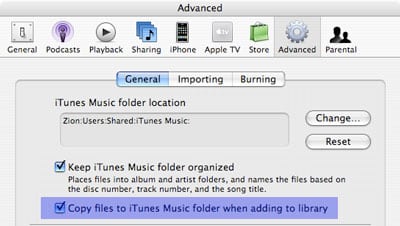
A: The simplest way to do this is to ensure that you have the “Copy files to iTunes Music Folder when adding to library” option turned OFF in your iTunes advanced preferences:

Storing iTunes content on two hard drives

This will ensure that any tracks that you add to your iTunes library via drag-and-drop or the File, Add to Library menu are simply referenced from their original locations (ie, on whichever external drive they’re located on), rather than being copied into the iTunes Music Folder location. iTunes simply stores the full path to the original location of the file, referencing it from that location, regardless of which hard drive or other device that it is located on.


Keep in mind that when importing tracks in this manner, you will not be able to allow iTunes to manage your music folder structure for you, as it normally expects that all of your music files live in its normal iTunes Music Folder location, and will not manage any tracks outside of this folder path.

Therefore, since iTunes cannot manage the track file/folder organization, you will want to ensure that you have the tracks located in whatever organized directory structure you prefer before importing them into your iTunes library. iTunes stores the absolute path to each file, and it is much more complicated to move files around after they have been imported into iTunes, as it will lose track of their locations (resulting in broken links in your iTunes library).


Further, when deleting tracks from your iTunes library, if they are located outside of the iTunes Music Folder, then iTunes itself will not offer to delete the underlying physical file for you—you will have to find the file and remove it from your hard drive manually. Again, iTunes considers any tracks located outside of its own “iTunes Music Folder” to be outside of its control, and therefore does not manage these files in any way, other than simply referencing them.

If you prefer to use the automatic folder organization and management features of iTunes, you may want to consider purchasing a large enough external hard drive to store your entire music collection, and then simply changing your iTunes Music Folder location to the external drive and storing all of your content on there.



Latest News
The 14-inch MacBook Pro with M5 Chip 16GB RAM/512GB is $250 Off
1 Min Read
Noise and Static on AirPods Pro 3 Still Unfixed
1 Min Read
New iMac with 24-inch OLED Display May be Brighter With 600 Nits
1 Min Read
The 15-inch M4 MacBook Air 256GB Is $250 Off
1 Min Read
Internal Kernel Debug Kit from Apple Reveals Tests for a MacBook with A15 Chip
1 Min Read
Apple Currently In Talks With Suppliers for Chip Assembly & Packaging of iPhones in India
1 Min Read
Apple Allows Easier Battery Replacement For M5 MacBook Pro with 14-inch Display
1 Min Read
The Apple Watch SE 3 44mm GPS is $50 Off
1 Min Read
20th Anniversary iPhone May Launch in Two Years
1 Min Read
Better Image Generation Capabilities and Apple Music Integration Coming to ChatGPT
1 Min Read
A20 Pro Chip Coming to Next Gen iPad Mini OLED
1 Min Read
Amazon has the AirTag 4 Pack Marked $29 off
1 Min Read

iLounge logo

iLounge is an independent resource for all things iPod, iPhone, iPad, and beyond. iPod, iPhone, iPad, iTunes, Apple TV, and the Apple logo are trademarks of Apple Inc.

This website is not affiliated with Apple Inc.
iLounge © 2001 - 2025. All Rights Reserved.
  • Contact Us
  • Submit News
  • About Us
  • Forums
  • Privacy Policy
  • Terms Of Use
Welcome Back!

Sign in to your account

Lost your password?








