
iLoungeiLounge
  • News
    • Apple
      • AirPods Pro
      • AirPlay
      • Apps
        • Apple Music
      • iCloud
      • iTunes
      • HealthKit
      • HomeKit
      • HomePod
      • iOS 13
      • Apple Pay
      • Apple TV
      • Siri
    • Rumors
    • Humor
    • Technology
      • CES
    • Daily Deals
    • Articles
    • Web Stories
  • iPhone
    • iPhone Accessories
  • iPad
  • iPod
    • iPod Accessories
  • Apple Watch
    • Apple Watch Accessories
  • Mac
    • MacBook Air
    • MacBook Pro
  • Reviews
    • App Reviews
  • How-to
    • Ask iLounge
Font ResizerAa
iLoungeiLounge
Font ResizerAa
Search
  • News
    • Apple
    • Rumors
    • Humor
    • Technology
    • Daily Deals
    • Articles
    • Web Stories
  • iPhone
    • iPhone Accessories
  • iPad
  • iPod
    • iPod Accessories
  • Apple Watch
    • Apple Watch Accessories
  • Mac
    • MacBook Air
    • MacBook Pro
  • Reviews
    • App Reviews
  • How-to
    • Ask iLounge
Follow US

How-to › Ask iLounge

Ask iLoungeiTunes

Smart Playlists for Podcasts

Last updated: May 16, 2021 5:24 pm UTC
By Jesse Hollington
Smart Playlists for Podcasts

Q: How do I set up a playlist of Podcasts? I want to listen to certain Podcasts before I consider others I have downloaded. I don’t want to create a new playlist each day of individual podcasts episodes, I simply want to say “if Coverville episodes are present play first, if ESPN PTI episodes are present play those second, etc’


– Rand
Smart Playlists for Podcasts

A: This is certainly possible through the use of iTunes’ smart playlists feature, and there are various options available depending on exactly what you’re trying to accomplish.

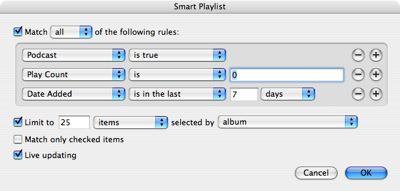
A smart playlist similar to the following should be enough to get you on the right track:

The option for Podcast is true will ensure that only tracks that are actually podcasts will be selected. Play Count filters out those podcasts that you have already listened to, and Date Added limits your smart playlist to include only podcasts added within a certain time frame.


The Limit option is also useful in this context, and can be used to select only a certain number of podcasts, grouping them by criteria such as Album name (the Podcast series is normally stored in the “Album” field in each track), or by other criteria such as “Date Added” which would allow you to limit your smart playlist to either only your oldest or newest unlistened podcast episodes.

Once the smart playlist has been created, you can then choose a sort order for it by clicking on the appropriate column headings in iTunes, which may help to group your podcasts into a more appropriate order based on your listening priority.


For more complicated needs, a series of nested smart playlists can also be used. In this case, individual playlists or smart playlists could be configured to contain individual podcast subscriptions, for example, and then a single master smart playlist would be used to aggregate the content of the individual smart playlists, using the Playlist is… criteria.

This is generally the only way to accomplish more complicated nested “AND/OR” conditions when building playlists with more complex criteria.

One other point that should be noted:  If you’re using a recent-model iPod, such as the 5G with v1.2 firmware or the 2G Shuffle, your podcasts will only play through sequentially if you have the shuffle mode turned OFF on your iPod, due to changes in the more recent firmware versions. Since all podcast episodes are set to “Skip when Shuffling” by default, if the iPod’s shuffle mode is enabled, selecting a playlist of podcasts will only play a single episode and then stop. The iPod’s shuffle setting can be enabled or disabled from within the Settings menu on the iPod.



Latest News
The 14-inch MacBook Pro with M5 Chip 16GB RAM/512GB is $250 Off
1 Min Read
Noise and Static on AirPods Pro 3 Still Unfixed
1 Min Read
New iMac with 24-inch OLED Display May be Brighter With 600 Nits
1 Min Read
The 15-inch M4 MacBook Air 256GB Is $250 Off
1 Min Read
Internal Kernel Debug Kit from Apple Reveals Tests for a MacBook with A15 Chip
1 Min Read
Apple Currently In Talks With Suppliers for Chip Assembly & Packaging of iPhones in India
1 Min Read
Apple Allows Easier Battery Replacement For M5 MacBook Pro with 14-inch Display
1 Min Read
The Apple Watch SE 3 44mm GPS is $50 Off
1 Min Read
20th Anniversary iPhone May Launch in Two Years
1 Min Read
Better Image Generation Capabilities and Apple Music Integration Coming to ChatGPT
1 Min Read
A20 Pro Chip Coming to Next Gen iPad Mini OLED
1 Min Read
Amazon has the AirTag 4 Pack Marked $29 off
1 Min Read

iLounge logo

iLounge is an independent resource for all things iPod, iPhone, iPad, and beyond. iPod, iPhone, iPad, iTunes, Apple TV, and the Apple logo are trademarks of Apple Inc.

This website is not affiliated with Apple Inc.
iLounge © 2001 - 2025. All Rights Reserved.
  • Contact Us
  • Submit News
  • About Us
  • Forums
  • Privacy Policy
  • Terms Of Use
Welcome Back!

Sign in to your account

Lost your password?








