
Q: What is the best way to share my iTunes library to all my devices in my house? My devices consist of one Windows PC, two iPads, two iPhones, and I’m about to buy a Mac Mini (which is what raised this question). 90% of the iTunes usage will be via the Mac Mini connected to an HDTV. Sharing the library to the iPads and iPhones is easy via Wi-Fi syncing, iCloud, etc, however it’s the PC & Mac Mini I am concerned with and I would prefer not to have separate huge drives for each computer. If I installed a network drive for my library will there be any problem with the Windows PC and Mac Mini both accessing this same library on the same drive? What network drive would you recommend and is this going to yield relatively slow performance? Is there a better way of managing this. Are there any advantages to purchasing a Mac Mini Server for this scenario?
– Kevin
A: There are a couple of different ways to approach this, and the best solution will depend somewhat on exactly how you plan to use each computer.
Using an external network storage device for your iTunes library is only a viable solution if you intend to still maintain two separate databases for your media content. In other words, you can share the content on the network drive, but each computer will need to have its own library in terms of things like playlists, ratings, play counts, and so on. You will not be able to easily sync this information between your libraries, new content will have to be added to each one individually.
You will also need to ensure that all options related to reorganizing the library are disabled in iTunes so that one computer doesn’t move files around causing the other one to lose track of its tracks. You will also be limited to syncing your iOS devices with only one of the two libraries, even though they may both contain the same media content.
Even if you decide to go this route, you definitely do not need to purchase the Mac Mini Server model. The server simply includes OS X Lion Server software (which you don’t need, and can be purchased separately for much less anyway) as well as two faster, mirrored hard drives designed for server-based fault tolerance.
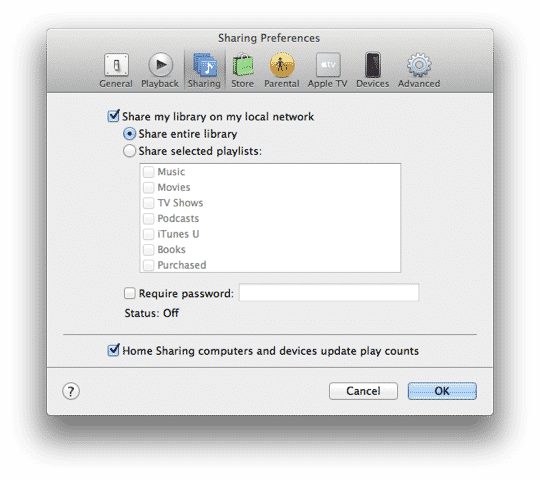
However, since you’ve indicated that the majority of your iTunes use will be from the Mac Mini, you may find that using iTunes Home Sharing is a more efficient way of handling this, especially if you only plan to use your Windows PC to listen to (or view) content from the main library. For play-only access, you can use traditional iTunes Sharing to access some or all of your playlists on multiple computers. You can find this in your iTunes Preferences under the Sharing button.
Alternatively, if you want to be able to actually transfer content from your main library on an as-needed basis, you can setup iTunes Home Sharing, which provides all of the benefits of play-only sharing plus the ability to copy and/or sync files across your home network.
Obviously, you’d still be using local storage, but if you’re not copying everything across to the Windows PC, this would be minimal. Further, you can still listen to audio content and watch video content streamed to the Windows PC from the Mac Mini via your home network without requiring any permanent local storage for these items.

Another option that could be very useful if you’re primarily concerned with music would be to simply subscribe to iTunes Match. For $25/year, you get direct access to your music library from any computer or iOS device—up to 25,000 or your own tracks plus all of your tracks that were originally purchased from the iTunes Store. Enabling iTunes Match on your Windows PC will show you what is essentially an iCloud-based copy of your music library that includes all of your metadata and playlists. Playing songs from an iCloud library streams them from iCloud rather than downloading them to local storage, and you can even manage metadata and playlists from this view—changes are synced back up to iCloud and then down to your primary library.

As an added benefit, all of your iOS devices can participate in iTunes Match as well, removing the need to sync music directly with your iTunes library over either Wi-Fi or USB. Be sure to check out our Secrets & Features of iTunes Match for more detailed information on how the service works.











