
iLoungeiLounge
  • News
    • Apple
      • AirPods Pro
      • AirPlay
      • Apps
        • Apple Music
      • iCloud
      • iTunes
      • HealthKit
      • HomeKit
      • HomePod
      • iOS 13
      • Apple Pay
      • Apple TV
      • Siri
    • Rumors
    • Humor
    • Technology
      • CES
    • Daily Deals
    • Articles
    • Web Stories
  • iPhone
    • iPhone Accessories
  • iPad
  • iPod
    • iPod Accessories
  • Apple Watch
    • Apple Watch Accessories
  • Mac
    • MacBook Air
    • MacBook Pro
  • Reviews
    • App Reviews
  • How-to
    • Ask iLounge
Font ResizerAa
iLoungeiLounge
Font ResizerAa
Search
  • News
    • Apple
    • Rumors
    • Humor
    • Technology
    • Daily Deals
    • Articles
    • Web Stories
  • iPhone
    • iPhone Accessories
  • iPad
  • iPod
    • iPod Accessories
  • Apple Watch
    • Apple Watch Accessories
  • Mac
    • MacBook Air
    • MacBook Pro
  • Reviews
    • App Reviews
  • How-to
    • Ask iLounge
Follow US

How-to › Ask iLounge

Ask iLoungeiPadiPhoneiPod

Sharing an iMessage account between family members

Last updated: May 16, 2021 4:13 pm UTC
By Jesse Hollington
Sharing an iMessage account between family members

Q: I have an iPhone and an iPad mini. My youngest daughter uses the iPad mini when she’s away to be able to text me through iMessage. Which means she also receives iMessages between myself and others. Is there a way, without turning off iMessage, to keep the iMessages from certain people from going to my iPad?


– Christy
Sharing an iMessage account between family members

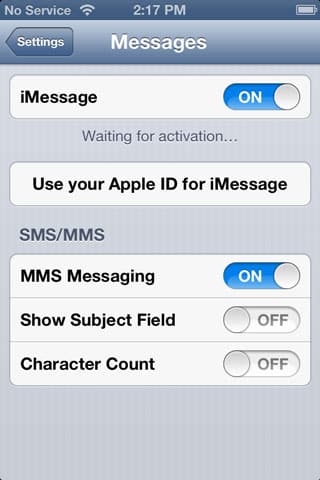
A: While there is no way to block iMessages from specific senders right now, it is possible to ensure that only specific iMessages go to certain devices by configuring different addresses on each device.

iMessage is automatically configured on an iPhone to send and receive messages using your iPhone’s phone number. You can optionally log in using an Apple ID and password to allow iMessages to be sent and received from one or more e-mail addresses in addition to your phone number.


Since an iPad or iPod touch do not have a phone number assigned to them you are required to sign in with an Apple ID to use iMessage on these devices.

You can use the same Apple ID on multiple iOS devices in order to share iMessages between devices automatically, which sounds like exactly what you are doing in this case. With iOS 6, signing into your iPhone with an Apple ID will also automatically share your phone number via Apple’s servers with other iOS devices that are using iMessage.


In addition, all of the e-mail addresses configured for your Apple ID are shared across all of your iOS devices that are using the same Apple ID for iMessage. iMessages sent to or received from any of these addresses will therefore automatically be synced between all of your devices. This is normally desirable behaviour if you are the primary user of all of the devices in question.


Sharing an iMessage account between family members

The standard solution to this problem is to give your daughter her own Apple ID for iMessage. This would use an e-mail address unique to her own account and you would use this e-mail address to send iMessages to her, and her messages to you would come from this e-mail address, rather than a phone number. The downside to this approach, however, is that none of her iMessages would be synced to your iPhone, which will be a problem if your daughter is younger and you want to monitor her messages.


If this is a concern, the more effective approach would be to continue sharing the same Apple ID while assigning a unique e-mail address to your daughter. To do this, simply go into Settings, Messages on her device and add a new e-mail address; note that you will need to verify the new address by clicking a link in an e-mail that will be sent to that address.

Once you’ve done this, simply DE-select all of the additional e-mail addresses, and your phone number, from the Messages settings on her iPad, such that only the new e-mail address remains selected.



Latest News
The 14-inch MacBook Pro with M5 Chip 16GB RAM/512GB is $250 Off
1 Min Read
Noise and Static on AirPods Pro 3 Still Unfixed
1 Min Read
New iMac with 24-inch OLED Display May be Brighter With 600 Nits
1 Min Read
The 15-inch M4 MacBook Air 256GB Is $250 Off
1 Min Read
Internal Kernel Debug Kit from Apple Reveals Tests for a MacBook with A15 Chip
1 Min Read
Apple Currently In Talks With Suppliers for Chip Assembly & Packaging of iPhones in India
1 Min Read
Apple Allows Easier Battery Replacement For M5 MacBook Pro with 14-inch Display
1 Min Read
The Apple Watch SE 3 44mm GPS is $50 Off
1 Min Read
20th Anniversary iPhone May Launch in Two Years
1 Min Read
Better Image Generation Capabilities and Apple Music Integration Coming to ChatGPT
1 Min Read
A20 Pro Chip Coming to Next Gen iPad Mini OLED
1 Min Read
Amazon has the AirTag 4 Pack Marked $29 off
1 Min Read

iLounge logo

iLounge is an independent resource for all things iPod, iPhone, iPad, and beyond. iPod, iPhone, iPad, iTunes, Apple TV, and the Apple logo are trademarks of Apple Inc.

This website is not affiliated with Apple Inc.
iLounge © 2001 - 2025. All Rights Reserved.
  • Contact Us
  • Submit News
  • About Us
  • Forums
  • Privacy Policy
  • Terms Of Use
Welcome Back!

Sign in to your account

Lost your password?








