
iLoungeiLounge
  • News
    • Apple
      • AirPods Pro
      • AirPlay
      • Apps
        • Apple Music
      • iCloud
      • iTunes
      • HealthKit
      • HomeKit
      • HomePod
      • iOS 13
      • Apple Pay
      • Apple TV
      • Siri
    • Rumors
    • Humor
    • Technology
      • CES
    • Daily Deals
    • Articles
    • Web Stories
  • iPhone
    • iPhone Accessories
  • iPad
  • iPod
    • iPod Accessories
  • Apple Watch
    • Apple Watch Accessories
  • Mac
    • MacBook Air
    • MacBook Pro
  • Reviews
    • App Reviews
  • How-to
    • Ask iLounge
Font ResizerAa
iLoungeiLounge
Font ResizerAa
Search
  • News
    • Apple
    • Rumors
    • Humor
    • Technology
    • Daily Deals
    • Articles
    • Web Stories
  • iPhone
    • iPhone Accessories
  • iPad
  • iPod
    • iPod Accessories
  • Apple Watch
    • Apple Watch Accessories
  • Mac
    • MacBook Air
    • MacBook Pro
  • Reviews
    • App Reviews
  • How-to
    • Ask iLounge
Follow US

How-to › Ask iLounge

Ask iLoungeiPodiTunes

Setting up iPod touch without Internet access

Last updated: May 16, 2021 5:05 pm UTC
By Jesse Hollington
Setting up iPod touch without Internet access

Q: I purchased an iPod touch for my son for Christmas. He does not use my computer and I do not let him have Internet access on his computer. Is the iPod touch a plug and play like his former MP3 player or does he need to connect to the Internet in order to use it?  I hope he can use it without having to put all his music and pictures on my computer to do so. Can you please help me? Thanks.


– Claudia
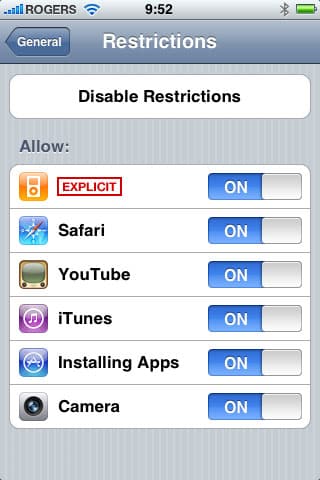
Setting up iPod touch without Internet access

A: The iPod touch can be used without an Internet connection on the computer you’re connecting it to, although you will need to have iTunes installed on that computer if it’s not already there.

The iPod touch does not come with an installation CD as you are expected to download the latest version of iTunes from the Internet. You can either temporarily connect your son’s computer to the Internet to do this, or you can simply download iTunes on your own computer, and then copy it over to his using a CD, USB memory key or a home network connection.


Note as well that iTunes will likely expect you to be connected to the Internet the first time you connect the iPod touch so that it can complete your product registration online. This is a completely optional process, however, so you can safely ignore any warnings about this, and if you are concerned about registering the product with Apple, you can either do so by connecting the iPod touch to iTunes on your own computer (if you have it installed there) or simply go directly to Apple’s web site.


While the iPod touch will function fine without Internet access, there are some limitations to be aware of.

Firstly, software updates for the iPod touch are delivered across the Internet via iTunes, and it will be necessary to occasionally connect the iPod touch to iTunes on an Internet-enabled computer just to update the software. These come out infrequently, however, and are usually prominently announced in various iPod-related news sites such as on our own main page.

The second consideration is that he will not be able to download content from the iTunes Store—even free content such as podcasts and some of the free applications which can be added to the iPod touch. The iPod touch itself includes a built-in App Store section, so some free applications can be downloaded directly from the Internet via the iPod touch’s built-in Wi-Fi, but an iTunes Store account will be required to do so, and this needs to be set up from a computer running iTunes with an Internet connection (note that setting up an iTunes Store account also requires a credit card, Paypal account, or iTunes Gift card to get started).

Lastly, if you are concerned about your son’s Internet access, keep in mind that the iPod touch itself is an Internet-enabled device and he will be able to get onto the Internet with it wherever there is a Wi-Fi connection, such as can be found in many coffee shops.



Latest News
The 14-inch MacBook Pro with M5 Chip 16GB RAM/512GB is $250 Off
1 Min Read
Noise and Static on AirPods Pro 3 Still Unfixed
1 Min Read
New iMac with 24-inch OLED Display May be Brighter With 600 Nits
1 Min Read
The 15-inch M4 MacBook Air 256GB Is $250 Off
1 Min Read
Internal Kernel Debug Kit from Apple Reveals Tests for a MacBook with A15 Chip
1 Min Read
Apple Currently In Talks With Suppliers for Chip Assembly & Packaging of iPhones in India
1 Min Read
Apple Allows Easier Battery Replacement For M5 MacBook Pro with 14-inch Display
1 Min Read
The Apple Watch SE 3 44mm GPS is $50 Off
1 Min Read
20th Anniversary iPhone May Launch in Two Years
1 Min Read
Better Image Generation Capabilities and Apple Music Integration Coming to ChatGPT
1 Min Read
A20 Pro Chip Coming to Next Gen iPad Mini OLED
1 Min Read
Amazon has the AirTag 4 Pack Marked $29 off
1 Min Read

iLounge logo

iLounge is an independent resource for all things iPod, iPhone, iPad, and beyond. iPod, iPhone, iPad, iTunes, Apple TV, and the Apple logo are trademarks of Apple Inc.

This website is not affiliated with Apple Inc.
iLounge © 2001 - 2025. All Rights Reserved.
  • Contact Us
  • Submit News
  • About Us
  • Forums
  • Privacy Policy
  • Terms Of Use
Welcome Back!

Sign in to your account

Lost your password?








