
iLoungeiLounge
  • News
    • Apple
      • AirPods Pro
      • AirPlay
      • Apps
        • Apple Music
      • iCloud
      • iTunes
      • HealthKit
      • HomeKit
      • HomePod
      • iOS 13
      • Apple Pay
      • Apple TV
      • Siri
    • Rumors
    • Humor
    • Technology
      • CES
    • Daily Deals
    • Articles
    • Web Stories
  • iPhone
    • iPhone Accessories
  • iPad
  • iPod
    • iPod Accessories
  • Apple Watch
    • Apple Watch Accessories
  • Mac
    • MacBook Air
    • MacBook Pro
  • Reviews
    • App Reviews
  • How-to
    • Ask iLounge
Font ResizerAa
iLoungeiLounge
Font ResizerAa
Search
  • News
    • Apple
    • Rumors
    • Humor
    • Technology
    • Daily Deals
    • Articles
    • Web Stories
  • iPhone
    • iPhone Accessories
  • iPad
  • iPod
    • iPod Accessories
  • Apple Watch
    • Apple Watch Accessories
  • Mac
    • MacBook Air
    • MacBook Pro
  • Reviews
    • App Reviews
  • How-to
    • Ask iLounge
Follow US

How-to › Ask iLounge

Ask iLoungeiCloudMac

Setting Custom Repeat Intervals in the Reminders app

Last updated: May 16, 2021 4:27 pm UTC
By Jesse Hollington
Setting Custom Repeat Intervals in the Reminders app

Q: I’ve just upgraded to Mountain Lion, and discovered that the new Reminders app for the Mac is almost exactly the same as the one on my iPhone, with many of the same annoying limits. I’m glad I can create repeating tasks on my Mac finally, but it seems I can only choose from a very limited set of options like every day or every week. What do I do if I want to repeat a task at another interval, such as every three or four days? What about repeating after I complete the task, rather than from the original due date? Am I missing something here, or is this app really as stupid as it seems? I know there are other apps out there, but I do like the Reminders for the location features and that it works in the background without me needing to open it all the time to check for and sync my tasks.


– Geoff
Setting Custom Repeat Intervals in the Reminders app

A: Reminders is an odd sort of app on both the iOS and Mac side as it is capable of supporting more capability under the hood than Apple has actually provided in the limited user interface.

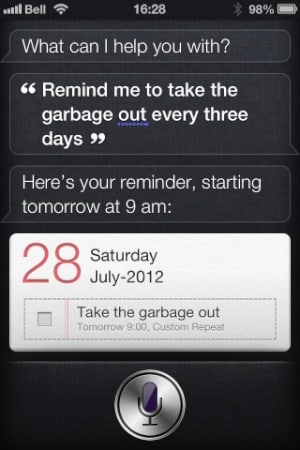
In fact, if you’re using an iPhone 4S, you can create a Reminder via Siri that includes options such as custom repeat intervals that aren’t available from directly in the app. For example, telling Siri “Remind me to take the garbage out every three days” will create a Reminder with a “custom” repeat interval of three days.


By default, this Reminder will start the next day at 9:00 AM, but you can customize this further by expanding your command to Siri, such as “Reminder me to take the garbage out every three days starting Sunday at 9 AM.”


Setting Custom Repeat Intervals in the Reminders app

Siri also provides additional hidden functionality for the Reminders app, such as Setting Call Reminders.

Further, since both the Calendars and Reminders applications use the open CalDAV standard, you can actually create and manage items in your Calendars and Reminders lists (which are also just CalDAV calendars under the hood) from just about any CalDAV application.


For example, as you’ve observed, your choices in the app for repeat intervals are limited to Every Day, Ever Week, Every 2 Weeks, Every Month, and Every Year; however not only can you create a task with a different repeat interval using another CalDAV application, but Reminders will display this as a “Custom” repeat interval and honour the repeat interval appropriately.

BusyCal, for example, actually provides direct support for iCloud Calendars and Reminders, yet allows users to specify additional properties for Reminders that are not normally supported directly in the Reminders app. This includes both highly customizable repeat intervals and the ability to specify a due date instead of a reminder; the due date feature allows a task to appear in the Reminders app on a specific day without actually firing off a notification alarm.


Setting Custom Repeat Intervals in the Reminders app

Not only are these features handled by the Reminders app, but once you’ve created tasks with these settings, they’ll actually be displayed in the Reminders app accordingly, with a new “Due Date” field available for that particular task, and a “Custom” repeat interval that expands to show the specific repeat information.



Latest News
The 14-inch MacBook Pro with M5 Chip 16GB RAM/512GB is $250 Off
1 Min Read
Noise and Static on AirPods Pro 3 Still Unfixed
1 Min Read
New iMac with 24-inch OLED Display May be Brighter With 600 Nits
1 Min Read
The 15-inch M4 MacBook Air 256GB Is $250 Off
1 Min Read
Internal Kernel Debug Kit from Apple Reveals Tests for a MacBook with A15 Chip
1 Min Read
Apple Currently In Talks With Suppliers for Chip Assembly & Packaging of iPhones in India
1 Min Read
Apple Allows Easier Battery Replacement For M5 MacBook Pro with 14-inch Display
1 Min Read
The Apple Watch SE 3 44mm GPS is $50 Off
1 Min Read
20th Anniversary iPhone May Launch in Two Years
1 Min Read
Better Image Generation Capabilities and Apple Music Integration Coming to ChatGPT
1 Min Read
A20 Pro Chip Coming to Next Gen iPad Mini OLED
1 Min Read
Amazon has the AirTag 4 Pack Marked $29 off
1 Min Read

iLounge logo

iLounge is an independent resource for all things iPod, iPhone, iPad, and beyond. iPod, iPhone, iPad, iTunes, Apple TV, and the Apple logo are trademarks of Apple Inc.

This website is not affiliated with Apple Inc.
iLounge © 2001 - 2025. All Rights Reserved.
  • Contact Us
  • Submit News
  • About Us
  • Forums
  • Privacy Policy
  • Terms Of Use
Welcome Back!

Sign in to your account

Lost your password?








