
Q: Our twin boys have received iPads for their birthday. They have set them up using our iCloud account and I am now thinking this was not the best idea. Currently we have 2 iPhones, 1 iPod and 3 iPads using this account. My concern is I do not want them having access to all their games and apps that are currently on their phones. I would like these iPads to be used for education/school. Is there a way to have each iPad on it’s own iCloud account and not allow them access to the family iCloud? If so, am I able to delete most of the current
apps but keep a few or would I need to repurchase everything. They have only had these iPads a few days and are just about to start using them in class so not too much is on them.
– Anonymous
A: You can definitely control which apps are installed on which iOS devices, but this doesn’t actually have anything to do with which iCloud account a given device is using.
The apps available on a given iOS device are determined by the iTunes Store account used to purchase those apps and whether they have been installed either directly over-the-air from the App Store or synced on via iTunes. Further, an iOS device can actually be authorized to use apps from more than one iTunes Store account; the device is automatically authorized for whichever account was used to purchase a given app when the app is synced from iTunes or downloaded from the App Store on the device.
On the other hand, an iCloud account is used primarily to share information between devices wirelessly over-the-air. This includes information such as contacts, calendars, photos, and browser bookmarks as well as application data for those apps that specifically support iCloud for data storage.
Although most people use the same Apple ID for both their iCloud account and iTunes Store account, this is actually not at all necessary, and in many family situations, each user gets their own personal iCloud account while a family iTunes Store account is often used for purchasing and installing apps and media content. Similarly, different Apple IDs can also be used for Game Center, iMessage, and FaceTime, and if you’re subscribing to iTunes Match or re-downloading previous iTunes purchases from iCloud, it is the iTunes Store account that is used to determine this, not the iCloud account.
There are valid reasons both for and against using separate iCloud accounts for each user in your household, but which apps are stored on which devices has nothing to do with which iCloud accounts are being used. For example, you may want to use separate iCloud accounts to provide each user with their own contacts and calendar information, or on the other hand share a common iCloud account for aggregating photos from all of your devices into a single Photo Stream. Further, if you’re using iCloud Backups for your iOS devices and sharing a single account, you may need to purchase additional storage beyond the 5GB that is provided for free; individual iCloud accounts, however, would each get their own 5GB storage for their own backups.
In terms of separating the actual apps, the most straightforward solution is to simply delete any apps and games you don’t want on their iPads, and install any apps you do want there as you normally would, either by syncing them from iTunes or downloading them from the App Store. Again, the Apple ID that is configured on the device has nothing to do with this, as you can have apps from multiple accounts on a given device—even if your sons don’t know the family iTunes Store account password, they can just as easily sync apps on from an iTunes library on the family computer.
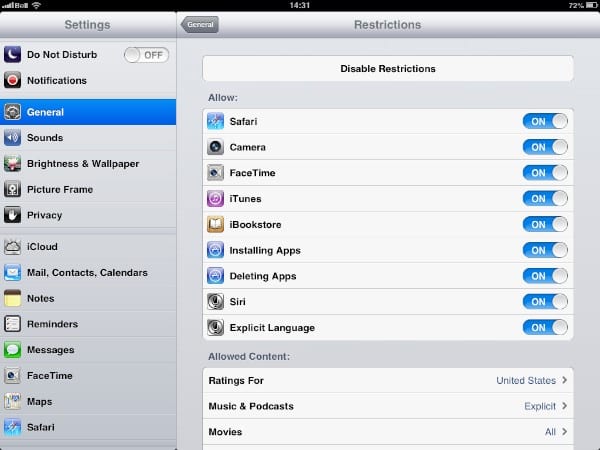
If you want to prevent your sons from installing any new apps, you can enable Parental Restrictions on their iPads, disabling the Installing Apps option.
The Restrictions settings can be found in the Settings app under General, Restrictions.











