
iLoungeiLounge
  • News
    • Apple
      • AirPods Pro
      • AirPlay
      • Apps
        • Apple Music
      • iCloud
      • iTunes
      • HealthKit
      • HomeKit
      • HomePod
      • iOS 13
      • Apple Pay
      • Apple TV
      • Siri
    • Rumors
    • Humor
    • Technology
      • CES
    • Daily Deals
    • Articles
    • Web Stories
  • iPhone
    • iPhone Accessories
  • iPad
  • iPod
    • iPod Accessories
  • Apple Watch
    • Apple Watch Accessories
  • Mac
    • MacBook Air
    • MacBook Pro
  • Reviews
    • App Reviews
  • How-to
    • Ask iLounge
Font ResizerAa
iLoungeiLounge
Font ResizerAa
Search
  • News
    • Apple
    • Rumors
    • Humor
    • Technology
    • Daily Deals
    • Articles
    • Web Stories
  • iPhone
    • iPhone Accessories
  • iPad
  • iPod
    • iPod Accessories
  • Apple Watch
    • Apple Watch Accessories
  • Mac
    • MacBook Air
    • MacBook Pro
  • Reviews
    • App Reviews
  • How-to
    • Ask iLounge
Follow US

How-to › Ask iLounge

Ask iLoungeiPadiPhoneiPod

Scheduling irregularly recurring events

Last updated: May 16, 2021 4:25 pm UTC
By Jesse Hollington
Scheduling irregularly recurring events

Q: Is there an app or program that will allow entry of irregularly recurring events on the calendars for the iPhone, iPad or Mac?


– Antonio
Scheduling irregularly recurring events

A: Although this depends partly on exactly how “irregular” you want your events to recur, much like the Reminders app, this is one of these situations where the iOS user interface provides for much more limited options than are actually possible.

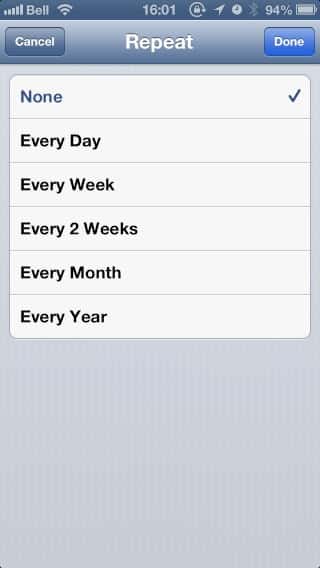
Setting a repeat interval on the iPhone, iPod touch or iPad provides only a very limited list of fixed options, with no further customization available. Specifically, you can set the repeat interval to Every Day, Every Week, Every 2 Weeks, Every Month or Every Year, and that’s about it.


Fortunately, the Mac OS X Calendar application provides considerably more flexibility in this regard, with options for custom daily, weekly, monthly and yearly repeats, including intervals based on only certain days of the week or month, the Nth weekday of a given month or only certain months out of each year.


Scheduling irregularly recurring events

Even though you cannot actually set these options in the iOS Calendar app, anything you set here (or in any other third-party app) will actually be handled properly by the iOS Calendar, which will even show the custom repeat information for the event.


Scheduling irregularly recurring events

Other desktop and web calendar solutions such as Microsoft Outlook and Google Calendar offer similar options for creating recurring events, all of which will be handled by the iOS Calendar in much the same way.

Further, numerous third-party apps such as Calendars by Readdle and Pocket Informant also provide the ability to set custom repeat information directly on the iOS device; although they are basically limited to the same type of repeat settings that can be configured in the OS X Calendars app, they may be viable solutions if you find that you do most of your calendar management on an iOS device rather than a Mac.


Unfortunately, these semi-regular repeat intervals are about as sophisticated as most applications get, and if you’re looking for something that is completely irregular and follows no standard pattern, you’re basically going to be faced with handling this at least somewhat manually.

One option is to simply create a standard appointment on your Mac or Windows PC and then copy and paste it to any additional dates as necessary. 

Alternatively, if your events follow a semi-regular schedule with only some exceptions, you can begin with one of the custom repeat options as a starting point, and then simply delete or move any events that don’t fit that standard pattern. The Calendar app is capable of handling such exceptions, effectively breaking them out from the repeat interval without affecting any subsequent events.


Scheduling irregularly recurring events

For example, lets say you had a meeting that occurred every Monday at 9 AM, Wednesday at 10 AM, and then every second Friday at 9 AM. In this case, you could create a weekly repeat for Mondays, Wednesdays and Fridays at 9AM, and then simply adjust each of the Wednesday appointments to 10AM and delete the appointments every other Friday.



Latest News
The 14-inch MacBook Pro with M5 Chip 16GB RAM/512GB is $250 Off
1 Min Read
Noise and Static on AirPods Pro 3 Still Unfixed
1 Min Read
New iMac with 24-inch OLED Display May be Brighter With 600 Nits
1 Min Read
The 15-inch M4 MacBook Air 256GB Is $250 Off
1 Min Read
Internal Kernel Debug Kit from Apple Reveals Tests for a MacBook with A15 Chip
1 Min Read
Apple Currently In Talks With Suppliers for Chip Assembly & Packaging of iPhones in India
1 Min Read
Apple Allows Easier Battery Replacement For M5 MacBook Pro with 14-inch Display
1 Min Read
The Apple Watch SE 3 44mm GPS is $50 Off
1 Min Read
20th Anniversary iPhone May Launch in Two Years
1 Min Read
Better Image Generation Capabilities and Apple Music Integration Coming to ChatGPT
1 Min Read
A20 Pro Chip Coming to Next Gen iPad Mini OLED
1 Min Read
Amazon has the AirTag 4 Pack Marked $29 off
1 Min Read

iLounge logo

iLounge is an independent resource for all things iPod, iPhone, iPad, and beyond. iPod, iPhone, iPad, iTunes, Apple TV, and the Apple logo are trademarks of Apple Inc.

This website is not affiliated with Apple Inc.
iLounge © 2001 - 2025. All Rights Reserved.
  • Contact Us
  • Submit News
  • About Us
  • Forums
  • Privacy Policy
  • Terms Of Use
Welcome Back!

Sign in to your account

Lost your password?








