
iLoungeiLounge
  • News
    • Apple
      • AirPods Pro
      • AirPlay
      • Apps
        • Apple Music
      • iCloud
      • iTunes
      • HealthKit
      • HomeKit
      • HomePod
      • iOS 13
      • Apple Pay
      • Apple TV
      • Siri
    • Rumors
    • Humor
    • Technology
      • CES
    • Daily Deals
    • Articles
    • Web Stories
  • iPhone
    • iPhone Accessories
  • iPad
  • iPod
    • iPod Accessories
  • Apple Watch
    • Apple Watch Accessories
  • Mac
    • MacBook Air
    • MacBook Pro
  • Reviews
    • App Reviews
  • How-to
    • Ask iLounge
Font ResizerAa
iLoungeiLounge
Font ResizerAa
Search
  • News
    • Apple
    • Rumors
    • Humor
    • Technology
    • Daily Deals
    • Articles
    • Web Stories
  • iPhone
    • iPhone Accessories
  • iPad
  • iPod
    • iPod Accessories
  • Apple Watch
    • Apple Watch Accessories
  • Mac
    • MacBook Air
    • MacBook Pro
  • Reviews
    • App Reviews
  • How-to
    • Ask iLounge
Follow US

How-to › Ask iLounge

Ask iLoungeReviews

Saving your place in multi-track audiobooks

Last updated: May 16, 2021 5:24 pm UTC
By Jesse Hollington
Saving your place in multi-track audiobooks

Q: How can I manage my audiobooks so that when I am listening to an audiobook and then I decide to change off and listen to something else, music or otherwise; when I return to listen to my audiobook again I have to remember which track I was on and the exact amount of time that has expired. Is there a way to listen to an audiobook, leave, and then return to the spot where you left off?


– Joe
Saving your place in multi-track audiobooks

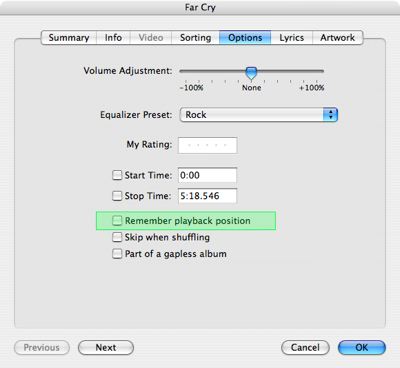
A: iTunes and the iPod offer a feature whereby any track can be set to “bookmark” its playback position when you stop listening to it. While this is obviously most useful for audiobooks, it can actually be set on any audio or video track in your iTunes library.

To tell iTunes and/or the iPod to save the playback position for a specific track, simply modify the track properties in iTunes by selecting the track in question, and choosing File, Get Info.


The “Remember Playback Position” checkbox can be found on the “Options” tab.

Once this setting is enabled, not only will the iPod and iTunes retain the current playback position in these tracks, but will in fact even transfer this bookmark information between devices—so if you leave off five minutes into an audiobook on your iPod, and then sync your iPod to iTunes, you will be able to pick up right where you left off in your iTunes library, or even on another iPod (after syncing the other iPod to your iTunes library, of course).


Note that this only works within individual tracks, however. If you’re using audiobooks that are made up of more than one track, and want to maintain a reference to the tracks you’ve listened to, this can be done with a smart playlist to track the “Play Count” field of your audiobook tracks, and exclude those you’ve already listened to.

To create a smart playlist, simply choose File, New Smart Playlist and fill in the criteria that you would like the smart playlist to use. For an audiobook playlist, you can likely filter by a field such as the album or artist name, depending upon how you have your audiobooks tagged in iTunes. Beyond that, simply set the “Play Count” criteria to zero, and your smart playlist will automatically exclude any chapters from that audiobook that you’ve already listened to.


Saving your place in multi-track audiobooks

If the space on your iPod is limited, you can even use the “Limit” option in the smart playlist to only load in a few chapters of each audiobook at a time.



Latest News
The 14-inch MacBook Pro with M5 Chip 16GB RAM/512GB is $250 Off
1 Min Read
Noise and Static on AirPods Pro 3 Still Unfixed
1 Min Read
New iMac with 24-inch OLED Display May be Brighter With 600 Nits
1 Min Read
The 15-inch M4 MacBook Air 256GB Is $250 Off
1 Min Read
Internal Kernel Debug Kit from Apple Reveals Tests for a MacBook with A15 Chip
1 Min Read
Apple Currently In Talks With Suppliers for Chip Assembly & Packaging of iPhones in India
1 Min Read
Apple Allows Easier Battery Replacement For M5 MacBook Pro with 14-inch Display
1 Min Read
The Apple Watch SE 3 44mm GPS is $50 Off
1 Min Read
20th Anniversary iPhone May Launch in Two Years
1 Min Read
Better Image Generation Capabilities and Apple Music Integration Coming to ChatGPT
1 Min Read
A20 Pro Chip Coming to Next Gen iPad Mini OLED
1 Min Read
Amazon has the AirTag 4 Pack Marked $29 off
1 Min Read

iLounge logo

iLounge is an independent resource for all things iPod, iPhone, iPad, and beyond. iPod, iPhone, iPad, iTunes, Apple TV, and the Apple logo are trademarks of Apple Inc.

This website is not affiliated with Apple Inc.
iLounge © 2001 - 2025. All Rights Reserved.
  • Contact Us
  • Submit News
  • About Us
  • Forums
  • Privacy Policy
  • Terms Of Use
Welcome Back!

Sign in to your account

Lost your password?








