
iLoungeiLounge
  • News
    • Apple
      • AirPods Pro
      • AirPlay
      • Apps
        • Apple Music
      • iCloud
      • iTunes
      • HealthKit
      • HomeKit
      • HomePod
      • iOS 13
      • Apple Pay
      • Apple TV
      • Siri
    • Rumors
    • Humor
    • Technology
      • CES
    • Daily Deals
    • Articles
    • Web Stories
  • iPhone
    • iPhone Accessories
  • iPad
  • iPod
    • iPod Accessories
  • Apple Watch
    • Apple Watch Accessories
  • Mac
    • MacBook Air
    • MacBook Pro
  • Reviews
    • App Reviews
  • How-to
    • Ask iLounge
Font ResizerAa
iLoungeiLounge
Font ResizerAa
Search
  • News
    • Apple
    • Rumors
    • Humor
    • Technology
    • Daily Deals
    • Articles
    • Web Stories
  • iPhone
    • iPhone Accessories
  • iPad
  • iPod
    • iPod Accessories
  • Apple Watch
    • Apple Watch Accessories
  • Mac
    • MacBook Air
    • MacBook Pro
  • Reviews
    • App Reviews
  • How-to
    • Ask iLounge
Follow US

How-to › Ask iLounge

Ask iLoungeiCloudiPadiPhoneiPod

Retrieving deleted data from an old iCloud backup

Last updated: May 16, 2021 4:13 pm UTC
By Jesse Hollington
Retrieving deleted data from an old iCloud backup

Q: I accidentally deleted an important note on my iPhone 5 last week. Not realizing that I’ve backed up on iCloud at least twice this week. How can I retrieve my important note from last week?


– Randy
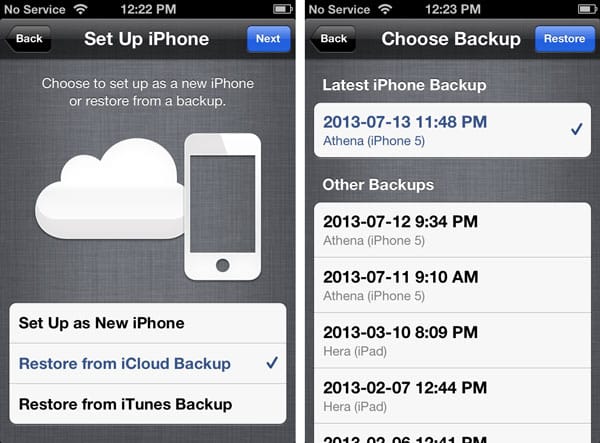
Retrieving deleted data from an old iCloud backup

A: Unless you’re synchronizing your notes with iCloud or another e-mail account, or syncing them to iTunes, you may be out of luck. Whether or not you will be able to retrieve this note from a backup depends entirely on how many iCloud backups you have made since the note was deleted.

iCloud retains the three most recent backups of your device, so as long as you actually haven’t made more than two backups since deleting the note, you can restore the older iCloud backup to your device and get it off this way.


The catch, however, is that there’s no easy way to extract data directly from an iCloud backup, so you’re going to need to restore that backup in its entirety in order to retrieve the missing information. This will replace everything that is currently on your device, however you can easily restore back to your most recent backup once you’ve retrieved the missing note.

If you don’t have a recent enough iCloud backup of your iPhone you’ll probably want to avoid making another iCloud backup since that would potentially push out the older iCloud backup that might contain your note. In this case, you can connect your iPhone to your computer and perform a manual backup using iTunes, which you can then restore to your device once you are ready to return to your current configuration.


Retrieving deleted data from an old iCloud backup

Note that if you’ve previously backed up your iPhone 5 to your computer using iTunes, it may be worth looking into that backup.

While iTunes only stores the most current backup, if you don’t backup to iTunes regularly, you may have an older backup lying around on your computer that does contain the note you’re looking for. Further, if you backup your computer regularly using a PC or Mac based backup tool, you may have older iTunes backups stored as part of your normal computer backups.


In addition, there are a number of third-party utilities such as iBackupBot that actually can read information directly from an iOS backup stored on your computer, which would allow you to search for and retrieve the missing note rather than having to restore the entire backup onto your iPhone.

For more information on the iCloud and iTunes backup and restore process, be sure to check out our Guide to Transferring your Content to a new iPhone, iPad or iPod touch.

Note that iCloud and most other IMAP-based e-mail accounts allow you to synchronize items from your iPhone Notes app to your e-mail account, where they can be viewed in the “Notes” app in OS X Lion or Mountain Lion or simply by looking for a “Notes” folder in your e-mail client.



Latest News
The 14-inch MacBook Pro with M5 Chip 16GB RAM/512GB is $250 Off
1 Min Read
Noise and Static on AirPods Pro 3 Still Unfixed
1 Min Read
New iMac with 24-inch OLED Display May be Brighter With 600 Nits
1 Min Read
The 15-inch M4 MacBook Air 256GB Is $250 Off
1 Min Read
Internal Kernel Debug Kit from Apple Reveals Tests for a MacBook with A15 Chip
1 Min Read
Apple Currently In Talks With Suppliers for Chip Assembly & Packaging of iPhones in India
1 Min Read
Apple Allows Easier Battery Replacement For M5 MacBook Pro with 14-inch Display
1 Min Read
The Apple Watch SE 3 44mm GPS is $50 Off
1 Min Read
20th Anniversary iPhone May Launch in Two Years
1 Min Read
Better Image Generation Capabilities and Apple Music Integration Coming to ChatGPT
1 Min Read
A20 Pro Chip Coming to Next Gen iPad Mini OLED
1 Min Read
Amazon has the AirTag 4 Pack Marked $29 off
1 Min Read

iLounge logo

iLounge is an independent resource for all things iPod, iPhone, iPad, and beyond. iPod, iPhone, iPad, iTunes, Apple TV, and the Apple logo are trademarks of Apple Inc.

This website is not affiliated with Apple Inc.
iLounge © 2001 - 2025. All Rights Reserved.
  • Contact Us
  • Submit News
  • About Us
  • Forums
  • Privacy Policy
  • Terms Of Use
Welcome Back!

Sign in to your account

Lost your password?








