
iLoungeiLounge
  • News
    • Apple
      • AirPods Pro
      • AirPlay
      • Apps
        • Apple Music
      • iCloud
      • iTunes
      • HealthKit
      • HomeKit
      • HomePod
      • iOS 13
      • Apple Pay
      • Apple TV
      • Siri
    • Rumors
    • Humor
    • Technology
      • CES
    • Daily Deals
    • Articles
    • Web Stories
  • iPhone
    • iPhone Accessories
  • iPad
  • iPod
    • iPod Accessories
  • Apple Watch
    • Apple Watch Accessories
  • Mac
    • MacBook Air
    • MacBook Pro
  • Reviews
    • App Reviews
  • How-to
    • Ask iLounge
Font ResizerAa
iLoungeiLounge
Font ResizerAa
Search
  • News
    • Apple
    • Rumors
    • Humor
    • Technology
    • Daily Deals
    • Articles
    • Web Stories
  • iPhone
    • iPhone Accessories
  • iPad
  • iPod
    • iPod Accessories
  • Apple Watch
    • Apple Watch Accessories
  • Mac
    • MacBook Air
    • MacBook Pro
  • Reviews
    • App Reviews
  • How-to
    • Ask iLounge
Follow US

How-to › Ask iLounge

ArticlesAsk iLoungeiPodiTunes

Resuming playlists on iPod touch

Last updated: May 16, 2021 4:58 pm UTC
By Jesse Hollington
Resuming playlists on iPod touch

Q: I have a playlist of 550 songs that I use when working out. With my old fifth-generation iPod I used the shuffle and started at song #1. If it went to song 35 before shutting it off, when I next turned it on, it would start with #36 and so on until I went through all 550 songs. I now use a new iPod touch and I can’t figure out how to get it to pick up where it left off within a playlist.


It always starts back at the menu and then I hit playlists and then workout and it starts with the first song on the list. Is there a setting that I am unaware of that I can get the iPod touch to restart where it left off within a playlist?
Resuming playlists on iPod touch

– Gary

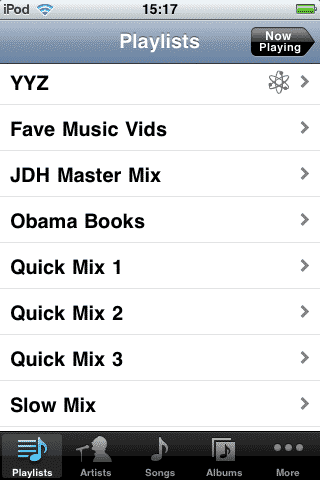
A: The iPod touch should retain its playback position in a similar manner to the fifth-generation iPod, however it may not necessarily return directly to the “Now Playing” screen when you re-enter the “Music” application. You should see a “Now Playing” button in the top-right corner of the Music application, and tapping on this button will take you to the track that you were previously listening to.


IMG_0027.PNG

Prior to iPhone OS 3.0, the play queue was cleared when you synced the iPod with iTunes, similar to how the fifth-generation iPod worked, but otherwise was retained.

With iPhone OS 3.0 and later, the play queue is maintained even after syncing.

Keep in mind as well that despite the “Music” and “Video” sections on the iPod touch appearing as separate applications, they both play content through the same core iPod playback system, so if you start playing back a stored video it is the same as choosing another playlist or album to listen to and the play queue will be cleared in favor of the video track, in the same way as playing back videos on click-wheel iPod models would work.


If you do want to maintain your playback position within a playlist even after you’ve started listening to or viewing different content, you can either sort your playlist in iTunes by “Last Played Date” so that recently-played tracks sort to the bottom, or look at using a Smart Playlist to filter out any tracks you’ve recently listened to. Note that the current iPhone and iPod touch OS versions have known problems with sorting in Smart Playlists and dynamic updating on the devices themselves, however normal playlists synced with iTunes should update any sorting changes properly regardless of these issues.



Latest News
The Apple Watch Series 11 42mm GPS is $100 Off
1 Min Read
Apple Launching A New Education Hub In India Teaching Robotics and Swift Programming
1 Min Read
Women’s and Men’s Golf Added to Apple Sports
1 Min Read
Apple Adding Civilization VII and Other Games To Apple Arcade
1 Min Read
AirPods 4 ANC Is $59 Off
1 Min Read
Apple Using 2NM Process For Their M6 and A20 Chip
1 Min Read
iPhone 18 Models Will Not Have a Big Redesign
1 Min Read
Launch of MacBook Pro M5 Pro and M5 Max Models is Approaching
1 Min Read
Get the iPad Mini 7 256GB Wi-Fi at $99 Off
1 Min Read
Mozilla Now Allows Turning AI Features Off
1 Min Read
Barcelona Passeig de Gràcia Apple Store Temporarily Closing
1 Min Read
Apple’s Plans to Enter the Smart Glasses Market is Changing the Industry
1 Min Read

iLounge logo

iLounge is an independent resource for all things iPod, iPhone, iPad, and beyond. iPod, iPhone, iPad, iTunes, Apple TV, and the Apple logo are trademarks of Apple Inc.

This website is not affiliated with Apple Inc.
iLounge © 2001 - 2025. All Rights Reserved.
  • Contact Us
  • Submit News
  • About Us
  • Forums
  • Privacy Policy
  • Terms Of Use
Welcome Back!

Sign in to your account

Lost your password?








