
iLoungeiLounge
  • News
    • Apple
      • AirPods Pro
      • AirPlay
      • Apps
        • Apple Music
      • iCloud
      • iTunes
      • HealthKit
      • HomeKit
      • HomePod
      • iOS 13
      • Apple Pay
      • Apple TV
      • Siri
    • Rumors
    • Humor
    • Technology
      • CES
    • Daily Deals
    • Articles
    • Web Stories
  • iPhone
    • iPhone Accessories
  • iPad
  • iPod
    • iPod Accessories
  • Apple Watch
    • Apple Watch Accessories
  • Mac
    • MacBook Air
    • MacBook Pro
  • Reviews
    • App Reviews
  • How-to
    • Ask iLounge
Font ResizerAa
iLoungeiLounge
Font ResizerAa
Search
  • News
    • Apple
    • Rumors
    • Humor
    • Technology
    • Daily Deals
    • Articles
    • Web Stories
  • iPhone
    • iPhone Accessories
  • iPad
  • iPod
    • iPod Accessories
  • Apple Watch
    • Apple Watch Accessories
  • Mac
    • MacBook Air
    • MacBook Pro
  • Reviews
    • App Reviews
  • How-to
    • Ask iLounge
Follow US

How-to › Ask iLounge

Ask iLoungeiPod

Restoring iPod touch after forgotten passcode

Last updated: May 16, 2021 4:27 pm UTC
By Jesse Hollington
Restoring iPod touch after forgotten passcode

Q: I forgot my passcode to my iPod touch. I have a bunch of texts and Kik messages and everything on there pending up as we speak. I also have like 3,000-4,000 pictures on it and really don’t want to have to re-download all my apps and try to rebuild my library of pictures. Also I have songs on there and I don’t have any iTunes money left so I can’t re-download them. Please help.


– Lexi
Restoring iPod touch after forgotten passcode

A: Unfortunately, the only easy and reliable way to reset the passcode on an iPod touch or other iOS device is to perform a complete restore of the device, which will wipe everything on it. Connecting your iPod touch to your original iTunes library will reset any disabled passcode counter, allowing you to make additional passcode attempts, but it will not bypass the passcode.

The good news, however, is that as long as you have a backup of your iPod touch in iTunes or iCloud, you can restore that backup onto your device after you’ve erased it, thereby allowing you to basically pick up where you left off. Restoring from backup will recover all of your data and settings except for the device passcode, which you will be prompted to re-enter. You may also need to re-enter some passwords for things like e-mail accounts or Wi-Fi networks as these are secured by the device passcode, and thereby lost if you can’t remember your original passcode.


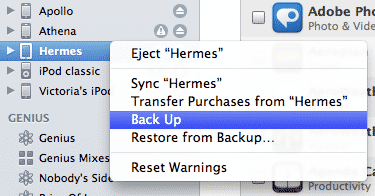
Note that even if you haven’t already made a recent backup of your device, you can still make one even with the device locked provided you still have your primary iTunes library available—usually the iTunes library and computer that you originally setup your iPod touch with. To do this, simply plug in your iPod touch, right-click on it in the Devices listing in iTunes, and choose the Back Up option from the context menu that appears.

This can be done even if you normally backup your device to iCloud in order to make an additional backup to your computer, and is probably a good idea just to make sure you have an extra backup.


You can also confirm that you have a current backup by going into your iTunes preferences and selecting the Devices section, which will show a list of all of the iOS device backups stored in the current iTunes library along with a date and time of when each backup was made.

See Identifying iOS Device Backups for more information.


Restoring iPod touch after forgotten passcode

In addition, you should also ensure that any purchased content—media and apps—have been transferred from your device to your iTunes library by selecting the Transfer Purchases option in the same context menu. The backups made by iTunes do not normally include your purchased media or apps as these are assumed to be in your iTunes library and will normally be restored from there.


Once you’ve confirmed that you have a current backup, you can restore your device simply by selecting it in iTunes, going to the Summary screen, and clicking the Restore button.


Restoring iPod touch after forgotten passcode

This will erase everything on your device, reinstalling the latest version of iOS in the process. Following this, your iPod touch will reboot and iTunes will ask you whether you want to set your iPod touch up as a new device, or restore it from your last backup.


Restoring iPod touch after forgotten passcode

Simply choose the restore from backup option, being sure to select the correct backup from your device in the drop-down menu, and iTunes will restore your device to its previous state.



Latest News
The 14-inch MacBook Pro with M5 Chip 16GB RAM/512GB is $250 Off
1 Min Read
Noise and Static on AirPods Pro 3 Still Unfixed
1 Min Read
New iMac with 24-inch OLED Display May be Brighter With 600 Nits
1 Min Read
The 15-inch M4 MacBook Air 256GB Is $250 Off
1 Min Read
Internal Kernel Debug Kit from Apple Reveals Tests for a MacBook with A15 Chip
1 Min Read
Apple Currently In Talks With Suppliers for Chip Assembly & Packaging of iPhones in India
1 Min Read
Apple Allows Easier Battery Replacement For M5 MacBook Pro with 14-inch Display
1 Min Read
The Apple Watch SE 3 44mm GPS is $50 Off
1 Min Read
20th Anniversary iPhone May Launch in Two Years
1 Min Read
Better Image Generation Capabilities and Apple Music Integration Coming to ChatGPT
1 Min Read
A20 Pro Chip Coming to Next Gen iPad Mini OLED
1 Min Read
Amazon has the AirTag 4 Pack Marked $29 off
1 Min Read

iLounge logo

iLounge is an independent resource for all things iPod, iPhone, iPad, and beyond. iPod, iPhone, iPad, iTunes, Apple TV, and the Apple logo are trademarks of Apple Inc.

This website is not affiliated with Apple Inc.
iLounge © 2001 - 2025. All Rights Reserved.
  • Contact Us
  • Submit News
  • About Us
  • Forums
  • Privacy Policy
  • Terms Of Use
Welcome Back!

Sign in to your account

Lost your password?








