
iLoungeiLounge
  • News
    • Apple
      • AirPods Pro
      • AirPlay
      • Apps
        • Apple Music
      • iCloud
      • iTunes
      • HealthKit
      • HomeKit
      • HomePod
      • iOS 13
      • Apple Pay
      • Apple TV
      • Siri
    • Rumors
    • Humor
    • Technology
      • CES
    • Daily Deals
    • Articles
    • Web Stories
  • iPhone
    • iPhone Accessories
  • iPad
  • iPod
    • iPod Accessories
  • Apple Watch
    • Apple Watch Accessories
  • Mac
    • MacBook Air
    • MacBook Pro
  • Reviews
    • App Reviews
  • How-to
    • Ask iLounge
Font ResizerAa
iLoungeiLounge
Font ResizerAa
Search
  • News
    • Apple
    • Rumors
    • Humor
    • Technology
    • Daily Deals
    • Articles
    • Web Stories
  • iPhone
    • iPhone Accessories
  • iPad
  • iPod
    • iPod Accessories
  • Apple Watch
    • Apple Watch Accessories
  • Mac
    • MacBook Air
    • MacBook Pro
  • Reviews
    • App Reviews
  • How-to
    • Ask iLounge
Follow US

How-to › Ask iLounge

Ask iLoungeiPhoneiTunes

Restoring iPhone from Backup

Last updated: May 16, 2021 4:55 pm UTC
By Jesse Hollington
Restoring iPhone from Backup

Q: Every time I attempt to restore my iPhone in iTunes, it asks me if I want to restore it to its factory settings. I want to restore to a previous backup. How do I retrieve an iTunes backup from Time Machine and actually get it to restore to the iPhone?  I attempted to pull a previous backup held in Time Machine from the ~/Library/Application Support/Mobile Sync/Backup folder: e85e8c85ec0854b38aa596ab5ac0a91a4ec0d93f and overwrite the existing one, but even after doing this iTunes still asks me if I want to restore it to its factory settings. How do I tell iTunes to actually use my backup when restoring my iPhone?


– Basil
Restoring iPhone from Backup

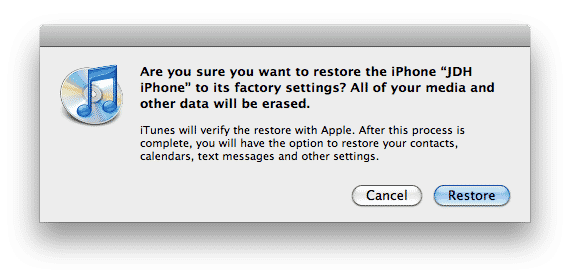
A: You don’t need to take any special steps to restore your iPhone backup, but it seems you may be getting misled by the initial dialog box that appears when you attempt to restore your iPhone, which does indicate that iTunes will restore your iPhone back to its factory settings.

The key is that doing a full restore on an iPhone from a backup is actually a two-stage process: You start by restoring the device back to factory settings, which actually reloads the iPhone OS onto the device. After the restore completes and the iPhone restarts, iTunes will prompt you as to whether you want to restore your iPhone from a backup or set it up as a new device.


Restoring iPhone from Backup

At this point, you would select your backup and restore it back to your iPhone. Note that there is no need to recover an iPhone backup from Time Machine unless you want to go back to an older backup since the last time that iTunes backed up your iPhone.

The latest backup is always kept by iTunes, and iTunes will also make extra checkpoint backups when upgrading your iPhone firmware. You can view the backups that iTunes has stored by going into your iTunes Preferences and selecting the “Devices” tab.


Restoring iPhone from Backup

Note that if you’re not concerned about wiping your iPhone completely and reloading the OS you can also quickly restore a backup directly from within iTunes by right-clicking on your iPhone in the Devices list and choosing “Restore” which will initiate the same restore procedure as illustrated above.


Restoring iPhone from Backup

Restoring iPhone from Backup

As a rule of thumb, if you’re restoring to troubleshoot a problem that you’re having with your iPhone then you’re far better to do the full restore, including the reload of the OS, as this will return you to the cleanest possible configuration.



Latest News
The 14-inch MacBook Pro with M5 Chip 16GB RAM/512GB is $250 Off
1 Min Read
Noise and Static on AirPods Pro 3 Still Unfixed
1 Min Read
New iMac with 24-inch OLED Display May be Brighter With 600 Nits
1 Min Read
The 15-inch M4 MacBook Air 256GB Is $250 Off
1 Min Read
Internal Kernel Debug Kit from Apple Reveals Tests for a MacBook with A15 Chip
1 Min Read
Apple Currently In Talks With Suppliers for Chip Assembly & Packaging of iPhones in India
1 Min Read
Apple Allows Easier Battery Replacement For M5 MacBook Pro with 14-inch Display
1 Min Read
The Apple Watch SE 3 44mm GPS is $50 Off
1 Min Read
20th Anniversary iPhone May Launch in Two Years
1 Min Read
Better Image Generation Capabilities and Apple Music Integration Coming to ChatGPT
1 Min Read
A20 Pro Chip Coming to Next Gen iPad Mini OLED
1 Min Read
Amazon has the AirTag 4 Pack Marked $29 off
1 Min Read

iLounge logo

iLounge is an independent resource for all things iPod, iPhone, iPad, and beyond. iPod, iPhone, iPad, iTunes, Apple TV, and the Apple logo are trademarks of Apple Inc.

This website is not affiliated with Apple Inc.
iLounge © 2001 - 2025. All Rights Reserved.
  • Contact Us
  • Submit News
  • About Us
  • Forums
  • Privacy Policy
  • Terms Of Use
Welcome Back!

Sign in to your account

Lost your password?








