
iLoungeiLounge
  • News
    • Apple
      • AirPods Pro
      • AirPlay
      • Apps
        • Apple Music
      • iCloud
      • iTunes
      • HealthKit
      • HomeKit
      • HomePod
      • iOS 13
      • Apple Pay
      • Apple TV
      • Siri
    • Rumors
    • Humor
    • Technology
      • CES
    • Daily Deals
    • Articles
    • Web Stories
  • iPhone
    • iPhone Accessories
  • iPad
  • iPod
    • iPod Accessories
  • Apple Watch
    • Apple Watch Accessories
  • Mac
    • MacBook Air
    • MacBook Pro
  • Reviews
    • App Reviews
  • How-to
    • Ask iLounge
Font ResizerAa
iLoungeiLounge
Font ResizerAa
Search
  • News
    • Apple
    • Rumors
    • Humor
    • Technology
    • Daily Deals
    • Articles
    • Web Stories
  • iPhone
    • iPhone Accessories
  • iPad
  • iPod
    • iPod Accessories
  • Apple Watch
    • Apple Watch Accessories
  • Mac
    • MacBook Air
    • MacBook Pro
  • Reviews
    • App Reviews
  • How-to
    • Ask iLounge
Follow US

How-to › Ask iLounge

Ask iLoungeiPadiPhoneiPodiTunes

Restoring Apps and App folder layouts

Last updated: May 16, 2021 4:26 pm UTC
By Jesse Hollington
Restoring Apps and App folder layouts

Q: Thank you to your team for making so many cryptic situations clear. In Syncing iOS apps with a different computer you helpfully explained that you can preserve app data when you sync apps with a new computer as long as on the first sync you choose to sync all apps currently on your device that you wish to preserve data for.


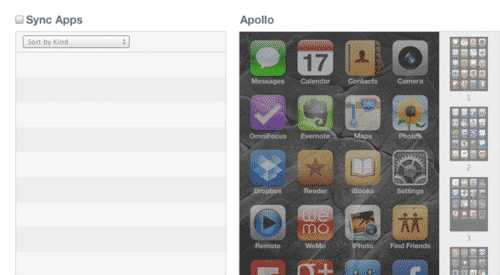
If you sync every app currently on the iOS device will app folder arrangement also be preserved? Where is the folder app arrangement data stored? Only on the device or also in the library?
Restoring Apps and App folder layouts

Also, when you restore from backup to an iOS device which backups can be used? Can iPod touch backups be used to restore onto an iPhone? Do the operating systems and models have to match? Or can earlier operating system backups be used? What about later ones?


– Philip

A: The arrangement of your app icons and folders on your iOS device is stored on the device and also forms part of the backups made of your device made by iTunes or to iCloud. If you connect your iOS device to another iTunes library, you should see the app and folder arrangement displayed on the Apps screen in your iTunes Device settings even without the “Sync Apps” option selected.

If you ensure that every app currently on the iOS device is selected for synchronization, the app arrangement and folder layout is preserved as well. In fact, this arrangement will actually be preserved as much as possible regardless of whether you choose to resync all of your applications or not; built-in apps and those that you do choose to sync will remain on their assigned screens and in their assigned folders, with each screen and folder being rearranged to fill in the gaps.


Restoring Apps and App folder layouts

Restoring a device from an iTunes or iCloud backup will also restore the arrangement of your applications in much the same manner. Note that this is the only way to automatically transfer an app layout to another iOS device.

In terms of restoring backups, the rule of thumb is that you can restore any iOS device backup to any other iOS device as long as the backup is being restored to an iOS version that is the same as, or newer than the version from which the backup was made. This means that you can restore an iPhone 4S, iOS 5.1 backup to an iPhone 5 running iOS 6, but you cannot restore an iOS 6 backup to a device running iOS 5.1.


Other than iOS versions, however, there are no inter-device restrictions; an iPod touch backup can be restored to an iPad, an iPad backup can be restored to an iPhone, or any other combination you can think of, so long as the target device is running the same or newer iOS version. Keep in mind, however, that certain options will be precluded simply by iOS version limitations; you cannot restore an iPhone 5 backup to an iPhone 3G or first-generation iPad, for example, simply because those older devices are incapable of running iOS 6.



Latest News
The 14-inch MacBook Pro with M5 Chip 16GB RAM/512GB is $250 Off
1 Min Read
Noise and Static on AirPods Pro 3 Still Unfixed
1 Min Read
New iMac with 24-inch OLED Display May be Brighter With 600 Nits
1 Min Read
The 15-inch M4 MacBook Air 256GB Is $250 Off
1 Min Read
Internal Kernel Debug Kit from Apple Reveals Tests for a MacBook with A15 Chip
1 Min Read
Apple Currently In Talks With Suppliers for Chip Assembly & Packaging of iPhones in India
1 Min Read
Apple Allows Easier Battery Replacement For M5 MacBook Pro with 14-inch Display
1 Min Read
The Apple Watch SE 3 44mm GPS is $50 Off
1 Min Read
20th Anniversary iPhone May Launch in Two Years
1 Min Read
Better Image Generation Capabilities and Apple Music Integration Coming to ChatGPT
1 Min Read
A20 Pro Chip Coming to Next Gen iPad Mini OLED
1 Min Read
Amazon has the AirTag 4 Pack Marked $29 off
1 Min Read

iLounge logo

iLounge is an independent resource for all things iPod, iPhone, iPad, and beyond. iPod, iPhone, iPad, iTunes, Apple TV, and the Apple logo are trademarks of Apple Inc.

This website is not affiliated with Apple Inc.
iLounge © 2001 - 2025. All Rights Reserved.
  • Contact Us
  • Submit News
  • About Us
  • Forums
  • Privacy Policy
  • Terms Of Use
Welcome Back!

Sign in to your account

Lost your password?








