
iLoungeiLounge
  • News
    • Apple
      • AirPods Pro
      • AirPlay
      • Apps
        • Apple Music
      • iCloud
      • iTunes
      • HealthKit
      • HomeKit
      • HomePod
      • iOS 13
      • Apple Pay
      • Apple TV
      • Siri
    • Rumors
    • Humor
    • Technology
      • CES
    • Daily Deals
    • Articles
    • Web Stories
  • iPhone
    • iPhone Accessories
  • iPad
  • iPod
    • iPod Accessories
  • Apple Watch
    • Apple Watch Accessories
  • Mac
    • MacBook Air
    • MacBook Pro
  • Reviews
    • App Reviews
  • How-to
    • Ask iLounge
Font ResizerAa
iLoungeiLounge
Font ResizerAa
Search
  • News
    • Apple
    • Rumors
    • Humor
    • Technology
    • Daily Deals
    • Articles
    • Web Stories
  • iPhone
    • iPhone Accessories
  • iPad
  • iPod
    • iPod Accessories
  • Apple Watch
    • Apple Watch Accessories
  • Mac
    • MacBook Air
    • MacBook Pro
  • Reviews
    • App Reviews
  • How-to
    • Ask iLounge
Follow US

How-to › Ask iLounge

ArticlesAsk iLoungeiTunesMac

Resetting iTunes Store authorization counts

Last updated: May 16, 2021 5:09 pm UTC
By Jesse Hollington
Resetting iTunes Store authorization counts

Q: We have 4 computers (PC and Mac) at home, two of which have crashed at various times. After reinstalling the OS and iTunes, I authorized my iTunes Store account and it sees this as a new computer. Further, I recently used Time Machine to restore my disk on my powerMac and now iTunes sees it as a new computer also. I’m eating up my 5 computer allowance with the same machines! What can I do?


– Gil
Resetting iTunes Store authorization counts

A: Unfortunately, there is nothing you can do about this directly in the situation where your computer becomes inaccessible and has to be reinstalled. Part of the iTunes Store authorization process is based on your actual operating system installation as well as certain hardware parameters, so when you reinstall your OS, iTunes sees your computer as a different machine from where it was previously authorized.

The best solution is to ensure that you DE-authorize your computer whenever possible before reinstalling or sending it for repair or upgrade. Reinstalling the OS or upgrading significant portions of your hardware (ie, replacing the main board) will usually result in iTunes needing to be re-authorized and using up another authorization count.


To DE-authorize your computer, simply select Deauthorize Computer from the Store menu in iTunes, and enter your iTunes Store userid and password. This will remove the authorization information from your computer and reduce the authorization count in your iTunes Store profile. You can reauthorize the same computer simply by trying to play back a purchased item (in which case iTunes will prompt you for your iTunes Store account information) or by selecting Store, Authorize Computer from the iTunes menu.

Note that there are no limits to the number of times you can deauthorize and reauthorize, so this can even be done just as a precaution in a situation where you are not sure whether or not you’ll have a problem (such as sending your computer in for repair or upgrade).


Of course, sometimes computers fail outright and it is simply not possible to deauthorize your computer before reinstalling it or replacing failed hardware. However, if you do find yourself in a situation where you have used up all of your authorizations and are at your five-computer limit, iTunes does provide a safety net: Once per year, after you have reached your five-computer limit, you can deauthorize ALL of the computers on your iTunes Store account, resetting your authorization count to zero.

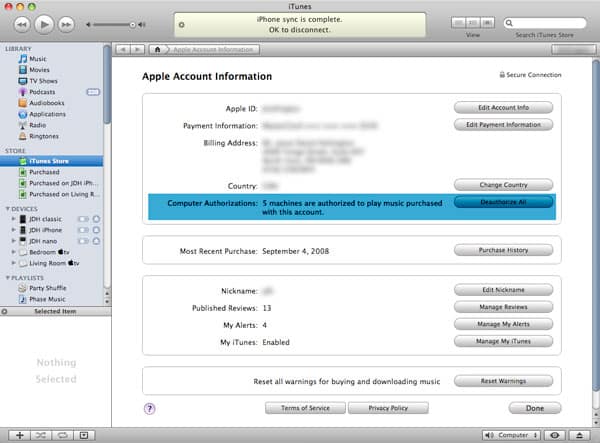
To do this, log in to your iTunes Store account by selecting the iTunes Store from within iTunes, and clicking on your account name (or the “Sign-in” button) which appears at the top-right corner of the screen. Once you have signed in, you will be taken to your “Apple Account Information” page:

Resetting iTunes Store authorization counts

Your number of computer authorizations are shown in the top section below your billing address information.



Latest News
The 14-inch MacBook Pro with M5 Chip 16GB RAM/512GB is $250 Off
1 Min Read
Noise and Static on AirPods Pro 3 Still Unfixed
1 Min Read
New iMac with 24-inch OLED Display May be Brighter With 600 Nits
1 Min Read
The 15-inch M4 MacBook Air 256GB Is $250 Off
1 Min Read
Internal Kernel Debug Kit from Apple Reveals Tests for a MacBook with A15 Chip
1 Min Read
Apple Currently In Talks With Suppliers for Chip Assembly & Packaging of iPhones in India
1 Min Read
Apple Allows Easier Battery Replacement For M5 MacBook Pro with 14-inch Display
1 Min Read
The Apple Watch SE 3 44mm GPS is $50 Off
1 Min Read
20th Anniversary iPhone May Launch in Two Years
1 Min Read
Better Image Generation Capabilities and Apple Music Integration Coming to ChatGPT
1 Min Read
A20 Pro Chip Coming to Next Gen iPad Mini OLED
1 Min Read
Amazon has the AirTag 4 Pack Marked $29 off
1 Min Read

iLounge logo

iLounge is an independent resource for all things iPod, iPhone, iPad, and beyond. iPod, iPhone, iPad, iTunes, Apple TV, and the Apple logo are trademarks of Apple Inc.

This website is not affiliated with Apple Inc.
iLounge © 2001 - 2025. All Rights Reserved.
  • Contact Us
  • Submit News
  • About Us
  • Forums
  • Privacy Policy
  • Terms Of Use
Welcome Back!

Sign in to your account

Lost your password?








