
iLoungeiLounge
  • News
    • Apple
      • AirPods Pro
      • AirPlay
      • Apps
        • Apple Music
      • iCloud
      • iTunes
      • HealthKit
      • HomeKit
      • HomePod
      • iOS 13
      • Apple Pay
      • Apple TV
      • Siri
    • Rumors
    • Humor
    • Technology
      • CES
    • Daily Deals
    • Articles
    • Web Stories
  • iPhone
    • iPhone Accessories
  • iPad
  • iPod
    • iPod Accessories
  • Apple Watch
    • Apple Watch Accessories
  • Mac
    • MacBook Air
    • MacBook Pro
  • Reviews
    • App Reviews
  • How-to
    • Ask iLounge
Font ResizerAa
iLoungeiLounge
Font ResizerAa
Search
  • News
    • Apple
    • Rumors
    • Humor
    • Technology
    • Daily Deals
    • Articles
    • Web Stories
  • iPhone
    • iPhone Accessories
  • iPad
  • iPod
    • iPod Accessories
  • Apple Watch
    • Apple Watch Accessories
  • Mac
    • MacBook Air
    • MacBook Pro
  • Reviews
    • App Reviews
  • How-to
    • Ask iLounge
Follow US

How-to › Ask iLounge

ArticlesAsk iLoungeiTunesMac

Resetting authorizations

Last updated: May 16, 2021 5:12 pm UTC
By Jesse Hollington
Resetting authorizations

Q: Unfortunately my computer has had some serious probems and crashed several times necessitating reformatting the hard drive. Each time I have restored iTunes and reloaded my music tracks back from my iPod. I have serveral purchased songs which I now cannot play because iTunes tells me I have 5 machines already authorised. I cannot deauthorise these computers as they refer to the same machine that I have had to reformat the drives on. How can I now get this reformatted computer, which iTunes thinks is 5 other machines authorised, enabling me to play my purchased music?


– Norman
Resetting authorizations

A: The problem here is that when you authorize a computer, iTunes downloads a specific set of authorization keys to that computer in the current configuration.

When you reformat the computer, as you’ve discovered, this authorization information is lost, and the iTunes Store thinks that you’re using a completely different computer.

The proper way to avoid this situation is to always ensure that you DEauthorize your computer before reformatting it or reinstalling Windows by selecting Store, Deauthorize Computer from the iTunes menu. This will remove the authorization information from your computer, and reduce your authorization count by one, allowing you to REauthorize the computer after you’ve reinstalled it.


Note that making significant changes to your computer hardware may also require your computer to be reauthorized, using up an additional authorization count. For this reason, always deauthorize your computer before performing major hardware upgrades (such as installing a new motherboard), or taking it in for service.

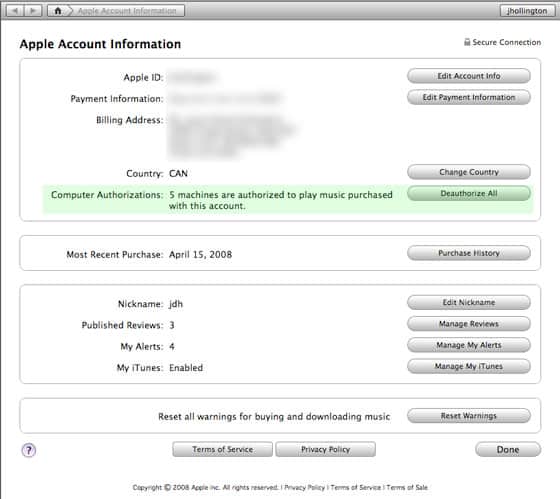
In this situation, however, since you’ve reformatted your computer, there is no easy way to DEauthorize the individual computer. For users in this situation, however, iTunes does offer the ability to reset ALL of your authorizations once per year. You can find this option on your Apple Account Information page in iTunes, which is found by clicking on your iTunes Store userid which appears in the top-right corner of your iTunes window when browsing the store:


Resetting authorizations

The section under “Computer Authorizations” will indicate how many computers you presently have authorized against this iTunes Store account. If you’ve reached your limit of five computers, a “Deauthorize All” button will appear immediately to the right of this.  Clicking this button will reset your authorization count to zero, and you can then manually reauthorize any computers that you are using to play your purchased content simply by selecting Store, Authorize Computer in the iTunes menu.

Note that you can only do this after you’ve reached your limit of five computers, and only once per year.



Latest News
The Apple Watch Series 11 46mm GPS Is $100 Off
1 Min Read
Clamshell Style iPhone Being Looked Into By Apple
1 Min Read
Foldable iPhones May Have the Largest Battery Ever
1 Min Read
Apple and TSMC’s 10-Year Collaboration May Be Ending
1 Min Read
The 13-inch M5 iPad Pro 256GB Wi-Fi Is $149 Off
1 Min Read
M5 Pro and M5 Max Chips for the MacBook Pro could Roll Out with macOS 26.3
1 Min Read
Mac Ordering Process Revamped
1 Min Read
Check Signed By Steve Wozniak and Steve Jobs Sold For $2.4 Million
1 Min Read
The Anker 140W 4-Port GaN USB-C Charger is $35 Off
1 Min Read
No iPhone Air 2 This Year, according to Latest Report
1 Min Read
New Report Corroborates Split iPhone Release Dates
1 Min Read
Apple Losing More Researchers As They Plan To Release 2 Siri Versions
1 Min Read

iLounge logo

iLounge is an independent resource for all things iPod, iPhone, iPad, and beyond. iPod, iPhone, iPad, iTunes, Apple TV, and the Apple logo are trademarks of Apple Inc.

This website is not affiliated with Apple Inc.
iLounge © 2001 - 2025. All Rights Reserved.
  • Contact Us
  • Submit News
  • About Us
  • Forums
  • Privacy Policy
  • Terms Of Use
Welcome Back!

Sign in to your account

Lost your password?








