
iLoungeiLounge
  • News
    • Apple
      • AirPods Pro
      • AirPlay
      • Apps
        • Apple Music
      • iCloud
      • iTunes
      • HealthKit
      • HomeKit
      • HomePod
      • iOS 13
      • Apple Pay
      • Apple TV
      • Siri
    • Rumors
    • Humor
    • Technology
      • CES
    • Daily Deals
    • Articles
    • Web Stories
  • iPhone
    • iPhone Accessories
  • iPad
  • iPod
    • iPod Accessories
  • Apple Watch
    • Apple Watch Accessories
  • Mac
    • MacBook Air
    • MacBook Pro
  • Reviews
    • App Reviews
  • How-to
    • Ask iLounge
Font ResizerAa
iLoungeiLounge
Font ResizerAa
Search
  • News
    • Apple
    • Rumors
    • Humor
    • Technology
    • Daily Deals
    • Articles
    • Web Stories
  • iPhone
    • iPhone Accessories
  • iPad
  • iPod
    • iPod Accessories
  • Apple Watch
    • Apple Watch Accessories
  • Mac
    • MacBook Air
    • MacBook Pro
  • Reviews
    • App Reviews
  • How-to
    • Ask iLounge
Follow US

How-to › Ask iLounge

ArticlesAsk iLoungeiTunes

Reordering and shuffling playlists

Last updated: May 16, 2021 5:12 pm UTC
By Jesse Hollington
Reordering and shuffling playlists

Q: Is there a way I can shuffle a playlist or Smart Playlist. For example if I have a Smart Playlist with the Blues, rather than playing them in the same order over and over (and if it is long enough never getting to the end), can I shuffle it instead. Random seems to do a random selection, but never changes it.


– Joe
Reordering and shuffling playlists

A: There is no option in the Smart Playlist criteria itself to always force the Smart Playlist to be shuffled. As you’ve noted, the “random” setting simply selects a random collection of content for the Smart Playlist—it does not present it in a random order.

If you want your Smart Playlist to refresh with random content, you will need to add additional criteria to trigger a Smart Playlist update, and perhaps limit the selection more effectively. Criteria such as “Last Played” and “Play Count” can be useful for limiting a Smart Playlist’s content and thereby causing it to refresh when you sync with your iPod.


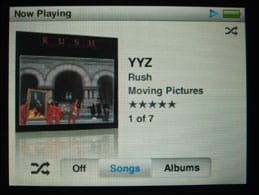
If the question is simply a matter of getting what is already in the Smart Playlist to play in a random order, the normal “Shuffle” settings on the iPod and iTunes itself can be used in the same way that they can for any other playlist. On the traditional iPod models the shuffle option can be found under the “Settings” menu, and the 2007 iPod classic and iPod nano also provide the ability to switch the shuffle mode while playing simply by pressing the centre button on the iPod two or three times until the shuffle options appear.


Reordering and shuffling playlists

For the iPod touch and the iPhone, a “Shuffle” menu option is presented at the top of each playlist that you can select instead of an individual track, or you can toggle shuffle on and off during playback by tapping the album artwork and tapping the small shuffle icon in the top-right corner beside the progress bar.


Reordering and shuffling playlists

In iTunes, the shuffle option can be found on the “Controls” menu, or as the second button from the left in the bottom right corner of the iTunes window.


Reordering and shuffling playlists

Note that in iTunes if you are sorting your playlist by anything other than it’s natural sort order, the “Shuffle” setting will have no effect, as your sort order overrides it. To be able to shuffle a playlist or Smart Playlist in iTunes, you must first sort it by the left-most number column:


Reordering and shuffling playlists

Once sorted by the number column, you can manually drag-and-drop tracks up and down the playlist into any order you like, or you can click the “Shuffle” option to randomize the play order.

Note that any sort order or manual re-ordering you specify for the Smart Playlist in iTunes will transfer to the iPod, including the shuffled order. This may be another option for changing the order of a playlist on your iPod, however the shuffled order in iTunes is static—it does not automatically update between iPod syncs, so you would need to toggle the “Shuffle” option in iTunes on and off each time you wanted to re-shuffle the playlist.



Latest News
The 14-inch MacBook Pro with M5 Chip 16GB RAM/512GB is $250 Off
1 Min Read
Noise and Static on AirPods Pro 3 Still Unfixed
1 Min Read
New iMac with 24-inch OLED Display May be Brighter With 600 Nits
1 Min Read
The 15-inch M4 MacBook Air 256GB Is $250 Off
1 Min Read
Internal Kernel Debug Kit from Apple Reveals Tests for a MacBook with A15 Chip
1 Min Read
Apple Currently In Talks With Suppliers for Chip Assembly & Packaging of iPhones in India
1 Min Read
Apple Allows Easier Battery Replacement For M5 MacBook Pro with 14-inch Display
1 Min Read
The Apple Watch SE 3 44mm GPS is $50 Off
1 Min Read
20th Anniversary iPhone May Launch in Two Years
1 Min Read
Better Image Generation Capabilities and Apple Music Integration Coming to ChatGPT
1 Min Read
A20 Pro Chip Coming to Next Gen iPad Mini OLED
1 Min Read
Amazon has the AirTag 4 Pack Marked $29 off
1 Min Read

iLounge logo

iLounge is an independent resource for all things iPod, iPhone, iPad, and beyond. iPod, iPhone, iPad, iTunes, Apple TV, and the Apple logo are trademarks of Apple Inc.

This website is not affiliated with Apple Inc.
iLounge © 2001 - 2025. All Rights Reserved.
  • Contact Us
  • Submit News
  • About Us
  • Forums
  • Privacy Policy
  • Terms Of Use
Welcome Back!

Sign in to your account

Lost your password?








