
iLoungeiLounge
  • News
    • Apple
      • AirPods Pro
      • AirPlay
      • Apps
        • Apple Music
      • iCloud
      • iTunes
      • HealthKit
      • HomeKit
      • HomePod
      • iOS 13
      • Apple Pay
      • Apple TV
      • Siri
    • Rumors
    • Humor
    • Technology
      • CES
    • Daily Deals
    • Articles
    • Web Stories
  • iPhone
    • iPhone Accessories
  • iPad
  • iPod
    • iPod Accessories
  • Apple Watch
    • Apple Watch Accessories
  • Mac
    • MacBook Air
    • MacBook Pro
  • Reviews
    • App Reviews
  • How-to
    • Ask iLounge
Font ResizerAa
iLoungeiLounge
Font ResizerAa
Search
  • News
    • Apple
    • Rumors
    • Humor
    • Technology
    • Daily Deals
    • Articles
    • Web Stories
  • iPhone
    • iPhone Accessories
  • iPad
  • iPod
    • iPod Accessories
  • Apple Watch
    • Apple Watch Accessories
  • Mac
    • MacBook Air
    • MacBook Pro
  • Reviews
    • App Reviews
  • How-to
    • Ask iLounge
Follow US

How-to › Ask iLounge

ArticlesAsk iLoungeiTunes

Removing intro/outro material from songs

Last updated: May 12, 2021 7:21 pm UTC
By Jerrod H.
Removing intro/outro material from songs

Q: I would like to make a few simple edits to a few songs in iTunes to make them more “radio edit” like. That is, on some songs I would like to chop off the first 10 to 20 seconds of an unusual introduction, and on others, I’d like to remove some of the final seconds.
 
I don’t believe that iTunes can edit audio like this, but maybe there is some other inexpensive add-on software that can?


– Les
Removing intro/outro material from songs

A: You’re right that iTunes can’t destructively edit audio files, but what you’d like to do is actually very easy to accomplish in a non-destructive manner from within iTunes’ own interface.

Essentially, iTunes allows you to select, on a per-song basis, where to start and stop playing a track.

This doesn’t actually shorten the file itself (and thus doesn’t save you any hard drive space), but the setting does transfer to the iPod, making it incredibly useful in many situations.


For example, we once downloaded the BBC’s free series of all nine Beethoven Symphonies. Although we found them to be a wonderful set of recordings, we didn’t need to listen to the minute-long introductory narratives (or the concluding applause) each time we played the tracks.

Not wanting to delete them forever, however, we simply told iTunes to start and stop the track at the appropriate points.

Here’s how:

  1. Choose a file in iTunes, and select it.
  2. Choose “Get Info” from iTunes’ “File” menu, and navigate to the “Options” panel.
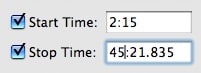
  3. Check the boxes next to “Start Time” and “Stop Time”, and enter the time values where you’d like to start and stop playing the song. This will define new start and stop points, without harming the file itself.
  4. Click “OK” to save the settings.


Removing intro/outro material from songs

To remove the setting, simply uncheck the boxes!

Note: To edit the file permanently (saving file space in the process), you will need to use an external editor such as QuickTime Pro.



Latest News
The 14-inch MacBook Pro with M5 Chip 16GB RAM/512GB is $250 Off
1 Min Read
Noise and Static on AirPods Pro 3 Still Unfixed
1 Min Read
New iMac with 24-inch OLED Display May be Brighter With 600 Nits
1 Min Read
The 15-inch M4 MacBook Air 256GB Is $250 Off
1 Min Read
Internal Kernel Debug Kit from Apple Reveals Tests for a MacBook with A15 Chip
1 Min Read
Apple Currently In Talks With Suppliers for Chip Assembly & Packaging of iPhones in India
1 Min Read
Apple Allows Easier Battery Replacement For M5 MacBook Pro with 14-inch Display
1 Min Read
The Apple Watch SE 3 44mm GPS is $50 Off
1 Min Read
20th Anniversary iPhone May Launch in Two Years
1 Min Read
Better Image Generation Capabilities and Apple Music Integration Coming to ChatGPT
1 Min Read
A20 Pro Chip Coming to Next Gen iPad Mini OLED
1 Min Read
Amazon has the AirTag 4 Pack Marked $29 off
1 Min Read

iLounge logo

iLounge is an independent resource for all things iPod, iPhone, iPad, and beyond. iPod, iPhone, iPad, iTunes, Apple TV, and the Apple logo are trademarks of Apple Inc.

This website is not affiliated with Apple Inc.
iLounge © 2001 - 2025. All Rights Reserved.
  • Contact Us
  • Submit News
  • About Us
  • Forums
  • Privacy Policy
  • Terms Of Use
Welcome Back!

Sign in to your account

Lost your password?








