
Q: I am having a problem with extraneous songs appearing on my daughter’s iPod touch. As this is a child’s iPod, we only sync some playlists to it, the ones with music appropriate for her. Unfortunately, I had the “auto download” switch toggled for music on her iPod and it seems that for a month or so, any time we downloaded music on any of our other iOS devices the songs appeared on her iPod touch as well, even if they weren’t in the playlists that were supposed to sync.
However, I don’t believe these songs are actually on the device itself—they are more like links which allow it to stream content. They only function when within a Wi-Fi signal and have small circular icons next to them. My problem is that these “songs” cannot be deleted from the device. Swiping over them doesn’t bring up the delete icon like it does with the regular music on the iPod. They do not appear in her playlists in iTunes either, so syncing the device doesn’t make them disappear.
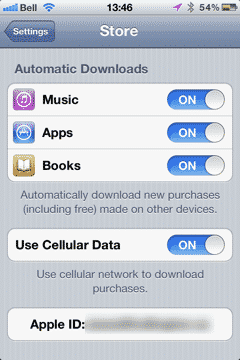
Is there any solution that will allow me to selectively remove these songs without doing a full “restore to factory defaults” then re-syncing the device (which I think might work, but would be a bit of trouble). I would assume that would solve it, if I made sure the “match download” feature was then turned off, though I do not know for certain that that is the cause of the problem.
My thanks to anyone who can solve this problem. Thus far a trip to the Genius Bar, as well as a back-and-forth email string with Apple have been unsuccessful.
– David
A: As you’ve no doubt realized, the automatic download option found under the Store Settings on your iOS device is in fact a global setting and will download any music purchased on other devices regardless of whether that music would normally otherwise be synced to the device. This is somewhat necessary as the iTunes Store really has no information on what playlists are being synchronized locally from iTunes, so it therefore has no way of knowing whether a new purchase should be delivered to a given device or not.
What is unusual here, however, is that the items appear to have not been actually downloaded to local storage. Normally the automatic download feature should download and store these newly purchased items locally in the same way as if they were loaded from iTunes, and you should therefore also be able to delete them in this case.
It is possible that the download has been stopped for some reason—the circular icons beside each track actually represent an in-progress download—so you may be able to restart these downloads by going into the iTunes app on your daughter’s iPod touch and checking in the Downloads section. If there are any pending downloads here you may be able to resume them simply by tapping on the small blue arrow to the right of each track. Resuming the downloads and allowing them to complete should allow you to then actually delete the tracks from her Music app.

Alternatively, if you’re dealing with a relatively small number of tracks, you can also find them in the Purchased section in the iTunes app and may be able to manually download them from there.
Note that actual streaming of music from iCloud is a feature of Apple’s iTunes Match service; if you are an iTunes Match subscriber you will want to confirm that iTunes Match is not enabled on your daughter’s iPod touch, as this might explain the greyed out, streaming-only tracks that you’re seeing in her Music app. When enabled, iTunes Match makes your entire iTunes music library available to that particular iOS device, with tracks that are not stored on the device available for streaming and downloading from iCloud. You can find the iTunes Match option under Settings, Music.

Even with iTunes Match enabled, however, if you also had automatic downloads enabled for new music purchases, those tracks should have actually been downloaded to local, on-device storage rather than simply being made available from the cloud.











