
iLoungeiLounge
  • News
    • Apple
      • AirPods Pro
      • AirPlay
      • Apps
        • Apple Music
      • iCloud
      • iTunes
      • HealthKit
      • HomeKit
      • HomePod
      • iOS 13
      • Apple Pay
      • Apple TV
      • Siri
    • Rumors
    • Humor
    • Technology
      • CES
    • Daily Deals
    • Articles
    • Web Stories
  • iPhone
    • iPhone Accessories
  • iPad
  • iPod
    • iPod Accessories
  • Apple Watch
    • Apple Watch Accessories
  • Mac
    • MacBook Air
    • MacBook Pro
  • Reviews
    • App Reviews
  • How-to
    • Ask iLounge
Font ResizerAa
iLoungeiLounge
Font ResizerAa
Search
  • News
    • Apple
    • Rumors
    • Humor
    • Technology
    • Daily Deals
    • Articles
    • Web Stories
  • iPhone
    • iPhone Accessories
  • iPad
  • iPod
    • iPod Accessories
  • Apple Watch
    • Apple Watch Accessories
  • Mac
    • MacBook Air
    • MacBook Pro
  • Reviews
    • App Reviews
  • How-to
    • Ask iLounge
Follow US

How-to › Ask iLounge

Ask iLoungeiCloudiPadiPhoneiPodiTunes

Removed iPhone still syncing with iTunes in the Cloud

Last updated: May 16, 2021 4:19 pm UTC
By Jesse Hollington
Removed iPhone still syncing with iTunes in the Cloud

Q: I used my iTunes account on my ex’s iPhone. When we broke up I deleted his iPhone from my iTunes devices. However, as I’ve just brought myself an iPhone, I found out that my apps, music, etc, are still syncing with his iPhone. How do I stop this?


– Gillian
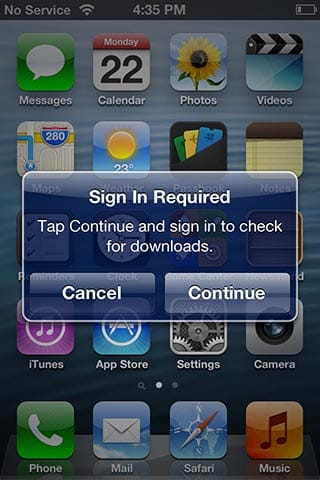
Removed iPhone still syncing with iTunes in the Cloud

A: Unfortunately, removing an iOS device from your Devices list in iTunes doesn’t actually disassociate the device with your iTunes in the Cloud account as far as the device itself is concerned. More specifically, the device still has your Apple ID and password stored so it can still log into your iTunes Store account and assumes that it’s still allowed to do so.

In fact, the device will eventually reappear in your devices list the next time a new iTunes music or app purchase is automatically downloaded by it, or the next time it syncs with iTunes Match.


The best way to permanently disassociate the device from your iTunes Store account is simply to change the password for your Apple ID. Once you’ve done this, any devices associated with your iTunes Store account will prompt the user to sign in again the next time they want to access your account.

Changing your password is probably a good idea anyway for security reasons, but keep in mind that this password may also be used for services like iMessage, FaceTime, iCloud, and Game Center. This means that you may end up needing to re-enter it in several places once you’ve changed it.


Your iPhone and the iTunes and iCloud apps on your Mac or Windows PC should automatically prompt you for the new password as required.

If you don’t want to change your password for some reason, your only other option is to talk to your ex and ask him to log out of your account on his device. This can be done from the iTunes & App Stores section under Settings.


Removed iPhone still syncing with iTunes in the Cloud

Simply tap on the Apple ID shown at the top of this screen and choose “Sign Out” from the pop-up menu that appears.

Once you’ve done either or both of these things, you should go back into your Devices listing in your iTunes Store Account Settings and remove the iPhone from here again, as it will probably have reappeared.



Latest News
The 14-inch MacBook Pro with M5 Chip 16GB RAM/512GB is $250 Off
1 Min Read
Noise and Static on AirPods Pro 3 Still Unfixed
1 Min Read
New iMac with 24-inch OLED Display May be Brighter With 600 Nits
1 Min Read
The 15-inch M4 MacBook Air 256GB Is $250 Off
1 Min Read
Internal Kernel Debug Kit from Apple Reveals Tests for a MacBook with A15 Chip
1 Min Read
Apple Currently In Talks With Suppliers for Chip Assembly & Packaging of iPhones in India
1 Min Read
Apple Allows Easier Battery Replacement For M5 MacBook Pro with 14-inch Display
1 Min Read
The Apple Watch SE 3 44mm GPS is $50 Off
1 Min Read
20th Anniversary iPhone May Launch in Two Years
1 Min Read
Better Image Generation Capabilities and Apple Music Integration Coming to ChatGPT
1 Min Read
A20 Pro Chip Coming to Next Gen iPad Mini OLED
1 Min Read
Amazon has the AirTag 4 Pack Marked $29 off
1 Min Read

iLounge logo

iLounge is an independent resource for all things iPod, iPhone, iPad, and beyond. iPod, iPhone, iPad, iTunes, Apple TV, and the Apple logo are trademarks of Apple Inc.

This website is not affiliated with Apple Inc.
iLounge © 2001 - 2025. All Rights Reserved.
  • Contact Us
  • Submit News
  • About Us
  • Forums
  • Privacy Policy
  • Terms Of Use
Welcome Back!

Sign in to your account

Lost your password?








