
iLoungeiLounge
  • News
    • Apple
      • AirPods Pro
      • AirPlay
      • Apps
        • Apple Music
      • iCloud
      • iTunes
      • HealthKit
      • HomeKit
      • HomePod
      • iOS 13
      • Apple Pay
      • Apple TV
      • Siri
    • Rumors
    • Humor
    • Technology
      • CES
    • Daily Deals
    • Articles
    • Web Stories
  • iPhone
    • iPhone Accessories
  • iPad
  • iPod
    • iPod Accessories
  • Apple Watch
    • Apple Watch Accessories
  • Mac
    • MacBook Air
    • MacBook Pro
  • Reviews
    • App Reviews
  • How-to
    • Ask iLounge
Font ResizerAa
iLoungeiLounge
Font ResizerAa
Search
  • News
    • Apple
    • Rumors
    • Humor
    • Technology
    • Daily Deals
    • Articles
    • Web Stories
  • iPhone
    • iPhone Accessories
  • iPad
  • iPod
    • iPod Accessories
  • Apple Watch
    • Apple Watch Accessories
  • Mac
    • MacBook Air
    • MacBook Pro
  • Reviews
    • App Reviews
  • How-to
    • Ask iLounge
Follow US

How-to › Ask iLounge

Ask iLoungeiTunes

Remote Home Shared Library in Play Only Mode

Last updated: May 16, 2021 4:19 pm UTC
By Jesse Hollington
Remote Home Shared Library in Play Only Mode

Q: I have four computers authorized for Home Sharing, and when accessing my other libraries, two of the three icons that show up are like a little house, while the other one is like a little musical note in a square box. When I try to access the library of the one with the musical note, I don’t get a show menu line at the bottom of the screen; no import box or anything else. How can I fix this so it functions like the other ones? I tried logging in and out of Home Sharing but it didn’t work.


– Steve
Remote Home Shared Library in Play Only Mode

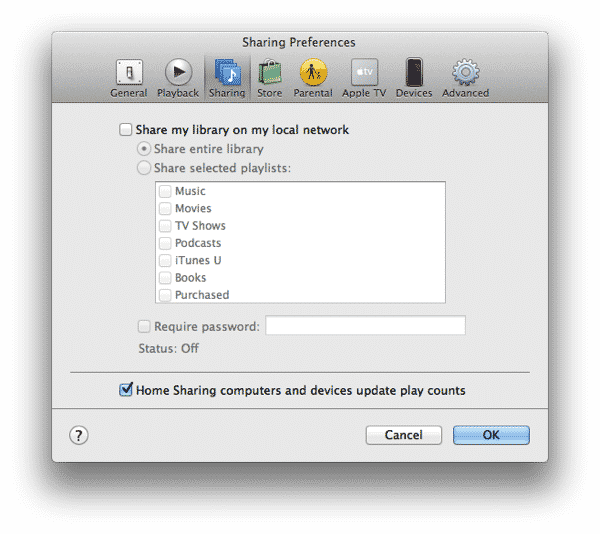
A: What you’re seeing here is a remote library using the older “play only” library sharing mode that pre-dates the iTunes Home Sharing feature. iTunes has long provided library sharing that allowed other users to play content from your library without allowing it to be transferred to other computers. This type of shared library could be seen by anybody running iTunes on the same network and has often been used in work and school environments to share libraries among friends.


The idea here was to allow other users to listen to your content while avoiding music piracy issues.

Home Sharing changed this by using an Apple ID to authenticate library sharing between computers owned by the same user, thereby allowing copying of tracks while limiting the options for piracy by limiting it to only libraries logged in with the appropriate Apple ID.

Normally, when Home Sharing has been enabled on a computer, it overrides the older library sharing mode between all computers where Home Sharing is enabled. Note that it is possible to use both together, however; computers that are not authorized as part of the same Home Sharing account will see the remote library in the older sharing mode. You can configure this sharing mode from the Sharing section in your iTunes Preferences.


Note that the settings on this screen have absolutely no bearing on Home Sharing, so you may want to disable this feature on the problem computer entirely just to attempt to narrow things down.

Most likely this will cause the library to disappear from your shared list entirely, but in some cases we’ve seen it fix the problem and allow the library to appear properly.

Note that logging in and out of Home Sharing on the computer where you’re seeing the shared library won’t help, as the issue is likely that the remote shared library isn’t presenting itself to Home Sharing properly. What you’ll need to do to force it to re-register for Home Sharing is turn OFF Home Sharing on the computer that actually hosts the problem shared library by going to the File, Home Sharing menu in iTunes 11. If you are still using an older version of iTunes, this option can be found under the Advanced menu. Once you’ve done this, turn Home Sharing back ON using the same menu option, and ensure that you’re signing in with the same Apple ID used on your other computers.

If you’ve done this and the library still isn’t appearing properly, be sure you’re not running Windows or Mac firewall software that may be blocking the ports that iTunes wants to use for Home Sharing.



Latest News
The 14-inch MacBook Pro with M5 Chip 16GB RAM/512GB is $250 Off
1 Min Read
Noise and Static on AirPods Pro 3 Still Unfixed
1 Min Read
New iMac with 24-inch OLED Display May be Brighter With 600 Nits
1 Min Read
The 15-inch M4 MacBook Air 256GB Is $250 Off
1 Min Read
Internal Kernel Debug Kit from Apple Reveals Tests for a MacBook with A15 Chip
1 Min Read
Apple Currently In Talks With Suppliers for Chip Assembly & Packaging of iPhones in India
1 Min Read
Apple Allows Easier Battery Replacement For M5 MacBook Pro with 14-inch Display
1 Min Read
The Apple Watch SE 3 44mm GPS is $50 Off
1 Min Read
20th Anniversary iPhone May Launch in Two Years
1 Min Read
Better Image Generation Capabilities and Apple Music Integration Coming to ChatGPT
1 Min Read
A20 Pro Chip Coming to Next Gen iPad Mini OLED
1 Min Read
Amazon has the AirTag 4 Pack Marked $29 off
1 Min Read

iLounge logo

iLounge is an independent resource for all things iPod, iPhone, iPad, and beyond. iPod, iPhone, iPad, iTunes, Apple TV, and the Apple logo are trademarks of Apple Inc.

This website is not affiliated with Apple Inc.
iLounge © 2001 - 2025. All Rights Reserved.
  • Contact Us
  • Submit News
  • About Us
  • Forums
  • Privacy Policy
  • Terms Of Use
Welcome Back!

Sign in to your account

Lost your password?








