
iLoungeiLounge
  • News
    • Apple
      • AirPods Pro
      • AirPlay
      • Apps
        • Apple Music
      • iCloud
      • iTunes
      • HealthKit
      • HomeKit
      • HomePod
      • iOS 13
      • Apple Pay
      • Apple TV
      • Siri
    • Rumors
    • Humor
    • Technology
      • CES
    • Daily Deals
    • Articles
    • Web Stories
  • iPhone
    • iPhone Accessories
  • iPad
  • iPod
    • iPod Accessories
  • Apple Watch
    • Apple Watch Accessories
  • Mac
    • MacBook Air
    • MacBook Pro
  • Reviews
    • App Reviews
  • How-to
    • Ask iLounge
Font ResizerAa
iLoungeiLounge
Font ResizerAa
Search
  • News
    • Apple
    • Rumors
    • Humor
    • Technology
    • Daily Deals
    • Articles
    • Web Stories
  • iPhone
    • iPhone Accessories
  • iPad
  • iPod
    • iPod Accessories
  • Apple Watch
    • Apple Watch Accessories
  • Mac
    • MacBook Air
    • MacBook Pro
  • Reviews
    • App Reviews
  • How-to
    • Ask iLounge
Follow US

How-to › Ask iLounge

Ask iLoungeiPadiPhoneiPodiTunes

Problems Syncing and Downloading Podcasts on iOS

Last updated: May 16, 2021 4:24 pm UTC
By Jesse Hollington
Problems Syncing and Downloading Podcasts on iOS

Q: The last few paragraphs of your article on Auto-deleting Episodes in iOS Podcasts App refer to things not working as expected and some syncing and downloading issues. I’m experiencing this and thought I could fix them by unsubscribing in iTunes and only maintaining the subscription within the Podcast app, but that didn’t seem to help. I suspect there’s a file somewhere, either on the phone or on my MacBook that’s screwing things up. Short of completely uninstalling iTunes on the MacBook and the Podcast app on the phone, then reinstalling and starting from scratch, is there any way to get the app to behave the way I tell it to via its settings for sync and save?


– Scott
Problems Syncing and Downloading Podcasts on iOS

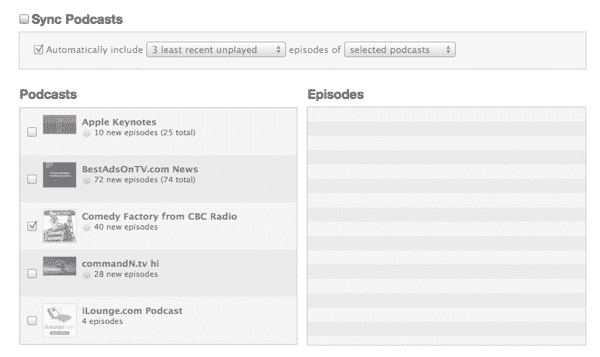
A: It is unlikely that there is anything in iTunes on your MacBook that is causing problems with your iOS device, although you should ensure that you have actually disabled Podcast syncing entirely from iTunes, as opposed to simply unsubscribing.

To do this, go into your Podcasts settings for your iPhone, iPad or iPod touch and ensure that the Sync Podcasts option is completely unchecked.

This will effectively break the connection between iTunes and your iOS device for handling podcasts, removing any podcast episodes that were previously transferred onto your device via iTunes, although you can of course simply re-download those manually in the Podcasts app directly. Any new episodes downloaded by the Podcasts app on your device will also no longer be transferred back to iTunes automatically.


The problem here is that if a Podcast subscription is still being synced from iTunes, the Podcasts app will assume that it should get new content via iTunes rather than automatically syncing new content over-the-air.

This happens regardless of whether you are actually subscribed to the Podcast in iTunes, as the subscription status isn’t actually communicated between iTunes and your iOS device.

If this doesn’t solve the problem by itself, it may still be necessary to either toggle auto-downloading off and back on within the affected podcast subscription(s) or remove them from the app entirely and resubscribe. As a worst-case scenario, it may be necessary to delete the Podcasts app entirely and start over from scratch, but this shouldn’t normally be the case. You definitely shouldn’t need to worry about reinstalling iTunes on your MacBook, since as long as you’re not syncing Podcasts to your device, iTunes otherwise has no effect on the Podcasts app or its content.



Latest News
The 14-inch MacBook Pro with M5 Chip 16GB RAM/512GB is $250 Off
1 Min Read
Noise and Static on AirPods Pro 3 Still Unfixed
1 Min Read
New iMac with 24-inch OLED Display May be Brighter With 600 Nits
1 Min Read
The 15-inch M4 MacBook Air 256GB Is $250 Off
1 Min Read
Internal Kernel Debug Kit from Apple Reveals Tests for a MacBook with A15 Chip
1 Min Read
Apple Currently In Talks With Suppliers for Chip Assembly & Packaging of iPhones in India
1 Min Read
Apple Allows Easier Battery Replacement For M5 MacBook Pro with 14-inch Display
1 Min Read
The Apple Watch SE 3 44mm GPS is $50 Off
1 Min Read
20th Anniversary iPhone May Launch in Two Years
1 Min Read
Better Image Generation Capabilities and Apple Music Integration Coming to ChatGPT
1 Min Read
A20 Pro Chip Coming to Next Gen iPad Mini OLED
1 Min Read
Amazon has the AirTag 4 Pack Marked $29 off
1 Min Read

iLounge logo

iLounge is an independent resource for all things iPod, iPhone, iPad, and beyond. iPod, iPhone, iPad, iTunes, Apple TV, and the Apple logo are trademarks of Apple Inc.

This website is not affiliated with Apple Inc.
iLounge © 2001 - 2025. All Rights Reserved.
  • Contact Us
  • Submit News
  • About Us
  • Forums
  • Privacy Policy
  • Terms Of Use
Welcome Back!

Sign in to your account

Lost your password?








