
iLoungeiLounge
  • News
    • Apple
      • AirPods Pro
      • AirPlay
      • Apps
        • Apple Music
      • iCloud
      • iTunes
      • HealthKit
      • HomeKit
      • HomePod
      • iOS 13
      • Apple Pay
      • Apple TV
      • Siri
    • Rumors
    • Humor
    • Technology
      • CES
    • Daily Deals
    • Articles
    • Web Stories
  • iPhone
    • iPhone Accessories
  • iPad
  • iPod
    • iPod Accessories
  • Apple Watch
    • Apple Watch Accessories
  • Mac
    • MacBook Air
    • MacBook Pro
  • Reviews
    • App Reviews
  • How-to
    • Ask iLounge
Font ResizerAa
iLoungeiLounge
Font ResizerAa
Search
  • News
    • Apple
    • Rumors
    • Humor
    • Technology
    • Daily Deals
    • Articles
    • Web Stories
  • iPhone
    • iPhone Accessories
  • iPad
  • iPod
    • iPod Accessories
  • Apple Watch
    • Apple Watch Accessories
  • Mac
    • MacBook Air
    • MacBook Pro
  • Reviews
    • App Reviews
  • How-to
    • Ask iLounge
Follow US

How-to › Ask iLounge

Ask iLounge

Problems sending e-mail over Wi-Fi

Last updated: May 16, 2021 4:40 pm UTC
By Jesse Hollington
Problems sending e-mail over Wi-Fi

Q: I am able to send email within seconds when I’m connected through 3G. Back when I had the 1st gen iPhone, I was able to send on the EDGE network as well. With either phone, however, I’ve never been able to send email when I’m connected through Wi-Fi to any network (home, work, coffee shop). Receiving mail works, as well as other Web functions. I just cannot send email, and in the rare case where it does work, it’s taken literally hours for a short email to send.


I used to think this was a weird phone thing and just ignored the problem since I always had the phone’s network to do the job.
Problems sending e-mail over Wi-Fi

But just last week I got an iPad and the exact same thing is happening—can’t send through Wi-Fi—and with my iPad, I don’t have the option of 3G.

Why is it that it’s only sending mail that won’t work, and only with Wi-Fi? I’ve configured the setting according to my web host’s specifications.

– Kara (via Discussion Forums)


A: The problem is likely your outbound server configuration on the iPhone and iPad.  Most business networks and home ISPs block outbound e-mail on the standard SMTP port 25 by default, ostensibly to protect against e-mail viruses and spam being sent through their network.

As a result, if you’re using port 25 for your Outgoing Mail Server, it’s very likely it won’t work on just about any Wi-Fi network you’re connected to. This isn’t specifically an iPhone problem, but is due to the fact that most networks are simply blocking outbound mail in some way. 


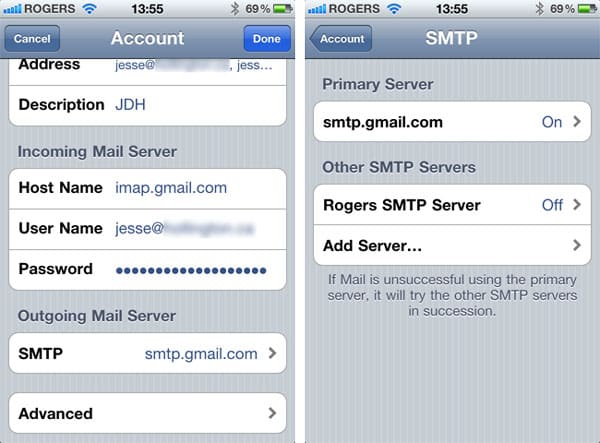
You can check which port you’re using for outbound mail by going into your Settings app, choosing Mail, Contacts and Calendars, selecting your mail account and then choosing “Outgoing Mail Server” near the bottom. This will display a list of outgoing mail servers configured on your device, with the primary server for your account shown at the top.

The primary server is the one used by default, however you can enable alternate servers to be used in the event that the primary server is down or unreachable. Note that you may also see one or more servers here that have been preconfigured by your wireless provider.


Selecting your primary server will show you its configuration details, and you should see a “Server Port” field down at the bottom.


Problems sending e-mail over Wi-Fi

Depending on your mail provider, you may be able to use an alternate port to send mail on. Although you should check your provider’s specific instructions, port 587 is commonly used for sending mail from an actual mail app, and as a result will be allowed through many firewalls that block port 25.  Technically speaking, port 25 is supposed to be used for server-to-server communications and port 587 for sending from a mail client running on a computer or mobile device; unfortunately many ISPs and mail providers still direct you to use port 25 as that’s the older method.

Note that some ISPs and networks will block outbound mail entirely on any port and force you to relay mail through their own servers.



Latest News
The 14-inch MacBook Pro with M5 Chip 16GB RAM/512GB is $250 Off
1 Min Read
Noise and Static on AirPods Pro 3 Still Unfixed
1 Min Read
New iMac with 24-inch OLED Display May be Brighter With 600 Nits
1 Min Read
The 15-inch M4 MacBook Air 256GB Is $250 Off
1 Min Read
Internal Kernel Debug Kit from Apple Reveals Tests for a MacBook with A15 Chip
1 Min Read
Apple Currently In Talks With Suppliers for Chip Assembly & Packaging of iPhones in India
1 Min Read
Apple Allows Easier Battery Replacement For M5 MacBook Pro with 14-inch Display
1 Min Read
The Apple Watch SE 3 44mm GPS is $50 Off
1 Min Read
20th Anniversary iPhone May Launch in Two Years
1 Min Read
Better Image Generation Capabilities and Apple Music Integration Coming to ChatGPT
1 Min Read
A20 Pro Chip Coming to Next Gen iPad Mini OLED
1 Min Read
Amazon has the AirTag 4 Pack Marked $29 off
1 Min Read

iLounge logo

iLounge is an independent resource for all things iPod, iPhone, iPad, and beyond. iPod, iPhone, iPad, iTunes, Apple TV, and the Apple logo are trademarks of Apple Inc.

This website is not affiliated with Apple Inc.
iLounge © 2001 - 2025. All Rights Reserved.
  • Contact Us
  • Submit News
  • About Us
  • Forums
  • Privacy Policy
  • Terms Of Use
Welcome Back!

Sign in to your account

Lost your password?








