
iLoungeiLounge
  • News
    • Apple
      • AirPods Pro
      • AirPlay
      • Apps
        • Apple Music
      • iCloud
      • iTunes
      • HealthKit
      • HomeKit
      • HomePod
      • iOS 13
      • Apple Pay
      • Apple TV
      • Siri
    • Rumors
    • Humor
    • Technology
      • CES
    • Daily Deals
    • Articles
    • Web Stories
  • iPhone
    • iPhone Accessories
  • iPad
  • iPod
    • iPod Accessories
  • Apple Watch
    • Apple Watch Accessories
  • Mac
    • MacBook Air
    • MacBook Pro
  • Reviews
    • App Reviews
  • How-to
    • Ask iLounge
Font ResizerAa
iLoungeiLounge
Font ResizerAa
Search
  • News
    • Apple
    • Rumors
    • Humor
    • Technology
    • Daily Deals
    • Articles
    • Web Stories
  • iPhone
    • iPhone Accessories
  • iPad
  • iPod
    • iPod Accessories
  • Apple Watch
    • Apple Watch Accessories
  • Mac
    • MacBook Air
    • MacBook Pro
  • Reviews
    • App Reviews
  • How-to
    • Ask iLounge
Follow US

How-to › Ask iLounge

Ask iLoungeiTunesReviews

Preventing iTunes from reorganizing Audiobooks on a NAS device

Last updated: May 16, 2021 4:24 pm UTC
By Jesse Hollington
Preventing iTunes from reorganizing Audiobooks on a NAS device

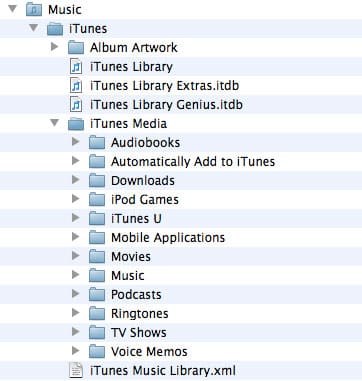
Q: I have many Audible books that I store on a NAS box. Each of my two Windows computers has iTunes installed and I have added all the books to the iTunes library manually. I put all the books in a directory called “AudibleBooks” on the NAS, however iTunes created a new sub-directory called “Audiobooks” and then several sub-directories under this for each author’s name when I clicked to organise the media folder. I’m happy enough with that, but as soon as I played the first book in iTunes I found a sub directory in “Audiobooks” called “Audiobooks” and a sub directory under that of the authors name of the book I had just finished. Now whenever I listen to a book the file moves from the original “Audiobooks/Author” to the “Audiobooks/Audiobooks/Author” directory.


iTunes’ preferences shows the media folder as “Y:AudibleBooks” on the two PC’s I have with iTunes. I really don’t want this happening as iTunes loses track of books that moved. Is this expected behaviour? Can I stop it somehow? Am I drinking too much coffee and just imagining it?
Preventing iTunes from reorganizing Audiobooks on a NAS device

– Robin

A: It sounds like there’s a bug here somewhere, as this is definitely not expected behaviour for iTunes. The initial Audiobooks directory organized into sub-directories by author is completely normal, as the iTunes Media folder structure uses a top-level folder structure for each category of content. Since it sounds like all you have in this folder are Audiobooks, you would only get the single Audiobooks folder appearing here, but if you also had other types of content such as music and movies you would see additional folders alongside the Audiobooks folder for each of these types of content.


Once organized, however, there is no reason that iTunes should be moving these files a second time further down in the file system, and it is even more unusual for iTunes to be losing track of these files if it is in fact the one moving them in the first place. It is likely that how you’re mapping to your NAS device may have some impact this as well—if Y: is mapped directly to the “AudibleBooks” folder rather than the parent folder, then of course “Y:AudibleBooks” would actually be AudibleBooksAudibleBooks. Further, since you’re using two separate computers with the same NAS device, it’s also important to make sure that the Y: drive mapping and the iTunes Media folder path is set to the same values on both machines. Keep in mind that even if you’re storing the iTunes library database on the NAS device and referencing it from there, each computer still maintains its own separate iTunes preferences, including the iTunes Media folder location setting.

To help avoid issues like this NAS mappings should normally be done directly to the root folder of the NAS device with the iTunes Media folder configured as a full path from that point.



Latest News
The 14-inch MacBook Pro with M5 Chip 16GB RAM/512GB is $250 Off
1 Min Read
Noise and Static on AirPods Pro 3 Still Unfixed
1 Min Read
New iMac with 24-inch OLED Display May be Brighter With 600 Nits
1 Min Read
The 15-inch M4 MacBook Air 256GB Is $250 Off
1 Min Read
Internal Kernel Debug Kit from Apple Reveals Tests for a MacBook with A15 Chip
1 Min Read
Apple Currently In Talks With Suppliers for Chip Assembly & Packaging of iPhones in India
1 Min Read
Apple Allows Easier Battery Replacement For M5 MacBook Pro with 14-inch Display
1 Min Read
The Apple Watch SE 3 44mm GPS is $50 Off
1 Min Read
20th Anniversary iPhone May Launch in Two Years
1 Min Read
Better Image Generation Capabilities and Apple Music Integration Coming to ChatGPT
1 Min Read
A20 Pro Chip Coming to Next Gen iPad Mini OLED
1 Min Read
Amazon has the AirTag 4 Pack Marked $29 off
1 Min Read

iLounge logo

iLounge is an independent resource for all things iPod, iPhone, iPad, and beyond. iPod, iPhone, iPad, iTunes, Apple TV, and the Apple logo are trademarks of Apple Inc.

This website is not affiliated with Apple Inc.
iLounge © 2001 - 2025. All Rights Reserved.
  • Contact Us
  • Submit News
  • About Us
  • Forums
  • Privacy Policy
  • Terms Of Use
Welcome Back!

Sign in to your account

Lost your password?








