
iLoungeiLounge
  • News
    • Apple
      • AirPods Pro
      • AirPlay
      • Apps
        • Apple Music
      • iCloud
      • iTunes
      • HealthKit
      • HomeKit
      • HomePod
      • iOS 13
      • Apple Pay
      • Apple TV
      • Siri
    • Rumors
    • Humor
    • Technology
      • CES
    • Daily Deals
    • Articles
    • Web Stories
  • iPhone
    • iPhone Accessories
  • iPad
  • iPod
    • iPod Accessories
  • Apple Watch
    • Apple Watch Accessories
  • Mac
    • MacBook Air
    • MacBook Pro
  • Reviews
    • App Reviews
  • How-to
    • Ask iLounge
Font ResizerAa
iLoungeiLounge
Font ResizerAa
Search
  • News
    • Apple
    • Rumors
    • Humor
    • Technology
    • Daily Deals
    • Articles
    • Web Stories
  • iPhone
    • iPhone Accessories
  • iPad
  • iPod
    • iPod Accessories
  • Apple Watch
    • Apple Watch Accessories
  • Mac
    • MacBook Air
    • MacBook Pro
  • Reviews
    • App Reviews
  • How-to
    • Ask iLounge
Follow US

How-to › Ask iLounge

ArticlesAsk iLoungeiTunesMacReviews

Playing iTunes at a party

Last updated: May 16, 2021 4:50 pm UTC
By Jesse Hollington
Playing iTunes at a party

Q: I am hosting a house party in the near future and I would like to play music from my iTunes library through my Pioneer DJ mixer. The mixer will be connected to an amp so the music will consequently be played through speakers. How do I do this through my MacBook Pro?


– Paul
Playing iTunes at a party

A: There are several ways to accomplish this. If you’re going to have your MacBook Pro near your audio system, the simplest solution is just to connect a cable from the line-out/headphone port on your MacBook Pro directly to the line-in on your mixer.

Any standard cable with a stereo 3.5mm headphone jack should work fine for this, with leads on the other end appropriate to the inputs on your mixer—usually RCA-type connectors. These cables are quite common and you should be able to find one at your local stereo or electronics store.


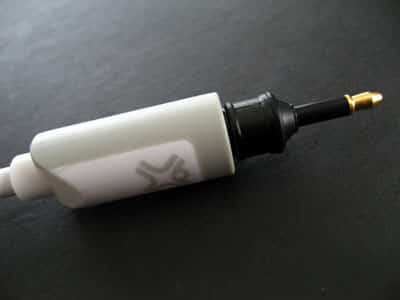
If your mixer has optical inputs you can also use an optical connection from the MacBook Pro line out port, which will theoretically provide better sound quality depending on your source material. The MacBook Pro actually supports both analog and optical output via the same port, although you’ll need a cable with an optical mini connection, or an adapter for an existing Toslink optical cable.

Adapters can be found at most higher-end electronics and stereo stores.

Playing iTunes at a party

Alternatively if you want to keep your MacBook Pro in a different room or roam around with it then you may want to consider picking up an Apple Airport Express ($99), which allows you to stream music from iTunes to a set of connected speakers over Wi-Fi and provides similar audio output capabilities—both analog and optical.


Playing iTunes at a party

The Airport Express can be configured to join your existing Wi-FI network or hooked up via an Ethernet cable and can be conveniently plugged in behind your stereo system and connected to your mixer. You can then simply select it as an output source from the AirPlay menu which appears in the bottom-right corner of your iTunes window.



Latest News
The 14-inch MacBook Pro with M5 Chip 16GB RAM/512GB is $250 Off
1 Min Read
Noise and Static on AirPods Pro 3 Still Unfixed
1 Min Read
New iMac with 24-inch OLED Display May be Brighter With 600 Nits
1 Min Read
The 15-inch M4 MacBook Air 256GB Is $250 Off
1 Min Read
Internal Kernel Debug Kit from Apple Reveals Tests for a MacBook with A15 Chip
1 Min Read
Apple Currently In Talks With Suppliers for Chip Assembly & Packaging of iPhones in India
1 Min Read
Apple Allows Easier Battery Replacement For M5 MacBook Pro with 14-inch Display
1 Min Read
The Apple Watch SE 3 44mm GPS is $50 Off
1 Min Read
20th Anniversary iPhone May Launch in Two Years
1 Min Read
Better Image Generation Capabilities and Apple Music Integration Coming to ChatGPT
1 Min Read
A20 Pro Chip Coming to Next Gen iPad Mini OLED
1 Min Read
Amazon has the AirTag 4 Pack Marked $29 off
1 Min Read

iLounge logo

iLounge is an independent resource for all things iPod, iPhone, iPad, and beyond. iPod, iPhone, iPad, iTunes, Apple TV, and the Apple logo are trademarks of Apple Inc.

This website is not affiliated with Apple Inc.
iLounge © 2001 - 2025. All Rights Reserved.
  • Contact Us
  • Submit News
  • About Us
  • Forums
  • Privacy Policy
  • Terms Of Use
Welcome Back!

Sign in to your account

Lost your password?








