
iLoungeiLounge
  • News
    • Apple
      • AirPods Pro
      • AirPlay
      • Apps
        • Apple Music
      • iCloud
      • iTunes
      • HealthKit
      • HomeKit
      • HomePod
      • iOS 13
      • Apple Pay
      • Apple TV
      • Siri
    • Rumors
    • Humor
    • Technology
      • CES
    • Daily Deals
    • Articles
    • Web Stories
  • iPhone
    • iPhone Accessories
  • iPad
  • iPod
    • iPod Accessories
  • Apple Watch
    • Apple Watch Accessories
  • Mac
    • MacBook Air
    • MacBook Pro
  • Reviews
    • App Reviews
  • How-to
    • Ask iLounge
Font ResizerAa
iLoungeiLounge
Font ResizerAa
Search
  • News
    • Apple
    • Rumors
    • Humor
    • Technology
    • Daily Deals
    • Articles
    • Web Stories
  • iPhone
    • iPhone Accessories
  • iPad
  • iPod
    • iPod Accessories
  • Apple Watch
    • Apple Watch Accessories
  • Mac
    • MacBook Air
    • MacBook Pro
  • Reviews
    • App Reviews
  • How-to
    • Ask iLounge
Follow US

How-to › Ask iLounge

ArticlesAsk iLoungeiTunes

Organizing music transferred from the iPod

Last updated: May 16, 2021 5:21 pm UTC
By Jesse Hollington
Organizing music transferred from the iPod

Q: I just recently added my music from my iPod to a second PC I have upstairs. Now all my music is in this folder and is still in the layout from the iPod_control folder (i.e. F00, F01 etc…). Is there a way to have iTunes rename those so that each has the proper song name and possibly organize the files so they are in folders by artist? Thanks for any help you might give on that.


– George
Organizing music transferred from the iPod

A: This is a common issue if you’ve transferred the content from your iPod back to your computer manually, as opposed to using a third-party application.

The good news, however, is that the tags within these files are still intact in terms of information such as track name, album, artist, etc. In fact the only information not stored within the tags would be details such as rating, play count, last played time, and any playlists that the tracks were in—if you wanted to recover this additional information, you will need to use an actual third-party software tool that can read the iPod database to extract this information from there.


If you’re merely concerned with getting the files reorganized and renamed properly, the simplest way to do this is actually just to reimport them into iTunes, ensuring that the option to “Copy files to iTunes Music folder when adding to library” is enabled. iTunes will copy these files into your iTunes music folder, renaming them and reorganizing them into sub-folders by artist and album in the process, based on the tags found within the files themselves.

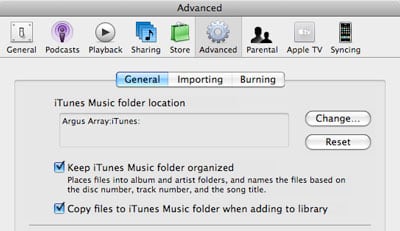
The options for configuring how iTunes handles importing files can be found in iTunes’ advanced preferences:


Organizing music transferred from the iPod

Simply ensure that the iTunes Music Folder path is set correctly, and that the “Copy files to iTunes Music folder when adding to library” option is enabled.

You may also wish to enable the option to “Keep iTunes Music folder organized”, which will ensure that the iTunes music folder is reorganized as you re-tag any tracks in the future.

Once you’ve confirmed these settings are correct, simply choose the File, Add Folder to Library option from within iTunes, and select the parent folder containing all of the music copied from your iPod. iTunes will copy tracks from this location, renaming and organizing them based on the tag information contained within.

Note that since this is a copy process, the original files are left intact in their original location. If your hard disk space is limited, you can move these files into your iTunes music folder manually, and then import them from there, ensuring the “Keep iTunes Music folder organized” setting is enabled.



Latest News
The 14-inch MacBook Pro with M5 Chip 16GB RAM/512GB is $250 Off
1 Min Read
Noise and Static on AirPods Pro 3 Still Unfixed
1 Min Read
New iMac with 24-inch OLED Display May be Brighter With 600 Nits
1 Min Read
The 15-inch M4 MacBook Air 256GB Is $250 Off
1 Min Read
Internal Kernel Debug Kit from Apple Reveals Tests for a MacBook with A15 Chip
1 Min Read
Apple Currently In Talks With Suppliers for Chip Assembly & Packaging of iPhones in India
1 Min Read
Apple Allows Easier Battery Replacement For M5 MacBook Pro with 14-inch Display
1 Min Read
The Apple Watch SE 3 44mm GPS is $50 Off
1 Min Read
20th Anniversary iPhone May Launch in Two Years
1 Min Read
Better Image Generation Capabilities and Apple Music Integration Coming to ChatGPT
1 Min Read
A20 Pro Chip Coming to Next Gen iPad Mini OLED
1 Min Read
Amazon has the AirTag 4 Pack Marked $29 off
1 Min Read

iLounge logo

iLounge is an independent resource for all things iPod, iPhone, iPad, and beyond. iPod, iPhone, iPad, iTunes, Apple TV, and the Apple logo are trademarks of Apple Inc.

This website is not affiliated with Apple Inc.
iLounge © 2001 - 2025. All Rights Reserved.
  • Contact Us
  • Submit News
  • About Us
  • Forums
  • Privacy Policy
  • Terms Of Use
Welcome Back!

Sign in to your account

Lost your password?








